

ChatGPT Ads are live, giving brands a new way to reach potential customers while they explore products, compare options, and make decisions through conversation. For smaller businesses, that timing matters. You do not need a huge ad budget to start learning what works, but you do need to understand how this new ad platform works before putting money behind a campaign. Editor’s note: This guide reflects OpenAI Ads Manager Beta as of September 2026. Features, specifications, advertiser availability, and campaign controls may change as the platform develops.
If you are used to Google or Meta Ads, some parts of ChatGPT advertising will feel familiar. The setup, targeting, bidding, and campaign tracking follow the basic logic of paid advertising. The way people discover information inside ChatGPT creates a very different environment for your ads, though. Your offer can appear alongside answers at the moment someone is exploring a product, service, or solution.
This ChatGPT Ads tutorial walks you through the new self-serve advertising platform step by step. You will learn how to run ads on ChatGPT, how they differ from Google and Meta, how to set up your Ads Manager account, and how to create your first campaign. We will also cover the short ad copy limits, CPC and CPM bidding, and the metrics you need to watch after launch.
What Are ChatGPT Ads?
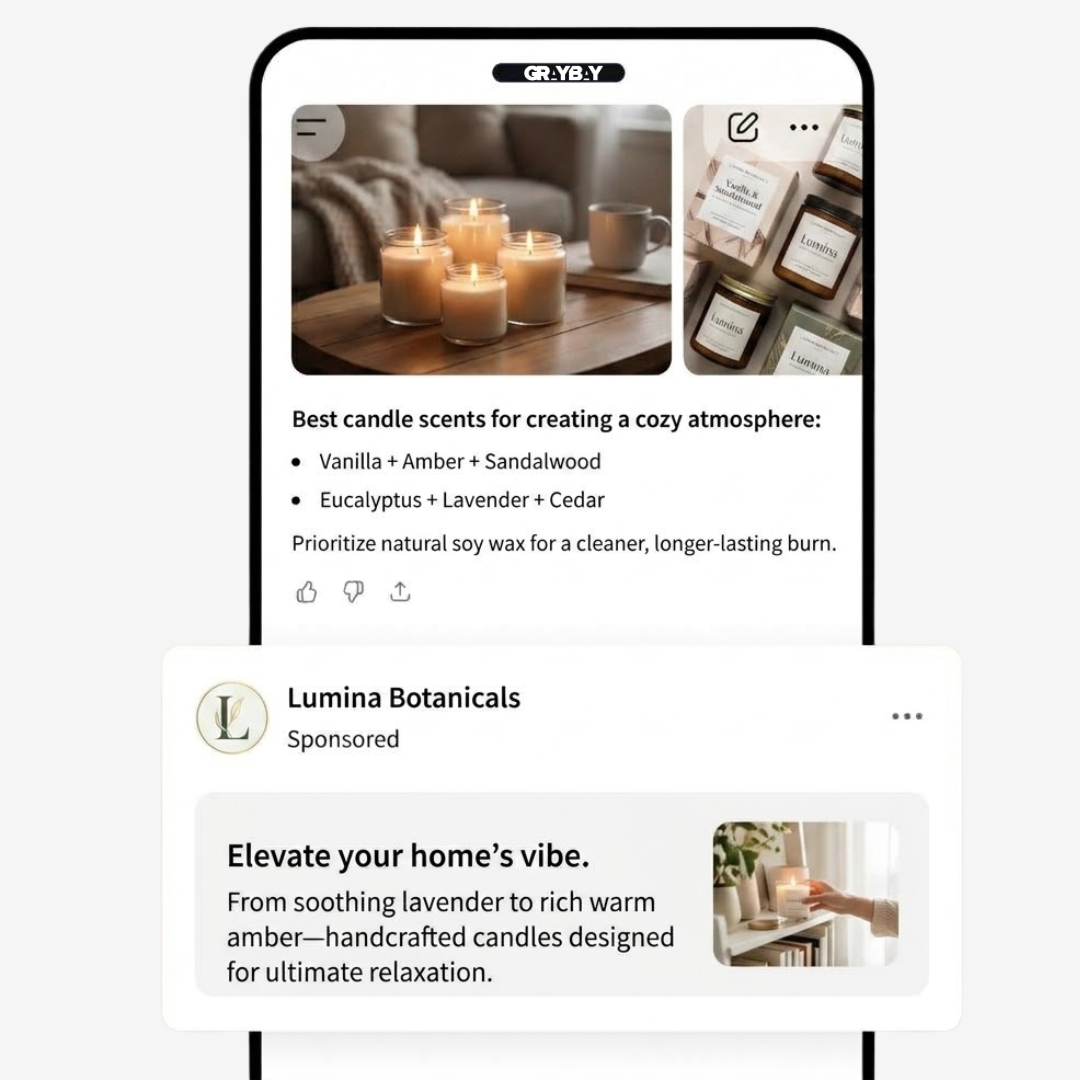
You might have noticed a clearly labeled sponsored placement below a response while using ChatGPT. That is where OpenAI is introducing paid advertising. Brands can create campaigns through OpenAI Ads Manager Beta and place sponsored content in eligible parts of the ChatGPT experience. During the current rollout, ads may appear to eligible users on Free and Go plans. OpenAI does not show ads to Plus, Pro, Business, Enterprise, or Edu accounts or to accounts identified as belonging to users under 18.
The interesting part is how these ads are matched to users.
Instead of targeting only a keyword, ChatGPT can consider the context of a user’s conversation and the intent behind what they are asking. The ad itself stays separate from the AI-generated answer and is clearly marked as sponsored. For advertisers, the setup includes familiar controls such as audience targeting, budgets, bidding, campaign settings, and ad creative.
How ChatGPT Ads Work
ChatGPT Ads look at the context and intent of the current conversation. It can also consider your ad’s title, description, landing page, targeting selections, and the context hints you provide at the ad group level.
Below is a closer look at how ChatGPT Ads work:
Ad Formats
A ChatGPT ad can include an advertiser name, logo, headline, description, image, and landing page. The sponsored placement appears below a ChatGPT response and stays visually separate from the answer itself.
Targeting and Context
This is where things get interesting. You can add context hints at the ad group level to describe the conversations, topics, or keywords where your product could be relevant. These hints guide the matching system, but they do not work like exact-match search keywords and do not guarantee that your ad will appear for a specific conversation.
Bidding and Ad Selection
OpenAI Ads Manager Beta currently supports CPM, CPC, and conversion-optimized CPC, or oCPC, objectives. CPM focuses on impressions, CPC focuses on clicks, and oCPC is designed around tracked conversion events. When multiple eligible ads compete for a placement, the system considers relevance and advertiser bids through a relevance-weighted, second-price auction. That means your bid matters, but it is not the only thing deciding delivery. Your ad needs to make sense for the conversation too.
Read more: How to Make AI Ads With Claude and Meta
ChatGPT Ads vs. Google Ads and Meta Ads
If you have run Google or Meta campaigns before, the basic idea of ChatGPT Ads will feel familiar. Here is how the three platforms compare:
| Factor | ChatGPT Ads | Google Ads | Meta Ads |
|---|---|---|---|
| Main environment | ChatGPT conversations | Google Search and Google’s wider ad network | Facebook, Instagram, and Meta placements |
| User intent | Users can be actively exploring, comparing, or deciding through a conversation | Strong intent when users search for a product, service, or answer | Intent can vary widely based on audience, interests, behavior, and campaign setup |
| How relevance is established | Conversation context, ad details, targeting, and context hints | Search queries, keywords, targeting, ad relevance, and other auction signals | Audience targeting, campaign settings, creative, and Meta’s delivery system |
| Keyword dependence | Does not rely on traditional keyword matching alone | Keywords remain an important part of Search campaign matching | Traditional keyword targeting is not the core targeting method |
| Targeting approach | Context and audience controls designed for the ChatGPT environment | Keywords, audiences, locations, languages, content, and other targeting methods | Audiences, demographics, interests, behaviors, custom audiences, and other options |
| Where the ad appears | Below ChatGPT responses as a clearly labeled sponsored placement | Search results, websites, apps, YouTube, and other Google properties depending on campaign type | Feed, Stories, Reels, and other Meta placements depending on campaign setup |
| Creative requirements | Short ad copy with advertiser details, headline, description, landing page, and optional image | Requirements vary by campaign and ad format | Multiple formats including image, video, carousel, and other creative types |
| Campaign objectives | Currently includes CPM, CPC, and oCPC objectives | Multiple objectives and bidding strategies depending on campaign type | Objectives are built around outcomes such as awareness, traffic, engagement, leads, and sales |
| Bidding | CPM, CPC, and oCPC options | CPC and several automated bidding strategies | Multiple bidding and optimization options depending on the campaign |
| Primary strength | Reaching users during conversational discovery and decision-making | Capturing existing search demand | Reaching and influencing audiences at scale |
| Best opportunity | Products and services that naturally fit questions, comparisons, recommendations, and decision-making | Products and services with clear search demand | Brands that have strong visual creative and defined audience segments |
| Competition | Newer advertising environment with a developing advertiser ecosystem | Mature and highly competitive | Mature and highly competitive |
| AEO relevance | High, since the advertising environment is built around conversational answers and discovery | SEO and search intent remain central | Less directly connected to answer engine visibility |
| Measurement | Campaign and conversion measurement through Ads Manager | Detailed campaign, click, conversion, and attribution reporting | Detailed campaign, engagement, conversion, and attribution reporting |
| Best starting point for a small brand | Test a focused campaign around a clear product or service and relevant conversational contexts | Start with specific search demand and controlled targeting | Start with a focused audience and a small set of strong creatives |
Read more: ChatGPT Ads vs. Google Ads: How Paid Search is Changing
The biggest difference is the setting where each platform reaches users. Google Ads captures people actively searching, while Meta Ads reaches users through social feeds and audience targeting. ChatGPT Ads sit within conversations, making relevance and user intent especially important when someone is researching, comparing, or looking for a solution.
What You Need Before Setting Up ChatGPT Ads
Before you jump into Ads Manager, have the basic campaign pieces ready. ChatGPT Ads has its own account structure, billing requirements, and creative specifications, so sorting these out first can save you a few headaches later. Here is what you need before setting up a ChatGPT Ads campaign:
| What You Need | What to Prepare | Why It Matters |
|---|---|---|
| OpenAI account | An existing OpenAI account linked to your work email, or a new account | You need an OpenAI account to create your Ads Manager account |
| Business details | Business name, website, logo, industry, country, currency, and time zone | These details are part of account onboarding and verification |
| Account verification | Business information and the additional details requested during verification | Your advertiser account needs to complete the review process before full access |
| Advertiser name and logo | The exact business name and logo you want displayed in your ad | Your account name and logo can appear directly in the ad unit |
| Billing profile | Business name, billing address, invoice email, and payment details | Campaigns cannot start delivering until billing is fully configured |
| Payment method | A valid credit card and matching billing information | Required before your campaigns can deliver |
| Campaign objective | Decide what you want the campaign to achieve, such as reach, clicks, or conversions | Your objective affects the campaign setup and bidding approach |
| Campaign budget | A starting daily or total budget you are comfortable testing | Your budget controls how much you are willing to spend during the campaign |
| Audience and context | The types of conversations, topics, or situations where your product is relevant | Context hints help describe where your ads may be useful |
| Ad copy | A clear title and description that fit the platform's character limits | ChatGPT Ads use short-form creative, so every word needs to earn its place |
| Landing page | A live, accessible URL that matches the product or offer in your ad | Users need a working destination after clicking your ad |
| Image creative | A suitable square JPG or PNG if your campaign uses an image | Image assets have specific technical requirements |
| Conversion tracking | Conversion events, Pixel, or Conversions API if you want conversion-based optimization | Required if you plan to use conversion-focused campaigns |
| Team access | Email addresses and appropriate roles for anyone helping manage the account | Ads Manager supports different levels of account access |
OpenAI currently requires advertisers to complete account onboarding, verification, account information, billing, and payment setup before campaigns can deliver. You can then build campaigns through the guided workflow or use a bulk CSV upload if you are managing campaigns at scale.
Important Note: There is one thing worth checking before you spend time preparing everything: Ads Manager availability depends on your country. OpenAI currently lists self-service availability by country, and that list can change as access expands. If self-service access is unavailable in your location, creating an account does not automatically give you access to the platform.
How to Run Ads on Chatgpt: Setting Up Ads Manger
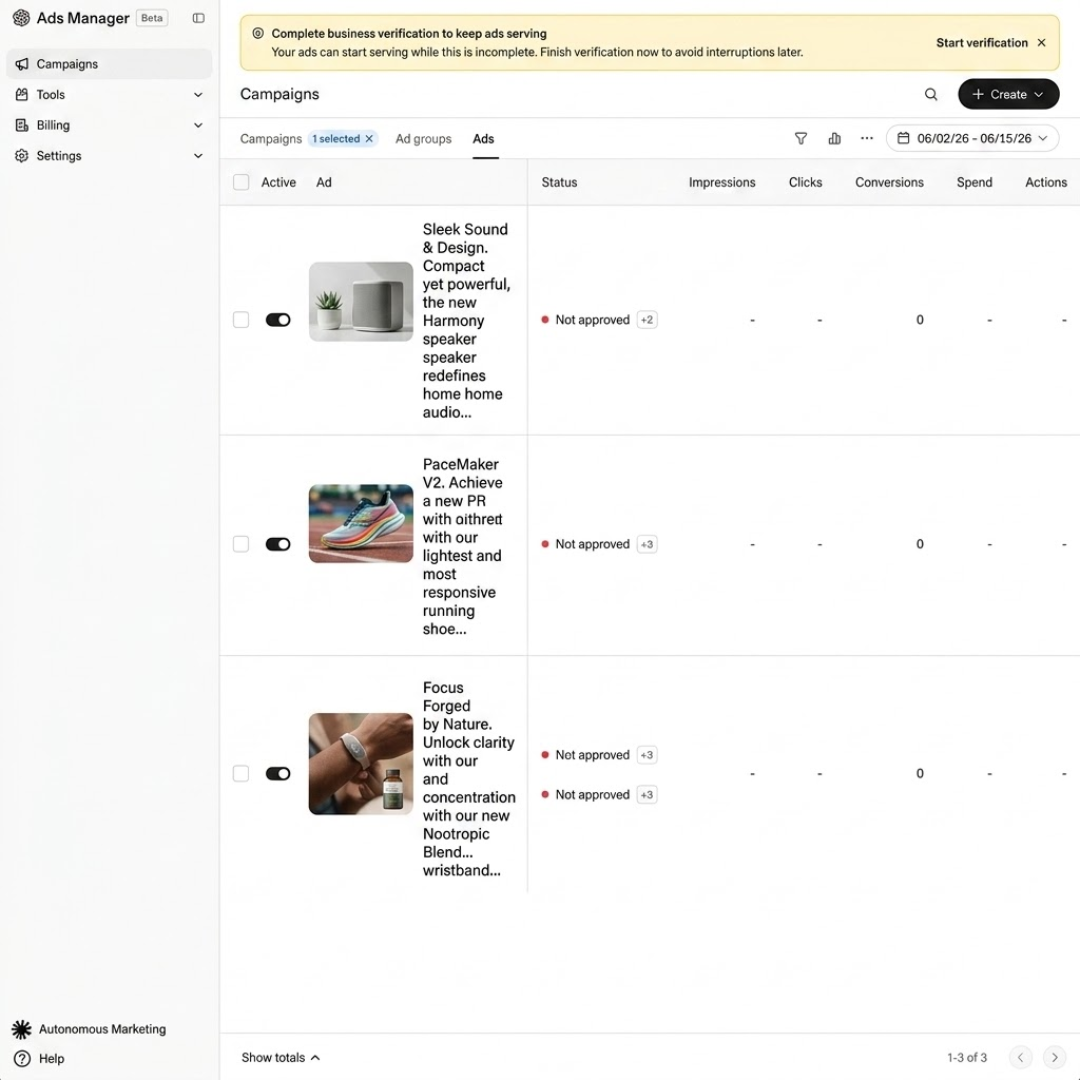
Once you have your business details, billing information, and campaign assets ready, you can move on to Ads Manager. This is where you will create, launch, manage, and track your ChatGPT ad campaigns.
Step 1: Go to ChatGPT Ads Manager
Head to ads.openai.com and sign in with your OpenAI account. If your business is eligible for access, you can start setting up your advertiser account there.
Step 2: Set Up Your Advertiser Account
Start by entering your business information. You will need to provide the details associated with your company and the information that will represent your brand inside the advertising platform.
Step 3: Complete Your Billing Setup
Next, add your billing information and payment method. Your billing setup needs to be complete before your campaigns can start delivering. Double check the business name, billing address, payment details, and other account information at this stage.
Step 4: Get Familiar With the Dashboard
Once your account is ready, you will work inside Ads Manager. The campaign structure uses three main levels:
| Level | What It Controls |
|---|---|
| Campaign | Objective, overall budget, dates, and location targeting |
| Ad Group | Specific themes, topics, or user contexts |
| Ad | The creative users see, including advertiser name, headline, description, image, and landing page |
Think of the structure as a funnel. The campaign sets the overall direction. The ad group defines the specific audience context. The ad contains the message users actually see.
Step 5: Choose Your Campaign Creation Method
You have two main ways to build a campaign:
Guided campaign creation lets you enter the campaign details directly inside Ads Manager. This is the better starting point if you are running your first campaign.
Bulk upload lets you upload campaign information through a CSV file. This can save time when you are managing several campaigns or ad groups at once. Ecommerce advertisers may also be able to create campaigns from eligible product feeds. Product-feed availability and supported features may vary by account, so check the current options in Ads Manager before building the campaign.
For your first campaign, stick with the guided setup. It gives you a better feel for how the platform is organized.
Step 6: Create Your Campaign
Inside Ads Manager, select Create → Create campaign. You will then enter the main campaign settings, including:
Campaign name
Campaign objective
Budget
Start date
End date
Target countries
After saving these settings, you can create your ad group. This is where you can define the specific conversation themes or contexts that relate to your product. You then move on to the ad itself, where you add your headline, description, landing page, and other creative details.
How to Create Your First ChatGPT Ad Campaign
Once your Ads Manager account is ready, you can start building your first campaign using the following steps:
Step 1: Choose Your Campaign Objective
Start by deciding what you want people to do after seeing your ad. Your objective should match the actual goal of the campaign. If your main goal is to bring people to your website, choose a traffic focused objective. If you already have conversion tracking in place and want to measure actions such as purchases or sign ups, a conversion focused objective makes more sense.
Step 2: Name Your Campaign
Give the campaign a name that makes it easy to identify later. A useful naming structure could include:
Product + Audience + Objective + Month
For example:
Running Shoes | New Buyers | Traffic | Sep 2026
Step 3: Set Your Target Location
Choose the countries where you want your ads to appear. If you sell only in specific markets, keep your targeting limited to those locations. Do not target a large number of countries simply because the option is available.
Step 4: Create Your Ad Group
An ad group can focus on a particular topic, conversation theme, or user intent that relates to your product. Think about the questions your potential customers might ask before they make a purchase. For example, a company selling office chairs could build an ad group around conversations such as:
Best chair for working from home
Comfortable office chair for long hours
Ergonomic chair recommendations
Office chair for back support
Step 5: Add Context Hints
Context hints help describe the conversations where you want your ad to be relevant. You can add relevant topics, phrases, or keywords that describe your intended context. These are signals for relevance, not traditional exact match keywords. Your ad is not guaranteed to appear every time a particular phrase appears in a conversation.
Step 6: Set Your Campaign Budget
Now decide how much you are comfortable spending. If this is your first ChatGPT campaign, start with a controlled test budget. The purpose of the first campaign is to collect useful performance data and understand how users respond. You can increase spending later if the campaign produces results that justify it.
Step 7: Choose Your Bidding Strategy
ChatGPT Ads supports CPM, CPC, and oCPC objectives. Below, we explain what each objective means and when to use it:
| Bidding Method | What You Pay For | Best For |
|---|---|---|
| CPM | Impressions | Reaching a larger number of users |
| CPC | Valid clicks | Driving traffic to your website |
| oCPC | Optimized clicks based on conversion goals | Campaigns with conversion tracking |
For a first campaign, CPC can be easier to understand if your immediate goal is to bring qualified visitors to your website. If you already have reliable conversion tracking, oCPC can be considered for campaigns focused on specific actions.
Step 8: Create Your Ad
Now you get to the part users will actually see. Add your:
Advertiser name
Logo or favicon
Headline
Description
Image, if applicable
Landing page URL
Step 9: Review Everything Before Launch
Before submitting the campaign, go through every setting one more time. Check your:
Campaign objective
Location
Ad group context
Context hints
Budget
Bid type
Headline
Description
Landing page
Tracking setup
Once everything looks right, submit the campaign for review and wait for it to become eligible for delivery.
How to Write ChatGPT Ad Copy
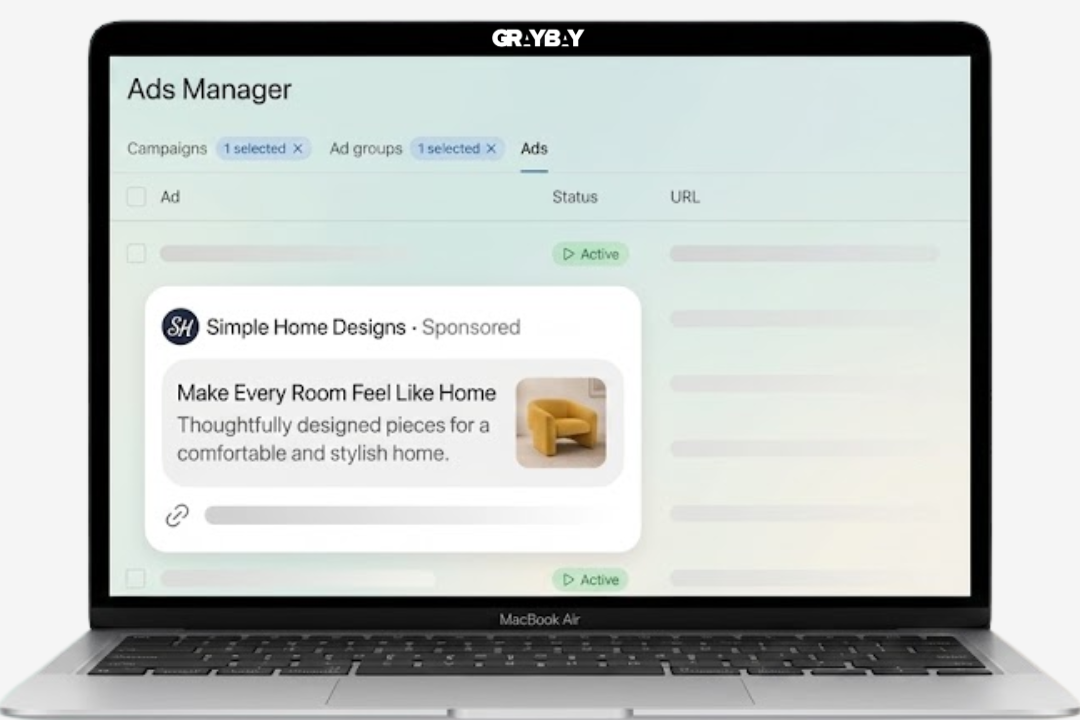
Writing ad copy for ChatGPT is a little different because you have very little room to work with. The platform gives you 16 characters for the headline and 32 characters for the description. That means you cannot squeeze in a full sales pitch. You need to make the message clear quickly using the following tips:
Keep the Headline Short
Your headline has only 16 characters, so focus on the main benefit, product, or offer. Avoid filler words and long brand statements.
For example:
| Goal | Example Headline |
|---|---|
| Product | Buy Running Shoes |
| Price | Shoes Under $50 |
| Offer | 20% Off Today |
| Service | Book a Free Call |
| Benefit | Better Sleep Now |
| Category | Shop Office Chairs |
Make the Description Do One Job
You get 32 characters for the description. Use that limited space to add useful information that the headline could not fit.
For example:
Headline: Shoes Under $50Description: Free shipping today
Avoid Trying to Say Everything
With only a few characters available, resist the urge to mention every feature, benefit, and promotion. Pick one clear message.
A useful formula is:
Headline: Product or main benefitDescription: Offer, reason to click, or supporting detail
Check Your Copy Before Launch
Before publishing, make sure both fields fit the character limits and still make sense when read together. Check spelling, pricing, promotional claims, and the landing page URL too.
How to Track ChatGPT Ad Performance?
Launching the campaign is only the beginning. Once your ads start running, you need to look at the numbers to understand how people are responding. Here are the main metrics to watch:
| Metric | What It Tells You |
|---|---|
| Impressions | How many times your ad was shown |
| Clicks | How many users clicked your ad |
| CTR | The percentage of impressions that resulted in clicks |
| CPC | The average amount paid for a click |
| CPM | The cost of getting 1,000 impressions |
| Conversions | How many users completed your selected conversion action |
| Conversion Rate | The percentage of visitors who completed the desired action |
| CPA | How much you spent to generate a conversion |
How much you spent to generate a conversion
Add UTM parameters to each landing-page URL so you can compare ChatGPT Ads traffic in GA4 or another analytics platform. Where supported, use separate parameters for campaigns, ad groups, and individual ads. Keep in mind that Ads Manager clicks and analytics sessions may differ because of page loading, consent settings, browser restrictions, redirects, and attribution rules.
For a traffic campaign, CTR and CPC can give you a useful first look. For a conversion campaign, you should pay much closer attention to conversions, conversion rate, and CPA.
How to Analyze and Optimize ChatGPT Ads
Once you have enough campaign data, start looking for patterns. The goal is not to find the ad with the most clicks. You want to find the combination of context, message, audience, and offer that produces useful results.
Start by comparing your ad groups. If one conversational context consistently produces better clicks or conversions, that gives you a strong signal about where your product fits naturally.
Then look at your ad copy. A small change in the headline or description can affect how people respond, especially when you have only a few characters available.
You can use a simple comparison like this:
| What to Compare | What to Look For |
|---|---|
| Ad groups | Which conversation contexts generate useful traffic |
| Headlines | Which messages attract more clicks |
| Descriptions | Which supporting messages improve response |
| CPC | Which ads bring visitors at a lower cost |
| Conversions | Which campaigns generate actual actions |
| CPA | Which campaigns produce conversions efficiently |
| Landing pages | Which pages turn visitors into customers |
Avoid changing everything at the same time. If you change the audience, copy, budget, and landing page together, you will have a hard time figuring out what actually caused the performance change.
ChatGPT Ads Policies and Common Reasons for Rejection
OpenAI reviews ads, advertiser information, and landing pages for compliance with its advertising policies. An ad may be rejected if it contains misleading claims, promotes a restricted product, uses inaccurate branding, links to an inaccessible page, or creates a mismatch between the advertisement and its destination.
Before submitting an ad, confirm that:
The product, price, promotion, and availability claims are accurate.
The advertiser name matches the business shown on the landing page.
The landing page works and does not block OpenAI’s advertising and search user agents.
The page clearly explains the advertised product or service.
Required disclosures are easy to find.
The offer complies with OpenAI’s current advertising policies.
If an ad is rejected, review the stated reason, correct the specific issue, and then resubmit it. Avoid repeatedly submitting the same version without addressing the policy concern.
ChatGPT Ads Campaign Checklist
Setting up your first ChatGPT ad campaign involves several small decisions. It helps to have a checklist before you click the launch button. You can use the table below to review your campaign from account setup to performance tracking.
| Checklist Area | How to Run Ads on Chatgpt | Why It Matters |
|---|---|---|
| Ads Manager Account | Your OpenAI account is ready and your advertiser profile is complete | You need a properly configured account before creating campaigns |
| Business Information | Business name, website, industry, country, currency, and time zone are correct | These details support account setup and campaign management |
| Account Verification | Complete any required verification steps | Some advertising features may require account verification |
| Advertiser Name | Use the name customers will recognize | This name can appear alongside your sponsored ad |
| Logo or Favicon | Upload a clear version of your brand logo or favicon | A recognizable visual helps users identify your business |
| Billing Profile | Add the correct business and billing information | Your campaign needs billing information before ads can run |
| Payment Method | Add a valid payment method | Ads cannot deliver without an active payment method |
| Campaign Objective | Choose CPM, CPC, or oCPC based on your campaign goal | Your objective determines what you are trying to achieve and how the campaign is measured |
| Campaign Name | Give the campaign a clear, recognizable name | A consistent naming system makes reporting easier when you have multiple campaigns |
| Target Locations | Select the countries or locations you want to reach | Your ads should reach people in the markets you actually serve |
| Campaign Budget | Set a daily budget that fits your testing plan | A defined budget gives you control over campaign spending |
| Bidding Strategy | Select the bidding approach that fits your objective | Your bidding settings influence how the campaign competes for available placements |
| Ad Group Structure | Group related audiences or conversation themes together | Clear ad groups make it easier to compare different targeting ideas |
| Context Hints | Add relevant conversations, topics, or situations where your product fits | Context hints help describe when your ad could be relevant |
| Ad Headline | Keep the headline short and focused | Limited space means every word needs to communicate something useful |
| Ad Description | Make the description support the headline | The description gives users another reason to consider the offer |
| Advertiser Branding | Check your name and logo before submission | Incorrect branding can create confusion for potential customers |
| Ad Image | Use a clear image that represents the product or offer | Your visual should support the message instead of distracting from it |
| Landing Page | Confirm that the URL works and leads to the correct page | A broken or unrelated landing page can waste paid traffic |
| Landing Page Message | Make sure the page matches the ad | Visitors should immediately understand the connection between the ad and the page |
| Mobile Experience | Test the landing page on a phone | A large share of users may interact with your site on mobile devices |
| Conversion Tracking | Set up the required tracking if measuring conversions | You need conversion data to understand which campaigns generate useful actions |
| Tracking Events | Confirm that important actions such as purchases or leads are being recorded | Accurate events help you measure campaign results |
| Ad Preview | Review how the complete ad looks before launching | This catches formatting, spelling, branding, and messaging problems |
| Campaign Settings | Check dates, locations, budget, objective, and other settings | A small configuration error can affect delivery |
| Final Review | Read the entire campaign as if you were a potential customer | A final review can catch issues that are easy to miss during setup |
| Launch Status | Confirm that the campaign has been submitted successfully | You want to know that the campaign actually entered the review and delivery process |
| Performance Monitoring | Check impressions, clicks, CTR, CPC, CPM, and conversions | These metrics show how the campaign is performing |
| Conversion Results | Compare conversions and CPA against your business goal | Traffic only matters if it contributes to the result you want |
| Ad Group Comparison | Compare different context themes and audiences | This helps you identify where your product performs best |
| Creative Testing | Test different headlines, descriptions, or images when appropriate | Testing can show which messages connect better with your audience |
| Landing Page Performance | Compare traffic with leads, purchases, or other actions | Poor results may come from the landing page rather than the ad |
| Campaign Adjustments | Make controlled changes based on actual data | Small, deliberate changes make performance easier to understand |
A Simple Pre-Launch Check
Before launching, make sure you can answer yes to these questions:
Is my advertiser account fully set up?
Is my billing information correct?
Did I choose the right campaign objective?
Are my target locations correct?
Does my ad group have relevant context hints?
Is my headline clear and within the character limit?
Does my description support the headline?
Is my landing page live and relevant?
Is conversion tracking working if I need it?
Have I reviewed the campaign settings and ad preview?
Do I know which metrics I will use to judge performance?
If the answer is yes across the board, you are ready to launch and start collecting real campaign data. The next step is to monitor those results and use them to decide what deserves more testing, what needs changing, and what should be paused.
Final Key Takeaways
Learning how to run ads on ChatGPT starts with understanding how the platform approaches advertising.
Before launching a campaign, take time to set up your Ads Manager account, choose the right objective, define your context hints, and create clear ad copy. Your landing page matters just as much as the ad itself, so make sure it supports the message and gives visitors a clear next step.
Once your campaign is live, focus on the numbers that match your goal. Look at clicks and CPC for traffic campaigns, then pay closer attention to conversions and CPA when you are measuring business results. Give your campaign enough time to collect useful data before making major changes.
ChatGPT Ads are still a developing advertising channel, so testing will be part of the process. Start with a focused campaign, learn how your audience responds to different conversation contexts and creative, and use those findings to guide your next campaign.
Ready to Get Your Brand Seen in AI Search?
ChatGPT is becoming another place where people discover businesses, products, and services. A strong strategy can help your brand stay visible across both traditional search and AI driven platforms.
Gray Bay Marketing can help you build that strategy with LLM SEO Services, paid advertising, and Google Ads Management tailored to your business goals. If you want a broader approach to paid campaigns, you can also explore our Paid Media Agency services.
Start building a search and advertising strategy that meets your customers where they are looking. Contact us now!
Can You Connect Other Advertising Platforms to ChatGPT?
You can use supported connectors, integrations, or MCP servers to work with data and tools from certain advertising platforms. However, connecting an Amazon Ads, Microsoft Advertising, or Google Ads account to ChatGPT is different from running paid advertisements through OpenAI Ads Manager.
An external advertising connection may help with reporting, analysis, campaign planning, or supported account actions. ChatGPT Ads Manager is the separate platform used to purchase sponsored placements that appear in ChatGPT.
FAQs About How to Run Ads on Chatgpt
How do I know if my ChatGPT ad is showing in the right conversations?
Look at the types of users and conversations your campaign is reaching, then compare that with your intended audience. Your context hints should describe situations where your product or service is genuinely relevant.
Why is my ChatGPT ad costing more than I expected?
Your costs can vary based on your campaign objective, bidding strategy, competition, and available opportunities for your ad to be shown. Check your CPC or CPM alongside conversions before deciding that the campaign is too expensive.
Should I use the same ad copy I use on Google or Meta?
You can reuse useful ideas, but the copy may need adjustment. ChatGPT Ads appear within a conversational environment, so the message should feel relevant to the type of problem or intent that brings someone to ChatGPT.
How much should I budget for my first ChatGPT Ads campaign?
Set a budget that gives you enough room to test without putting too much of your advertising spend into an unproven channel. Start with a clear objective and use the initial results to decide how much to invest next.
What should I do if my ChatGPT ad is rejected?
Check the reason given during the review process and identify the specific issue with the ad, landing page, or account. Make the required correction before submitting it again rather than repeatedly resubmitting the same version.
How to Connect Amazon Ads to ChatGPT?
To connect Amazon Ads to ChatGPT, you need a supported connector or MCP server that can access your Amazon Ads account. After authorization, ChatGPT can work with the advertising data and actions supported by that connection.
How to Connect Bing Ads to ChatGPT?
You can connect Bing Ads, now Microsoft Advertising, to ChatGPT through Microsoft's Advertising MCP Server. After setting up authentication and permissions, you can use ChatGPT with the advertising tools supported by the connection.
How to Use ChatGPT for Google Ads?
ChatGPT for Google Ads can help you develop ad-copy variations, organize keyword themes, summarize campaign data, identify performance patterns, and suggest tests. Unless you use a supported connection that provides specific account actions, you still create, manage, and launch the campaigns through Google Ads.