
UGC and UGC-style ads are everywhere, and for good reason. They feel personal, fit naturally into social feeds, and can demonstrate a product in ways that polished brand commercials sometimes cannot. The challenge begins when you need to produce enough strong variations to test consistently.
Finding actors, writing scripts, producing videos, uploading creative, organizing campaigns, and checking results can quickly turn into a long list of disconnected tasks. Each step may happen in a different platform, which leaves marketers moving files, copying data, and repeating instructions.
Claude can coordinate many of these tasks in one place when connected to compatible advertising and creative-production tools. With the right Model Context Protocol connections, you may be able to use campaign research to shape scripts, send approved creative directions to an AI video platform, organize campaign ideas, and interpret performance data through one conversation.
If you want to learn how to make AI ads, this guide walks through the process from research to testing. You will see how Claude, Meta, Arcads, and MCP can work together; where human review is still necessary; and which prompts can make each stage more useful.
Important: The actions Claude can perform depend on the MCP connectors you use. Some connectors may provide reporting access only, while others may support creative uploads, campaign creation, or publishing. Confirm the available tools, permissions, and provider before starting.
What You Need Before You Begin
A connected workflow still needs the right accounts, source material, and business decisions. Before starting, make sure you have:
A Claude account with connector access
A Meta Business Portfolio and advertising account
Permission to access the correct Meta ad account
A trusted Meta-compatible MCP connector
An Arcads account if you plan to generate creative through Arcads
Clear product images and basic brand guidelines
An offer, campaign objective, and landing page
An approved budget for creative production and advertising
A process for reviewing claims, creative assets, and campaign settings
You do not need every detail finalized before opening Claude. You should, however, know what you sell, whom you want to reach, and what action you want people to take. Without those basics, even a detailed prompt can produce broad ideas that do not fit the campaign.
Understanding Claude for Advertising
Claude can act as a central workspace for several parts of an advertising workflow when it has access to the right information and compatible connectors. It can help you sort campaign findings, explore customer problems, develop creative angles, write scripts, compare variations, and summarize performance.
Its role is not to replace Meta Ads Manager or an AI video platform. Claude provides the reasoning and conversational interface, while the connected services provide data or perform specific actions.
When using Claude for advertising, you might begin by sharing product details and asking for several campaign angles. If a compatible Meta connector provides reporting data, you can also ask Claude to identify patterns across existing ads. Those findings can then inform the next set of scripts instead of sitting in a separate report.
The workflow becomes more useful when each stage informs the next:
Campaign results reveal promising hooks and formats.
Those findings shape new creative briefs.
Approved briefs become scripts and production instructions.
Creative assets enter a controlled test.
Test results guide the next group of variations.
A second benefit of Claude for advertising is continuity. Product details, audience concerns, earlier scripts, and testing decisions can remain part of the same working context. You still make the final decisions, but you spend less time rebuilding the brief every time you move to another task.
What Is MCP and How Does It Support AI Advertising?
MCP stands for Model Context Protocol. It is an open standard that allows AI applications such as Claude to connect with external tools, services, and data sources.
Think of it as a bridge. Claude sits on one side, while a creative platform, reporting service, database, or advertising tool sits on the other. The MCP server determines which information Claude can retrieve and which actions it can request.
Depending on the connector, Claude may be able to:
Review available campaign and creative data
Identify patterns in advertising performance
Write scripts and develop creative concepts
Request UGC-style images or videos from a connected platform
Organize or upload approved creative when supported
Prepare campaigns or ad sets when supported
Summarize campaign performance
Recommend new variations based on earlier results
That last qualification matters. Connecting a tool does not automatically give Claude unlimited access to it. One Meta connector might offer reporting functions, while another may support asset uploads or campaign changes. The tools exposed by the server, your account permissions, and the access you approve determine what Claude can actually do.
What MCP Cannot Do by Itself?
MCP does not create, publish, or optimize advertisements on its own. It supplies the connection that allows Claude to use specific functions offered by another service.
It also cannot:
Give Claude automatic access to your Meta account
Bypass Meta’s account permissions or advertising review
Guarantee that a connector supports publishing
Confirm that an advertising claim is legally acceptable
Prevent every error in an AI-generated image or video
Guarantee that a creative concept will perform well
Replace your responsibility for budgets and campaign settings
Human approval remains important, particularly when a connected tool can edit an account, spend money, or publish content.
How Claude, MCP, Arcads, and Meta Work Together
| Component | Role in the Workflow |
|---|---|
| Claude | Helps with research, planning, prompts, coordination, and analysis |
| MCP | Connects Claude to external services and data sources |
| Arcads | Generates AI actors, UGC-style videos, images, and creative variations |
| Meta Connector | Provides supported campaign data or advertising actions |
| Meta Ads Manager | Delivers ads and records campaign performance |
This separation makes the workflow easier to understand. Claude can coordinate the conversation, but the connected platforms still control their own data, tools, and account permissions.
How to Make AI Ads With Claude and Meta: Step by Step
The value of this workflow is not simply that it produces content faster. Its real advantage is the ability to connect research, production, testing, and analysis. The following process keeps those stages organized without treating AI output as automatically ready for publication.
Step 1: Connect Your Advertising Tools to Claude
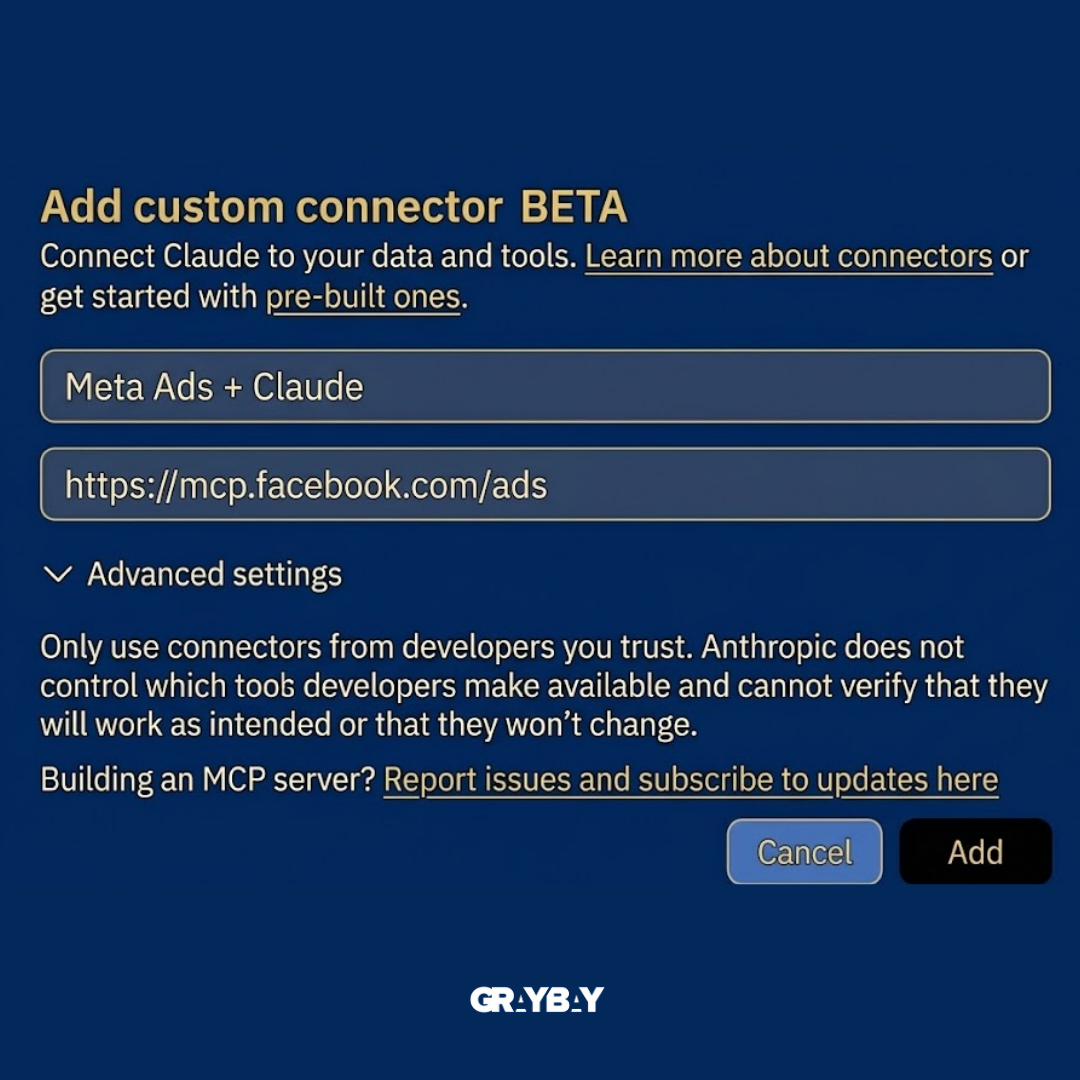
Start by identifying a trusted Meta-compatible connector or custom MCP server that supports the actions you need. In Claude, open the connectors area and select an available integration, or add a trusted custom connector using the provider’s verified remote MCP server URL.
The menu location, availability, and supported actions may vary by Claude plan, account, region, and connector. Do not assume that a connector called “Meta” provides access to every part of Ads Manager.
When you connect it:
Sign in to the Meta account with access to the correct Business Portfolio and ad account.
Check who operates the connector.
Review the requested permissions.
Confirm whether it can read data, upload files, edit campaigns, or publish changes.
Complete the authorization process.
Ask Claude to list the tools and actions available through the connector.
Test access with a low-risk request, such as listing permitted ad accounts or summarizing a limited reporting period.
If you also plan to use Arcads, add its official connector and authorize the appropriate account. Arcads can support creative-production tasks such as generating AI actors, UGC-style videos, static images, and variations.
Only connect services you trust. Review the provider’s data-retention terms, security practices, and revocation process. If a connector can publish campaigns or change budgets, require it to show you the proposed action before execution.
Step 2: Research Your Existing Meta Ads
Before generating new creative, use your existing campaign data to establish a performance baseline.
If your connector provides reporting access, ask Claude to analyze a defined period rather than vaguely requesting your “best ads.” Thirty days may be useful for an active account, but a longer period may be necessary when conversion volume is low or the business has a longer buying cycle.
Ask Claude to compare:
Amount spent
Impressions and reach
Click-through rate
Cost per click
Conversion rate
Cost per result
Purchase or lead volume
Return on ad spend, when applicable
Best-performing formats
Opening hooks
Messaging angles
Audience patterns
Landing pages or offers
Ads with high engagement but weak conversion performance
A video with the highest click-through rate is not necessarily the strongest business performer. It may attract attention without producing purchases. Tell Claude which result matters to the campaign and ask it to show the amount spent and conversion volume beside each conclusion.
This step gives creative development a direction. Instead of producing five unrelated videos, you can build hypotheses from patterns already visible in the account.
Step 3: Turn Performance Findings Into Creative Ideas
Give Claude the findings along with a clear product brief. Include:
Product name
Main features and benefits
Offer and pricing
Target audience
Customer problems
Common objections
Product differentiators
Available reviews or demonstrations
Brand voice
Platform and format
Desired video length
Campaign objective
Required disclaimers
Claims that must not be used
Ask for several distinct angles rather than multiple versions of the same idea. One angle might focus on convenience, another on a common frustration, and another on a specific product feature.
For a short UGC-style video, this structure can work well:
Hook → Problem → Product → Supported proof → CTA
The proof must be real. It might come from a product demonstration, a documented feature, an authentic review, or verified performance information. Do not ask Claude to invent testimonials, statistics, medical outcomes, financial results, or other claims.
Read each script aloud. A sentence can look fine on the page but sound stiff when spoken. Shorten formal phrases, remove unnecessary setup, and make sure the product appears early enough to hold attention.
Step 4: Create UGC-Style Concepts
A script gives you the words, but it does not provide the complete creative direction. Decide how each idea should look and feel before generating a video.
You could test concepts such as:
A problem-and-solution scenario
A direct product demonstration
A before-and-after scenario when it is appropriate and supportable
A creator-style product explanation
A factual comparison
An unboxing or first-look format
A list of three practical benefits
A response to a common customer question
Give each concept a purpose. If Concept 1 tests the hook, avoid changing the actor, setting, script structure, and offer at the same time. Otherwise, you may not know which difference affected performance.
For an actor-based UGC-style concept, ask Claude to recommend an appropriate adult age range, setting, clothing, emotion, on-camera personality, and delivery style. The choice should fit the message without relying on stereotypes.
A practical creative brief might read:
Create a 15-second vertical video for a personalized necklace. The audience is adults buying anniversary gifts. Open with the actor admitting that choosing a meaningful gift was harder than expected. Show the necklace by the fourth second, explain the personalization in simple language, and end with a direct invitation to explore the available designs. Keep the tone warm and conversational.
This is much more useful than asking an AI tool to “make a viral jewelry ad.”
Step 5: Generate the Creative Assets
If you have connected Arcads or another compatible creative platform through MCP, Claude may be able to send approved scripts and production instructions to that service.
Your instructions can include:
Actor age range
Setting
Clothing
Mood
Delivery style
Camera movement
Product placement
Approved script
Video orientation
Desired duration
Captions
Product reference images
Required AI-content disclosure
Music, voice, image, and likeness requirements
Claims or phrases that must be avoided
Use clear product references whenever the platform supports them. Include multiple views when shape, packaging, texture, or small details matter.
Do not move directly from generation to publication. AI-generated content can contain inaccurate product details, strange hand movements, unnatural speech, incorrect text, misleading scale, or background objects that change between frames.
If the ad features a virtual actor, describe it internally as UGC-style creative rather than genuine customer-generated content. Do not present the actor as an actual customer or claim that a scripted experience happened unless it did.
Step 6: Review Every Creative
Review the asset as carefully as you would review a video produced by a human team.
| What to Check | What to Look For |
|---|---|
| Product | Correct color, size, packaging, features, and details |
| Actor | Natural appearance, movement, voice, and presentation |
| Script | Clear message that sounds natural when spoken |
| Hook | A specific reason to continue watching |
| Visuals | Clean setting without distracting or inconsistent objects |
| Branding | Correct name, logo, colors, and product references |
| Claims | Accurate, supportable, and consistent with the landing page |
| CTA | A clear next step that matches the campaign objective |
| Format | Correct dimensions, captions, safe zones, and placement |
| Disclosure | Any required AI-content disclosure is included |
| Rights | Music, voices, images, and likenesses are cleared for advertising |
| Landing Page | Product, offer, price, and CTA match the advertisement |
| Policy | Creative follows Meta’s current advertising requirements |
Small details matter. A product that changes color halfway through the video can reduce trust even when the script is strong. The same is true when the advertisement promises an offer that does not appear on the destination page.
Step 7: Upload and Organize Approved Creative
Once the assets pass review, upload them manually through Meta Ads Manager or use a connected tool if the connector explicitly supports creative uploads.
Use a consistent naming structure. For example:
Product_Hook_Concept_Actor_Format_Version
A file called Necklace_GiftProblem_Demo_A1_9x16_V2 will be easier to analyze later than final-video-new-3.
Keep a record of:
Hook
Creative angle
Script
Actor
Setting
Format
Offer
Audience hypothesis
Generation date
Version number
This information helps Claude connect performance results to the actual differences between ads.
Step 8: Prepare and Review the Meta Campaign
Give Claude a campaign brief that includes:
Ad account
Campaign objective
Conversion location
Optimization event
Proposed daily or lifetime budget
Location
Age range
Audience strategy
Excluded audiences
Placements
Bid strategy
Attribution setting
Start date
Test duration
Creative variations
Naming convention
A safer instruction would be:
Draft a sales campaign structure for [product]. Use a proposed daily budget of [$X] and target [audience] in [location]. Organize the five approved UGC-style videos as separate ads. Show me the campaign, ad set, and ad-level settings for review. Do not create, edit, publish, or activate anything until I provide explicit approval.
Before publishing, manually confirm the account, objective, optimization event, budget, schedule, targeting, placements, tracking, destination URL, and creative assigned to each ad.
Step 9: Analyze the Results
After the test generates meaningful data, ask Claude to analyze performance in the context of your objective, amount spent, conversion volume, attribution setting, and target cost per result.
Useful questions include:
Which creative produced the strongest qualified result at a sustainable cost?
Which hook earned attention without sacrificing conversion quality?
Did one angle perform consistently across audiences?
Which ads spent enough to support a reasonable conclusion?
Which creative should continue running?
Which concept deserves another variation?
Did the landing page or offer appear to limit performance?
Which conclusion is still uncertain because of limited data?
Claude can turn a large report into a plain-language summary, but it should show the supporting numbers. Ask it to separate observations from assumptions and label findings based on limited data.
Avoid declaring a winner after a handful of impressions, clicks, or conversions. Consider spending, normal conversion delay, audience size, and your business economics before pausing or scaling anything.
Step 10: Create Variations From Promising Ads
The process does not stop when one ad produces a promising and repeatable result. Use that concept as the starting point for the next test.
You could vary the:
Opening hook
First visual
Script
Actor
Setting
Product benefit
Demonstration
CTA
Video length
Caption style
Change one major variable at a time when possible. For example, keep the actor, offer, and main script consistent while testing five opening hooks. That makes it easier to determine whether the opening changed performance.
The full process becomes:
Research → Plan → Create → Review → Launch → Measure → Learn → Revise
This is where the system becomes valuable. You are not generating a large batch of ads and hoping one works. You are using each campaign to make the next creative decision more informed.
Read more: How to Build a Landing Page With AI Using Lovable
Claude Prompts for Meta Ad Creation
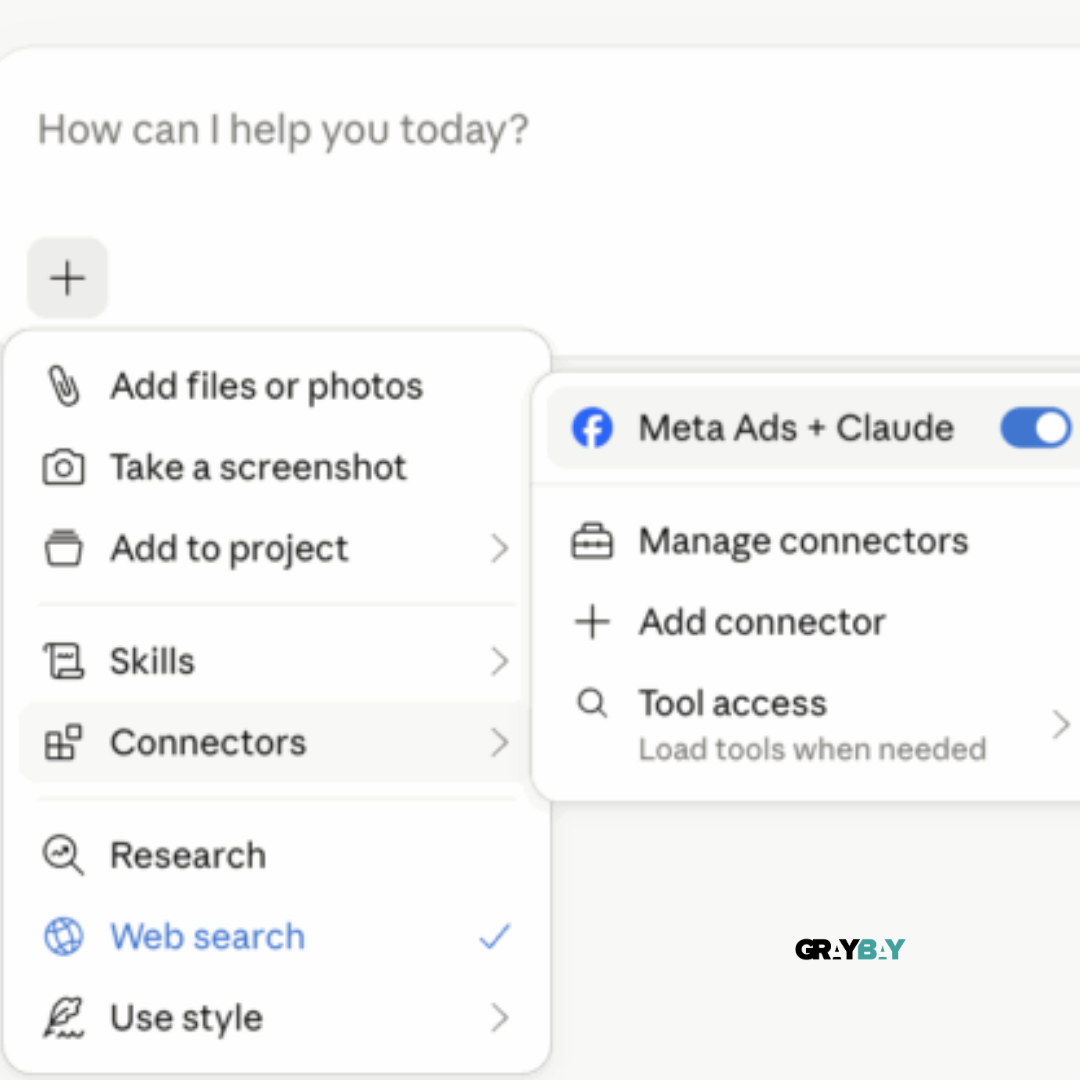
Good prompts include enough product, audience, offer, and campaign context to produce useful work. The following Claude prompts for Meta ad creation can be copied and adjusted, but confirm which actions your connectors support before requesting account data, uploads, or campaign changes.
1. Meta Ad Research Prompt
Using the Meta campaign data available through the connected tool, analyze my ads from the last 30 days. Compare creative formats, hooks, messaging angles, audiences, spend, conversion volume, cost per result, click-through rate, conversion rate, and return on ad spend where available. Identify recurring patterns, but do not declare a winner when the data is limited. Explain how the findings could inform the next creative test.
2. UGC-Style Script Prompt
Help me develop five performance-focused UGC-style scripts for [product]. The product helps customers [main benefit], and the target audience is [audience]. Use five distinct customer problems or objections. Keep each script natural and suitable for a [15- to 20-second] video. Include a hook, problem, product, supporting proof, and CTA. Do not invent testimonials, statistics, guarantees, or product claims. Flag any statement that requires evidence or legal review.
3. Actor and Setting Prompt
Recommend an actor and setting for each approved script. Include an appropriate adult age range, clothing, setting, on-camera personality, emotion, and delivery style. Explain why each choice fits the message. Avoid assumptions based on protected characteristics.
4. UGC-Style Video Prompt
Using the approved actor image and product references, create a vertical UGC-style video using this script: [insert script]. Keep the delivery conversational and the camera style suitable for a social feed. The video should be [10 to 20] seconds long. Do not change the product’s color, size, packaging, features, or branding. Do not portray the virtual actor as an actual customer. Include any required disclosure.
5. Meta Campaign Planning Prompt
Draft a Meta campaign structure for [product]. Use [sales/leads/traffic] as the proposed objective and [$X] as the proposed daily budget. The audience is [location], [age range], and [audience description]. Organize the five approved creatives as separate ads. Show the campaign, ad set, and ad-level settings for review. Do not create, edit, publish, or activate anything until I provide explicit approval.
6. Performance Analysis Prompt
Analyze the five ads using the campaign data available through the connected Meta tool. Compare spend, results, cost per result, click-through rate, conversion rate, and return on ad spend where applicable. Identify the strongest hook, angle, and format. Show the amount spent and conversion volume beside each recommendation, and clearly label conclusions based on limited data.
7. Promising Ad Variation Prompt
Take my highest-performing Meta ad and create five variations based on its central concept. Keep the main product benefit and offer consistent, but test different opening hooks. For each variation, identify the main element being changed and list the elements being held constant.
8. Creative Testing Prompt
Build a plan for testing five Meta creatives using the available performance data. Present the plan in a table with the hypothesis, creative angle, primary variable, hook, audience, budget consideration, success metric, and decision rule. Keep the test structured so I can understand which difference influenced performance.
How to Create Meta Ads With AI Without Skipping Research
Speed is useful only when it produces informed creative. The following mistakes can make an AI-assisted process faster without making it better.
| Common Mistake | What Can Go Wrong | What to Do Instead |
|---|---|---|
| Skipping Research | Ads may feel disconnected from the audience | Review available campaign findings and customer concerns first |
| Using Vague Prompts | Scripts may sound generic or miss the offer | Include the product, audience, problem, proof, tone, and goal |
| Omitting Reference Images | The product may change between scenes | Supply clear product images from several useful angles |
| Approving Every Output | Errors can reach a paid campaign | Review speech, visuals, claims, branding, and product details |
| Testing Too Many Variables | You cannot tell what changed performance | Change one major variable at a time when possible |
| Choosing the Wrong Objective | Meta may optimize for the wrong result | Match the objective and optimization event to the business goal |
| Stopping Too Early | Small samples may create false winners | Review spend, conversion volume, attribution delay, and target cost |
| Ignoring Strong Concepts | A useful idea gets tested only once | Create controlled variations from repeatable results |
| Letting AI Make Every Decision | Account or budget errors can become expensive | Keep approvals and final publishing under human control |
How Much Does It Cost to Make AI Ads?
The cost depends on your tools, production volume, revision needs, and Meta budget. Separate creative-production expenses from media spend so you can see where the money is going.
| Cost Area | What You May Pay For | What to Consider |
|---|---|---|
| Claude | Subscription or usage plan | Supports planning, scripts, prompts, and analysis |
| Arcads | Subscription or generation credits | Covers actors, videos, images, and variations |
| Generation Usage | Additional model or credit consumption | More versions and longer videos may cost more |
| MCP Connection | Connector or provider charges | Pricing and access vary by provider |
| Meta Ad Spend | Campaign delivery | Separate from creative-production expenses |
| Revisions | Extra generations or editing | Product errors may require additional versions |
| Human Review | Internal time or professional support | Needed for strategy, compliance, and quality control |
Pricing, plan limits, and connector availability can change. Check each provider’s current terms before estimating your production costs.
AI Creative Costs vs. Meta Ad Spend
Creative costs pay for planning and producing the advertisements. Media spend pays Meta to deliver them to an audience.
For example, a business may pay for Claude and Arcads to produce five videos, then assign a separate daily budget to the campaign. Tracking those expenses separately makes it easier to compare the cost of producing creative with the revenue or leads it generates.
Is It Cheaper Than Hiring an Agency?
It may reduce production costs for businesses that can manage strategy, review, compliance, campaign setup, and testing internally. That does not make every AI workflow cheaper.
Costs can rise when the team generates too many unusable variations, repeats videos because the product looks wrong, or launches campaigns without reliable tracking. Agencies also provide experience, account management, strategic judgment, and creative review—not only asset production.
The more realistic advantage is often speed. A prepared team can develop several controlled variations, review them, and respond to campaign results without arranging a new video shoot every time.
Benefits and Limitations of a Connected Claude Workflow
A connected workflow can reduce repetitive work, but it does not remove the need for good creative judgment.
| Benefit | How It Helps |
|---|---|
| Less App Switching | Compatible tasks can be coordinated through one conversation |
| Faster Planning | Campaign findings can become briefs and scripts quickly |
| More Variations | Teams can test several hooks, actors, and formats |
| Clearer Analysis | Complex reports can become easier-to-understand summaries |
| Faster Iteration | Promising ideas can lead to controlled follow-up tests |
| Better Continuity | Product context and earlier decisions remain connected |
Limitations
| Limitation | What to watch for |
|---|---|
| Inconsistent output | Scripts and videos may require several revisions |
| Human review | Product details, claims, budgets, and settings need approval |
| Connector setup | Available actions depend on the provider and permissions |
| Connector security | Third parties may access sensitive account or campaign data |
| Changing features | Models, prices, tools, and integrations may change |
| Creative quality | Producing more ads does not make the ideas stronger |
| Separate ad spend | AI subscriptions do not cover campaign delivery |
| Platform requirements | Ads must follow Meta’s current policies and disclosure rules |
The Best Way to Use Claude
Use Claude to support research, drafting, comparison, organization, and repetitive tasks. Keep creative approval, factual verification, targeting, tracking, budget decisions, and final publishing under human control.
This balance gives you the speed of AI without handing important business decisions to an automated workflow.
Read more: ChatGPT Ads vs. Google Ads: How Paid Search Is Changing
Final Thoughts
AI can remove a surprising amount of repetitive work from ad production when the tools are connected carefully. Claude can help coordinate research, scripts, creative directions, campaign findings, and supported actions. Arcads can turn approved ideas into UGC-style assets, while a compatible Meta connector may make permitted campaign data or advertising functions available.
The real value is not a single generated video. It is the feedback loop. Research guides the creative, testing reveals useful signals, and those signals shape the next round.
Learning how to make AI ads becomes easier when research, production, campaign management, and analysis follow one repeatable process. A clear prompt and strong toolset can save time, but the quality of the offer, message, creative judgment, and human review still determines whether the campaign deserves attention.
Ready to Build a Smarter Advertising Workflow?
AI can support creative production and analysis, but a useful advertising program still needs clear strategy, accurate tracking, and disciplined testing.
Gray Bay Marketing helps businesses connect paid advertising, creative work, data, and AI through practical strategies built around measurable goals.
Explore our Facebook Ads agency services for help with Meta strategy, creative testing, targeting, and campaign management. Our Google Ads management services can support high-intent search campaigns, while our AI SEO services help brands strengthen their presence across emerging search experiences.
Ready to put your advertising strategy to work? Contact Gray Bay Marketing today.
FAQs About How to Make AI Ads
Can I create Meta ads with AI without hiring an agency?
Yes. You can create Meta ads with AI without hiring an agency by using AI for research, scripts, concepts, UGC-style assets, and performance analysis. Depending on your connectors, some campaign-management tasks may also be supported. You will still need to review creative quality, claims, targeting, tracking, budgets, and campaign settings.
Do I need coding skills to use MCP with Claude?
Not necessarily. An available connector may offer a guided authorization process that does not require coding. Building or installing a custom MCP server can require technical knowledge, particularly when authentication, hosting, permissions, or tool definitions are involved.
Can Claude create Meta ads for me?
Claude can help research angles, write copy and scripts, plan creative, analyze data, and coordinate supported actions through connected tools. Whether it can upload assets, create campaigns, or publish ads depends on the specific Meta connector and the permissions you approve.
How do I make AI ads look less generic?
Start with specific customer problems rather than broad product benefits. Give Claude your offer, audience, brand voice, objections, reviews, differentiators, and earlier campaign findings. Ask for distinct hypotheses instead of five versions of the same script.
Can AI generate UGC-style videos for Facebook and Instagram?
Yes. AI creative platforms can generate UGC-style videos using virtual actors, scripts, and product references. Review each asset for product accuracy, natural speech, visual quality, usage rights, disclosures, and platform suitability before launching it.
How many AI ads should I test at once?
There is no fixed number. Five distinct creatives may provide several useful angles, but the appropriate number depends on your budget, audience size, objective, expected cost per result, and conversion volume. Avoid dividing a small budget across more ads than you can evaluate meaningfully.
Can Claude analyze my Meta ad performance?
Yes, if your Meta connector provides the necessary reporting data. Claude can compare creatives, summarize results, and identify patterns worth investigating. Ask it to show the spend and conversion volume behind every recommendation.
How can I learn how to make AI ads without wasting my budget?
Begin with research and a controlled test. Give each creative a clear hypothesis, document the variable being tested, and avoid major budget changes based on limited data. Use conversion volume, spending, attribution delay, and your target cost per result to guide the next round.
What are AI-generated Facebook ads?
AI-generated Facebook ads are advertisements developed partly or fully with artificial intelligence. AI can assist with angles, headlines, primary text, scripts, images, voices, and videos. A marketer should review the final ad for accuracy, product consistency, rights, disclosures, and compliance before publishing it.
Can an AI ad copy generator write Facebook ad copy?
Yes. An AI ad copy generator can create headlines, primary text, hooks, and CTAs based on your product and audience. Strong output requires clear information about the offer, customer problems, brand voice, available proof, and campaign objective. Review the copy to remove unsupported claims, invented statistics, or inaccurate product details.