
Claude for Meta Ads: How to Build, Write, and Optimize Campaigns
Meta ads can drain your budget without making the problem obvious. A campaign might keep spending as leads begin to drop, tracking could start showing inconsistent numbers, or one ad set may consume a large share of the budget without producing enough results. Meanwhile, finding the reason behind these changes can take hours when you have to check campaign structure, audiences, creative, and performance data across different parts of the account.
That is where Claude can fit into the workflow. Meta’s official Ads AI connector lets supported AI tools work with connected advertising accounts. In Claude, the information and actions available depend on your setup, account eligibility, and granted permissions.
In this guide, you’ll learn how to use Claude for Meta ads, connect your account, write useful prompts, build campaigns faster, review performance, and avoid common mistakes. The goal is to use AI to support better decisions without handing over control of your advertising account.
Why Claude Can Help You Do With Meta Ads
As you start using Claude for Meta ads, the biggest change is how quickly you can work through the information already available to you. Here are the key ways this connection can change your Facebook Ads workflow.
Real account data: Claude can work with relevant Meta Ads data, so you can ask questions based on actual campaign performance instead of relying on screenshots or copied reports.
Faster account reviews: Instead of checking campaigns, ad sets, and metrics one by one, you can ask Claude to organize the information and highlight patterns that deserve attention.
Smarter campaign planning: Claude can turn a campaign brief into audience hypotheses, campaign structures, creative ideas, and testing plans that you can review before launch.
More consistent reporting: Claude can organize campaign results into a repeatable reporting format, helping your team compare the same metrics across reporting periods.
Human oversight stays important: The value is not letting AI run your entire account. It is giving marketers another way to analyze information, catch potential issues, and work through decisions faster.
What Data Can Claude Access Through the Meta Ads Connector?
Before connecting your account, check which data the integration makes available. Access varies by connector capabilities, account eligibility, and permissions. The table below explains how available account data can support your workflow:
| What Claude Can Access | Why It Matters |
|---|---|
| Ad spend | Helps identify campaigns or ad sets using a large share of the budget and compare spending with results. |
| Clicks and traffic | Makes it easier to spot changes in click activity, engagement, and traffic patterns across campaigns. |
| Conversions | Lets Claude review conversion results and compare performance across campaigns, ad sets, audiences, or time periods. |
| Campaign structure | Gives Claude visibility into campaign and ad set organization, making account reviews easier to structure. |
| Product catalog data | Provides useful context for ecommerce campaigns and helps connect product information with advertising performance. |
| Pixel and Conversions API data | Can help surface tracking-related issues or unusual patterns that may affect how results are reported. |
Important: Review the connector’s available permissions before connecting. Use read-only access where supported if you only need reporting or analysis, and confirm which tools can create or modify campaigns.
Read more: How to Make AI Ads With Claude and Meta
How to Connect Claude to Facebook Ads
The very first step is to connect your Meta Ads account with Claude so it can work with the campaign information you want to analyze. The exact connection options can vary based on your Claude plan, workspace, and the connector or MCP setup available to your account.
However, the general steps include:
1. Open Claude’s connector settings
Open Claude’s connector settings and follow the supported setup instructions for Meta’s Ads MCP connection. Depending on your plan and workspace, this may involve adding a custom connector. Use the server details provided in Meta’s current documentation, then complete the Meta authorization process.
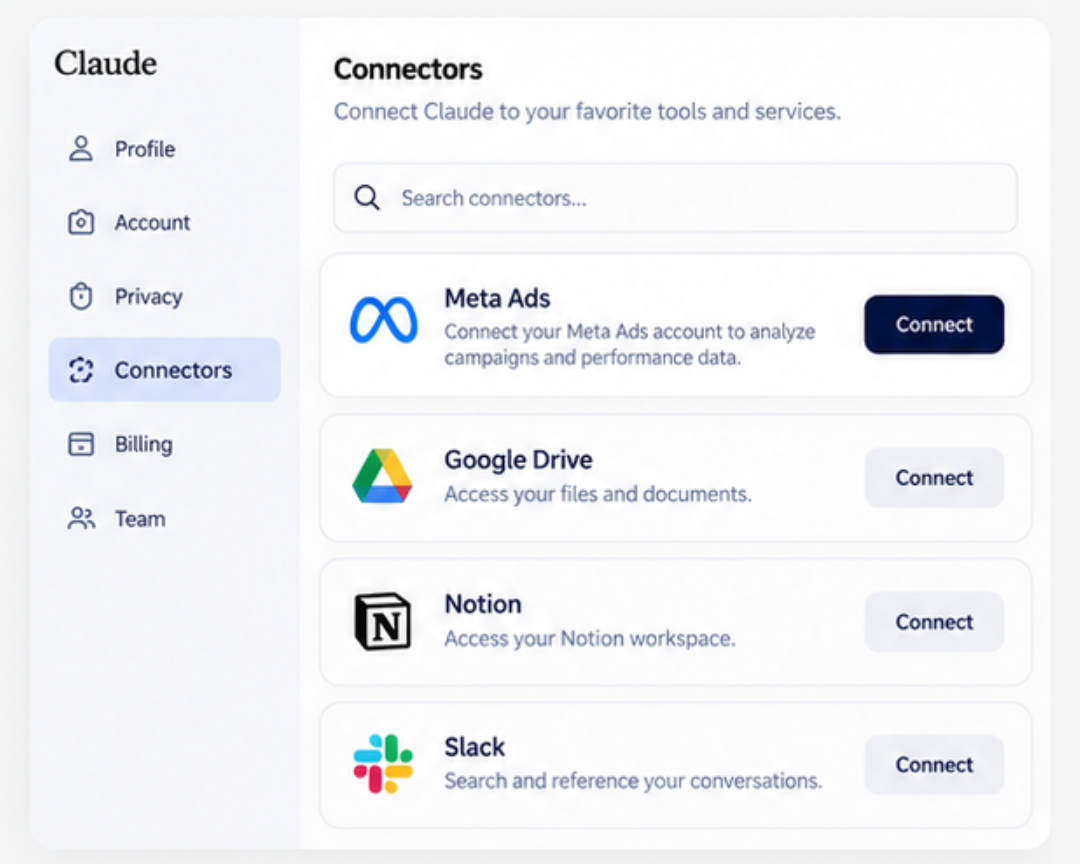
If the connection is unavailable, you can still use Claude to draft copy and analyze exported reports. Direct access to your advertising account requires a supported connection.
2. Sign in to your Meta account
Follow the authentication steps and sign in with the Facebook account that has access to the relevant Meta Business assets. Review the permissions carefully before approving the connection.
3. Choose the business assets you want to use
If Meta asks you to select business accounts, ad accounts, pages, or other assets, choose only the ones Claude needs for your workflow. Keeping access limited to the required assets makes account management easier.
4. Start with a reporting task
Once the connection is active, test it with a simple question about your existing campaigns. For example:
“Break down my ad set performance by placement over the last 30 days and identify the biggest changes in spend, CTR, and conversions.”
Starting with analysis lets you check that Claude is receiving the right account information before you use it for more involved campaign planning.
5. Review Claude’s access before expanding its role
Keep permissions as limited as your workflow allows, especially when you are testing a new connection. Claude can support analysis and planning, but your team should still review campaign changes, budgets, targeting, and other important advertising decisions before anything is activated.
How to Build Meta Ads With Claude from Scratch
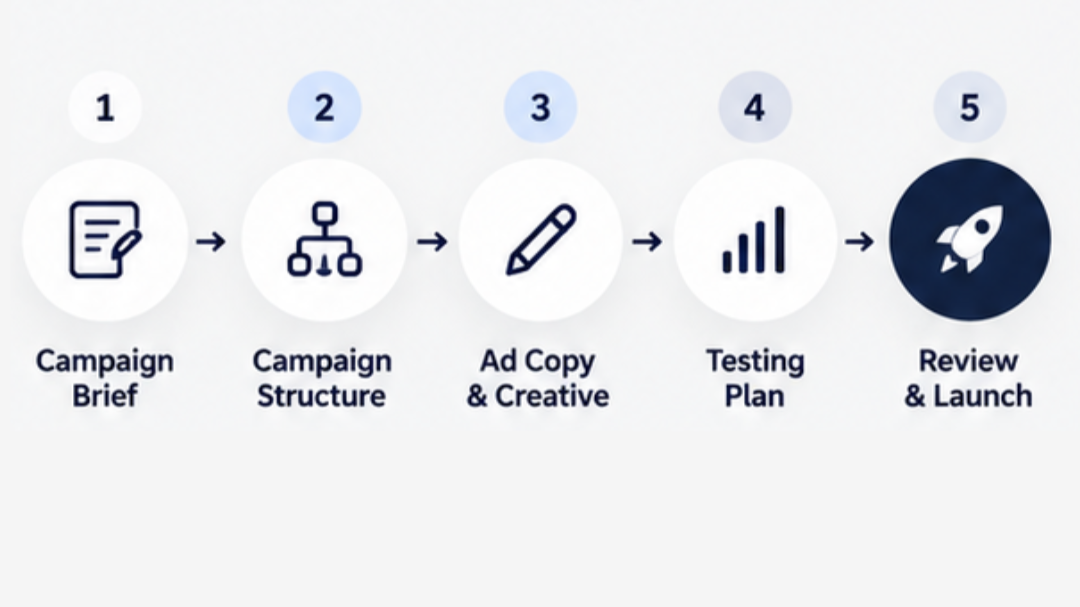
You can use Claude to plan a campaign from a detailed brief, even without connecting an advertising account. A supported connection can add account context where available. Follow these steps to create a campaign plan you can review and build in Ads Manager:
1. Give Claude Your Campaign Brief
Start by sharing the basic information Claude needs to understand the campaign. Include your product or service, target audience, campaign objective, offer, landing page, budget range, funnel stage, and any previous performance data you have.
2. Ask Claude to Build the Campaign Structure
Once Claude has the context, ask it to organize the campaign into a practical Meta Ads structure. You can ask for the campaign objective, ad sets, audience groups, budget allocation, placements, and funnel stages.
3. Develop Creative Angles and Ad Copy
Claude can also turn your campaign brief into different creative directions and copy variations. Ask for several hooks, primary text options, headlines, and calls to action based on different customer pain points or selling points.
4. Create a Testing Plan
Instead of launching several unrelated ads, ask Claude to organize your tests. It can suggest which audiences, creative angles, hooks, or offers to compare and explain what metric should determine the winner.
5. Review Everything Before Launch
Claude can give you a strong starting structure, but you should still check the campaign settings yourself. Review the objective, targeting, budget, placements, creative, tracking, and conversion event before publishing anything. This final review keeps the decision-making with you.
How to Write Meta Ad Copy With Claude
Using Claude as a Meta ad copy generator starts with a clear audience, offer, and reason to act. Give it those details alongside your brand voice and approved product claims, then ask for different hooks, primary text, headlines, and CTAs. Here is how to build and refine those variations:
1. Give Claude the Right Context
Start by telling Claude what you are selling, who you are targeting, what problem the product or service solves, and what action you want people to take. You can also provide your brand voice, offer details, customer objections, and examples of copy that match your style.
2. Ask for Multiple Copy Angles
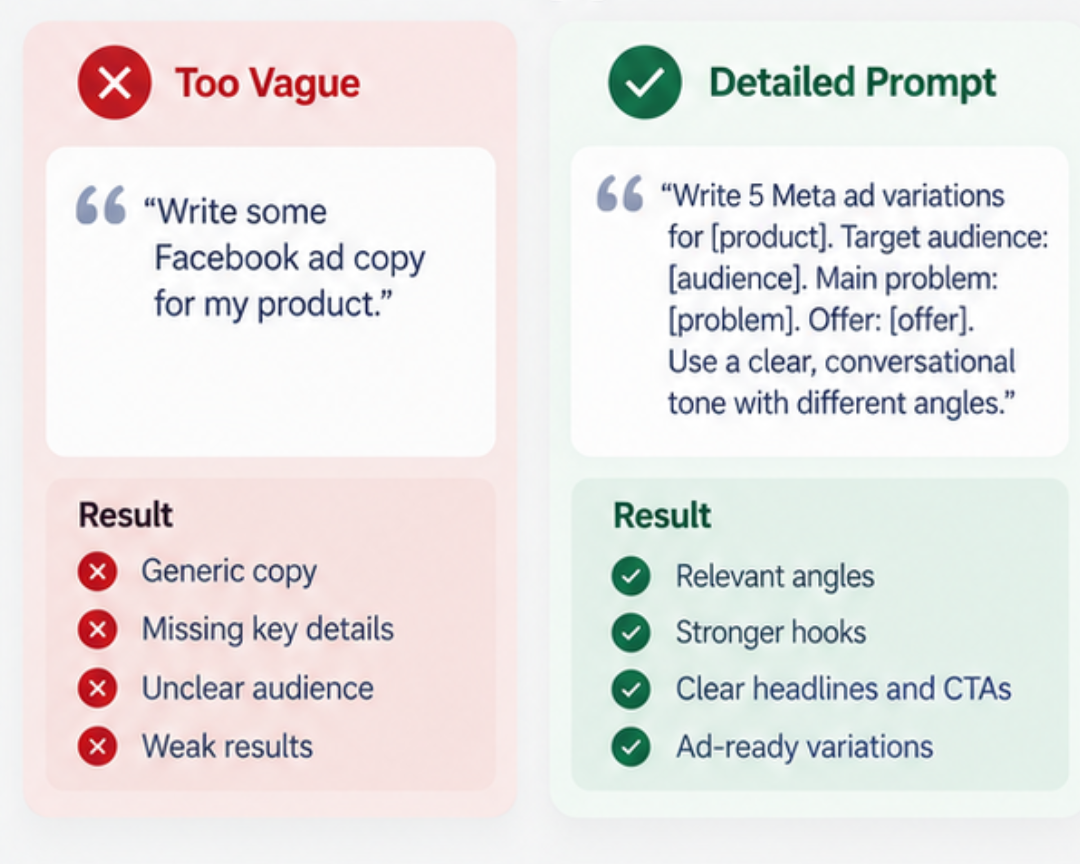
Instead of asking Claude to “write a Facebook ad,” give it a specific direction. For example, ask for copy based on a customer pain point, a product benefit, a common objection, a customer result, or a curiosity-driven hook. This gives you different angles to test.
3. Build the Ad Copy
Ask Claude to turn the strongest angles into complete Meta ad variations. You can request a hook, primary text, headline, description, and CTA for every variation.
A useful prompt could be:
“Write 5 Meta ad variations for [product/service]. Target audience: [audience]. Main problem: [problem]. Offer: [offer]. Use a clear, conversational tone. Give each ad a different angle and avoid exaggerated claims, generic marketing phrases, and unnecessary filler.”
4. Refine the Best Variations
Once Claude for Meta Ads gives you the first drafts, tell it what feels wrong. You can ask it to make a hook more specific, shorten the primary text, remove generic language, or make the copy sound closer to your brand voice.
5. Keep the Final Review Human
Read every variation before using it in your campaign. Check claims, promises, tone, customer relevance, and Meta policy considerations. Claude can produce several strong starting points quickly, but your final copy should reflect what your business can genuinely deliver.
How to Optimize Meta Ads with Claude
Claude can help highlight performance changes, but deciding what to do next takes business context. If you need support turning those findings into a testing and optimization plan, explore our Facebook ads management services:
1. Start With Your Performance Data
Ask Claude for Meta Ads to review key metrics such as spend, impressions, CPM, CTR, CPC, conversions, cost per result, and frequency. Give it a specific date range so the analysis has enough context.
2. Find Underperforming Ad Sets
Ask Claude to compare your ad sets and identify which ones are spending without producing enough results. It can highlight unusual changes in cost, click activity, conversion rates, or other performance signals that deserve further investigation.
3. Identify Creative Fatigue
Claude can compare the performance of different ads and look for patterns that may indicate creative fatigue. For example, rising frequency combined with falling CTR can give you a reason to review an ad's creative or messaging.
4. Compare Audience Performance
Ask Claude to compare audience groups using the same objective, conversion event, date range, and attribution setting. Have it flag differences in spend, conversion volume, offers, and creative that could make the comparison misleading.
5. Ask for Optimization Recommendations
After reviewing the data, ask Claude to list the biggest issues it found and suggest possible actions. For example, it might recommend reviewing an underperforming ad set, testing a new creative angle, or investigating a tracking change.
6. Make the Final Decision Yourself
Claude's analysis should give you a clearer starting point, not an automatic instruction to change your account. Before pausing an ad, changing a budget, adjusting targeting, or launching new creative, check the underlying data and consider your campaign goals. This keeps optimization based on both performance data and business context.
10 Claude AI Prompts for Facebook Ads
Claude for Meta Ads becomes more useful when you give it a specific advertising task instead of a broad instruction. For example, asking it to “optimize my ads” leaves plenty of room for interpretation. A focused prompt can tell Claude exactly what to analyze, compare, or create, giving you more practical output to work with.
Here are several Claude AI prompts you can use across different stages of your Facebook Ads workflow:
| Facebook Ads Task | Claude Prompt | What Claude Can Give You |
|---|---|---|
| Account performance review | “Review my Meta Ads performance for the last 30 days. Compare spend, CPM, CTR, CPC, conversions, conversion rate, and cost per result across campaigns. Identify the three biggest performance changes and explain which ones need further investigation.” | A structured performance summary, key changes, and areas that deserve closer attention. |
| Find budget waste | “Analyze my current campaigns and identify ad sets that are spending a significant amount without generating enough conversions. Compare their spend, results, and cost per result with the rest of the account. Do not recommend changes until you explain the data behind each finding.” | Potential sources of inefficient spending and the metrics supporting each finding. |
| Audience research | “Based on this product, customer profile, offer, and previous campaign data, create five audience hypotheses for testing. For each one, provide the customer signal, messaging angle, reason it could work, and what data would prove the hypothesis wrong.” | Testable audience ideas instead of one broad targeting recommendation. |
| Ad copy creation | “Write five Meta ad variations for this offer. Give each variation a different angle based on a customer pain point, benefit, objection, customer outcome, or offer. Include primary text, headline, and CTA. Keep the language conversational and avoid unsupported claims.” | Multiple copy variations that can be reviewed and tested against different messaging angles. |
| Creative testing | “Review these ad creatives and their performance metrics. Identify which creative elements may be contributing to stronger or weaker results. Suggest five new creative concepts that test one variable at a time.” | Creative patterns and new test ideas based on existing performance. |
| Ad fatigue review | “Compare frequency, CTR, CPM, and conversion performance for these ads over the last 30 days. Identify signs that an ad may be losing effectiveness and explain which metrics support your conclusion.” | Possible signs of fatigue and the performance changes behind them. |
| Campaign structure | “Turn this campaign brief into a Meta Ads structure. Include the campaign objective, funnel stage, audience groups, ad sets, budget logic, creative angles, and testing plan. Clearly mark any decision that requires human review.” | A campaign framework that gives you a starting point before building the campaign inside Meta Ads. |
| Performance comparison | “Compare these campaigns over the selected period. Rank them by cost per result, conversion volume, CTR, and spend efficiency. Explain what the strongest campaign is doing differently and identify any factors that could make the comparison misleading.” | A clearer comparison between campaigns with relevant context and limitations. |
| Landing page analysis | “Compare my ad messaging with the landing page copy provided below. Identify any gaps between the promise in the ad and the information on the landing page. List specific points that may create friction after the click.” | Messaging gaps that could affect the transition from ad click to conversion. |
| Reporting | “Turn this Meta Ads performance data into a client-ready report. Summarize what changed, what performed well, what declined, and what should be investigated next. Separate confirmed findings from possible explanations.” | A clearer performance report that separates data from assumptions. |
How to Get Better Results From These Prompts
The quality of Claude's response depends heavily on the context you provide. Include the campaign objective, date range, audience, offer, relevant performance metrics, and business goals whenever they matter to the task. You can also tell Claude exactly how you want the output organized, such as a table, ranked list, summary, or testing plan.
Ask Claude to cite the metrics, comparisons, and assumptions supporting each recommendation. It should distinguish observed changes from possible explanations and identify missing information before suggesting an action.
Most importantly, treat these prompts as starting points for analysis. Check Claude's findings against your actual Meta Ads account, business context, tracking setup, and campaign history before making changes to budgets, targeting, creative, or campaign structure.
Claude + Facebook Ads Limitations You Need to Know
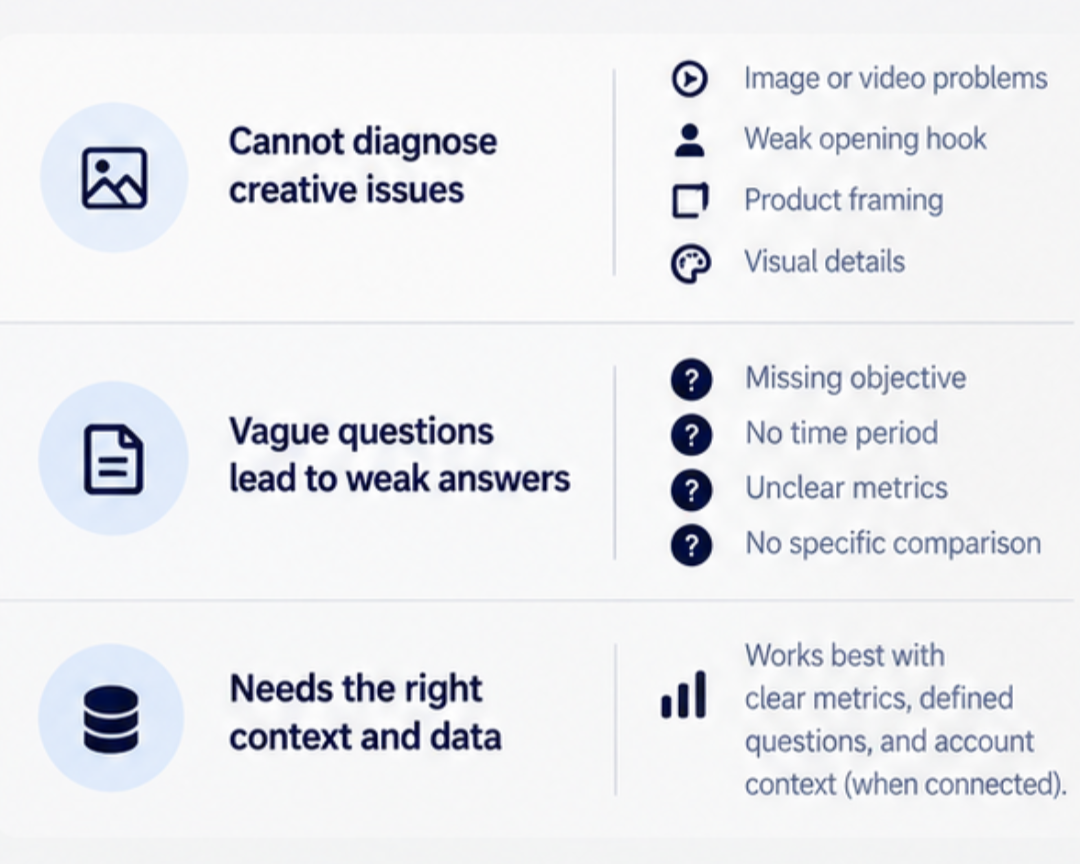
The connector can make account analysis much faster, but it still has blind spots. That matters because a fast answer is only useful when Claude has enough information to support it.
Performance Data Alone Cannot Explain Creative Problems
Claude can work with campaign data, ad copy, targeting details, and performance numbers. What it cannot do reliably is look at a weak-performing ad and tell you that the real problem is the image, the first second of the video, the product framing, or another visual detail.
For example, a Reel may have solid copy and the right audience but still lose attention because the opening shot is too slow. The numbers can point to a problem, but they may not explain the creative reason behind it.
So, use Claude to narrow down what needs attention, then review the actual ad yourself.
Vague Questions Can Lead to Weak Answers
The quality of the answer also depends heavily on the question.
Too vague:
“Why are my ads doing badly?”
That question leaves out the objective, time period, and metrics needed for a useful analysis.
A stronger question gives it clear metrics, a time period, and something specific to compare:
Better:
“Compare CTR, CPM, conversion rate, and frequency across these ad sets for the last 30 days and identify the biggest performance changes.”
Now Claude for Meta Ads has a defined job instead of an open-ended problem.
That distinction becomes even more important when you start using its answers to make changes inside a live ad account.
Read more: How to Use Claude AI to Optimize Meta and Google Ads Performance
3 Mistakes to Avoid When Using AI With Facebook Ads
Knowing Claude’s limits helps with analysis. The next step is making sure those limits do not turn into expensive decisions.
Mistake 1: Treating Claude’s Answer as the Final Verdict
Claude can spot patterns and suggest possible causes, but that does not mean the first explanation is automatically correct.
Suppose conversion rate drops after frequency rises. Claude may suggest creative fatigue. That is worth checking, but other factors could be involved, such as a landing page issue, a tracking problem, or a change in audience quality.
Use the answer as a lead to investigate, not the end of the investigation.
Mistake 2: Activating Drafts Without Reviewing Them
A campaign draft still needs a human check before money starts moving.
Before activating anything, review the:
Targeting
Budget
Placements
Ad copy
Campaign objective
Also check whether the recommendation makes sense for the actual business goal. Claude may build a clean structure, but it does not know every detail behind your margins, inventory, sales process, or client expectations.
Mistake 3: Granting Access Without Checking Permissions
Before connecting an advertising account, confirm who operates the integration, which permissions it requests, and whether it can create or modify campaigns.
Use a supported setup and limit access to what your workflow needs. Review any proposed campaign or budget changes before they are applied.
Where Claude Can Save the Most Time in Facebook Ads
With those guardrails in place, it becomes easier to see where Claude is genuinely useful.
Its biggest advantage is often not making the final decision. It is getting you to the decision faster. Instead of digging through several screens, exporting reports, or building every campaign idea from a blank page, you can use Claude to organize the first layer of work.
Here is where that split makes the most sense:
| Task | Best Role for Claude | Human Role |
|---|---|---|
| Account audit | Find patterns and possible issues | Verify the actual cause |
| Policy review | Flag wording that may create risk | Approve the final copy |
| Audience planning | Build testable hypotheses | Choose what is worth testing |
| Campaign structure | Draft the framework | Set priorities and budget |
| Reporting | Summarize the important results | Add business and client context |
| Optimization | Highlight changes and trends | Decide what to scale, pause, or change |
This division keeps repetitive analysis on Claude’s side and higher-stakes decisions on yours. It also gives you a practical starting point. If you are new to the connector, begin with reporting, audits, and campaign planning before asking Claude to help with bigger account changes.
Final Takeaway
Claude can make Facebook Ads easier to manage, but its real value is not handing the whole account over to AI. It can scan data quickly, surface possible problems, organize campaign ideas, explain metrics, and catch details that are easy to miss when you are managing several ads at the same time.
The final calls still belong to you. You decide what goes live, what gets paused, how the budget is used, and which recommendations make sense for the business. That is the most useful way to think about Claude inside Meta Ads: another set of eyes on the account, not an autopilot switch. Used that way, it can save time without removing the judgment that good advertising still depends on.
Need a Smarter Facebook Ads Strategy?
AI can help you move faster, but strong Facebook Ads still need clear strategy, careful testing, and someone who knows which numbers actually matter.
Gray Bay Marketing helps businesses improve paid social campaigns with a practical mix of strategy, creative direction, audience testing, and performance analysis. If your Meta Ads account feels hard to manage, inconsistent, or full of data without clear answers, we can help you turn that information into better decisions.
Work with Gray Bay Marketing to build a Facebook Ads strategy that uses AI where it helps and keeps human judgment where it matters most.
FAQs
Can Claude connect directly to Facebook Ads Manager?
Claude can connect to Meta Ads through a supported setup using Meta’s official Ads AI connector. Availability and account access depend on your Claude environment, Meta account eligibility, and granted permissions.
What can Claude see inside a connected Facebook Ads account?
Depending on the permissions you give it, Claude can work with campaign performance data such as spend, clicks, conversions, ad set details, and other account information. It can also help review parts of the campaign setup and tracking environment.
Can Claude make changes to Facebook Ads campaigns?
Some supported setups allow campaign creation or modification. Check the tools and permissions available in your connection rather than assuming all changes remain drafts. Review the proposed action, affected campaign, and budget before authorizing it.
Should I give Claude for Meta Ads full access?
Not necessarily. If your main goal is reporting, account analysis, or performance reviews, read-only access may be enough. Give Claude only the level of access needed for the task you want it to perform.
Can Claude audit Facebook Ads for policy risks?
Claude can flag potential policy concerns when you provide the ad copy and current Meta advertising policies. Its review does not guarantee approval or replace Meta’s own ad review process.
Can Claude tell me why a Facebook ad is underperforming?
It can help narrow down possible causes by looking at the data, but it may not be able to identify the full reason. For example, poor performance could be tied to the visual creative, landing page, offer, tracking, or audience quality. Those areas may still need human review.
What is the safest way to start using Claude with Facebook Ads?
Start with low-risk tasks such as reporting, account audits, policy checks, and performance analysis. After you understand how Claude handles your account data, you can gradually use it for campaign planning and draft creation while keeping a human review step before anything goes live.