
Best AI Tools in 2026: What to Use, Why, and Who They’re For
AI tools are everywhere now. Open one browser tab, and you can find an app for writing, another for research, another for video, another for automation, and several others promising to save you time. That makes the real challenge surprisingly simple: which ones are worth using?
This guide compares the best AI tools in 2026 for everyday work, research, coding, automation, and marketing. You’ll learn where their uses overlap, which tasks call for a specialist, and how to decide if another subscription would solve a real problem.
AI Productivity Tools at a Glance
These AI productivity tools cover different parts of a working day, from drafting content to researching sources and automating repeated tasks. The shortlist below shows where each tool fits; additional options appear in the detailed sections.
| AI Productivity Tools | Best For | Free Option | Best Fit |
|---|---|---|---|
| ChatGPT | General AI work | Yes | Writing, research, brainstorming, and mixed tasks |
| Claude | Writing and document work | Yes | Editing, long-form work, coding, and project-based tasks |
| Perplexity | Web research | Yes | Finding current information with sources |
| NotebookLM | Source-based research | Yes | Working with PDFs, notes, websites, and reference material |
| Cursor | Coding | Yes | Developers working inside larger codebases |
| Gumloop | AI automation | Trial/free access varies | Building AI-led workflows across repeated tasks |
| ElevenLabs | Voice generation | Yes | Voiceovers, narration, and conversational audio |
| Gamma | Presentations | Yes | Turning ideas and outlines into slide decks |
Read more: 6 AI Marketing Trends Shaping How Teams Work in 2026
What to Know Before Choosing an AI Tool
Before adding another AI subscription, take a moment to define the outcome you want. Different types of work call for different capabilities, which is why matching the tool to the task matters so much.
A few checks can narrow the field quickly:
Main use case: Pick the problem first, then look for the tool built to handle it well.
Ease of use: A powerful platform can still slow you down if the setup feels too heavy for everyday work.
Free vs. paid access: Check what the free plan actually includes and where the limits start to matter.
Integrations: Look at how well the tool fits with the apps you already use.
Output quality: Test the kind of work you expect to produce, not just the demo features.
Privacy: Review how the platform handles files, prompts, and sensitive business data.
Once you have these points in mind, you are ready to compare your options with a clearer sense of what fits your work and what you can skip.
Best AI Tools in 2026 by Use Case
ChatGPT or Claude: Which General-Purpose AI Assistant Fits Better?
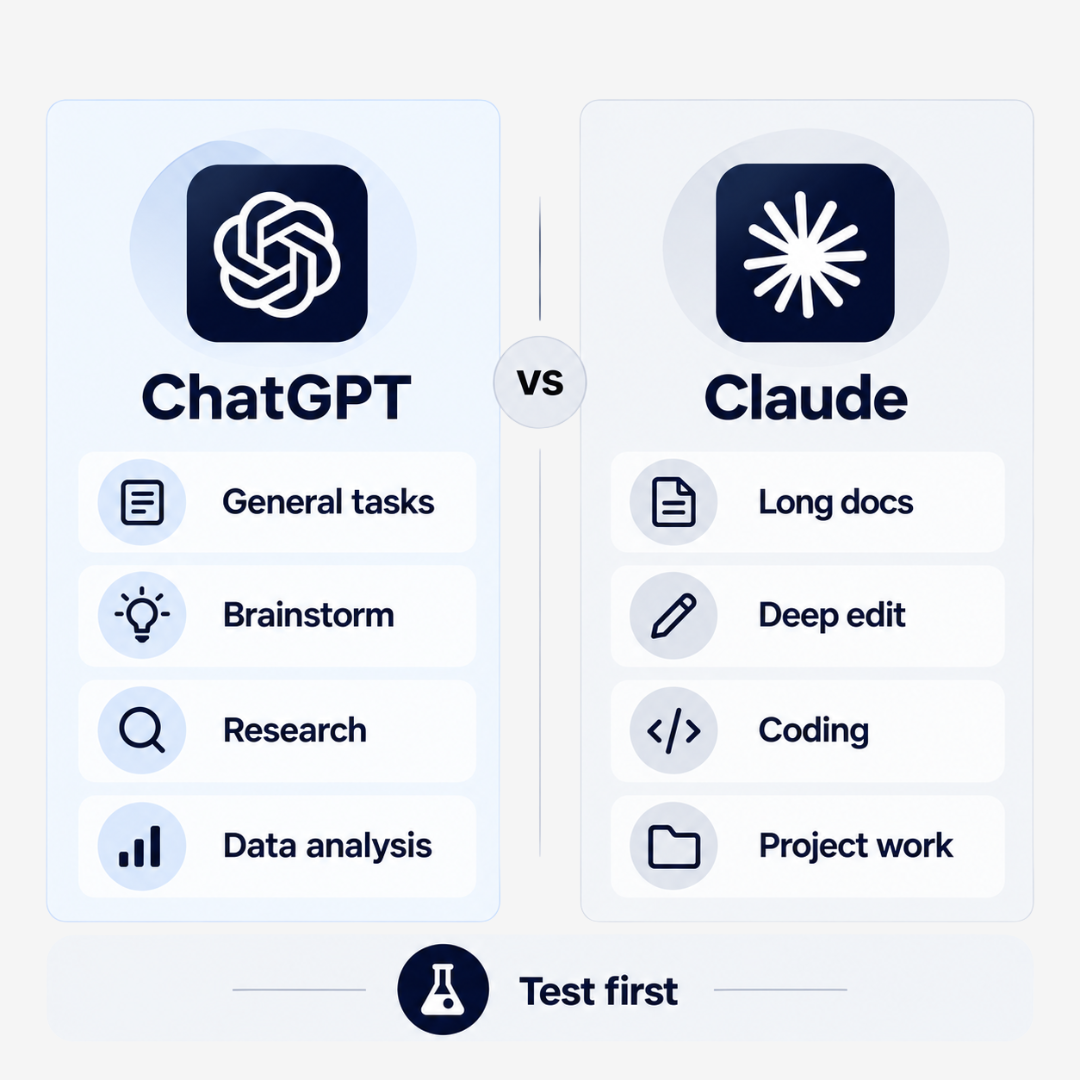
ChatGPT and Claude overlap across writing, analysis, brainstorming, and coding support. Before subscribing to either, give both the same task from your normal workload. Compare accuracy, editing time, ease of use, and the features available on the plan you would actually use.
Choose ChatGPT If…
ChatGPT is a strong fit for broad everyday use. It works well for brainstorming, drafting, research, data analysis, problem-solving, and mixed tasks that shift from one format to another. It suits people who want one tool that can handle a wide range of jobs without much setup.
Choose Claude If…
Claude is especially useful for long documents, detailed editing, nuanced text work, coding support, and project-based tasks. It also fits workflows that involve reviewing source material or working through longer pieces of content.
Do You Need Both?
Start with one and check how well it handles your regular work. A second subscription makes sense when it offers a capability or produces a result that your first tool cannot reliably provide. Test that difference before paying for both.
Best AI Tools for Research: Perplexity vs. NotebookLM
The next category worth exploring is research. Perplexity and NotebookLM both handle information-rich tasks well, although they are built for different research needs, such as:
| Tool | Best Use | Where It Starts |
|---|---|---|
| Perplexity | Current web research, competitor checks, market questions, fact-finding | The open web |
| NotebookLM | Reports, PDFs, notes, websites, and source-based analysis | Material you already have |
Best AI Tools for Coding and App Building
The next question is what happens when you need AI to help produce something. For coding and app building, the right choice depends heavily on how technical you already are.
If You Already Work Inside a Codebase: Cursor
Cursor fits developers who want AI built directly into their coding environment. It can help with editing files, understanding existing code, refactoring functions, and making coordinated changes across a project. Since it is built around a full development environment, it makes the most sense for users who are already comfortable working with code.
If You Want to Build Visually: v0
v0 suits people who want to turn written instructions into interfaces and early product ideas. It can be useful for quickly shaping layouts, components, and prototypes before deeper development begins.
For Building Through Written Instructions: Lovable
Lovable takes a more guided route. It can turn an idea into a working prototype through natural-language instructions, which gives nontechnical builders an easier entry point.
Best AI Tools for Automation
Repeated tasks are a natural starting point for automation. When a process involves the same steps across multiple days or weeks, platforms such as Zapier and Gumloop can reduce the amount of work that needs to be handled manually.

Zapier focuses on connecting apps and moving work across a broad software stack. Its AI features can trigger actions, process information, and pass results into other tools. Gumloop, on the other hand, takes a more AI-first approach, with workflows that can combine scraping, prompts, integrations, and decision-making inside one flow.
A quick check can tell you if automation is worth setting up:
Use it when: the same process happens repeatedly, involves several apps, or takes enough manual time to become annoying.
Consider Zapier when: broad app connectivity matters most.
Consider Gumloop when: AI reasoning sits at the center of the workflow.
Skip it for now when: the task happens rarely or changes so much that building a workflow would create extra work.
Best Specialized AI Tools Worth Adding to Your Stack
General-purpose AI can cover a lot of ground, but it does not need to handle everything. Specialist tools can step in when a particular task needs features or workflows that broader platforms do not offer. Here are a few options to consider:
| Need | Best AI Tools 2026 | Why It Earns a Place |
|---|---|---|
| Voice generation | ElevenLabs | Strong for narration, voiceovers, and conversational audio |
| Video editing | Descript | Lets you edit video through the transcript and handles spoken-content workflows well |
| Presentations | Gamma | Useful for turning rough ideas or outlines into structured slide decks |
| Image generation | Ideogram | A practical choice when text inside generated images matters |
| SEO content | Clearscope | Helps optimize content around search intent and related terms |
| Content checks | Originality AI | Useful for teams that need an added review step before publishing |
The point is to add these tools with a clear reason in mind. A specialist earns its place when the same task keeps taking up time, and your existing setup cannot handle it well enough. Occasional work may still be easier to manage with the tools you already have.
Once a tool has a clear role in your workflow, check whether its free plan covers the task or a paid upgrade removes a recurring limit.
Free vs. Paid AI Tools: When Is an Upgrade Worth It?
The next thing to consider is what these tools will cost you. Free plans can work well when you are testing a platform, using it occasionally, or simply trying to see if it fits into your workflow.
A paid plan starts to make sense when the free version gets in the way of work you already do regularly. That usually shows up through limits on usage, files, exports, automation runs, faster models, team features, or access to advanced tools.
A simple way to judge it is to look for a repeated bottleneck. If you hit the same limit every week and the upgrade removes it, the subscription has a clear job to do. If you are paying mainly to unlock features you rarely touch, the value is harder to justify.
The Hidden Cost of Using Too Many AI Tools
More subscriptions can make a workflow harder to manage, especially when several tools solve the same problem. The cost is not limited to monthly fees. Time also goes into learning interfaces, moving files between platforms, rebuilding prompts, and keeping track of where different projects live.
That friction can cancel out the time AI was supposed to save. A smaller stack is usually easier to manage because every tool has a clear role. Before adding another platform, check if something you already use can handle the task well enough. If it can, another subscription may only add clutter.
Read more: Latest AEO Trends 2026: 6 Ways to Help AI Recommend Your Brand
How to Build an AI Stack Without Wasting Money
Build your AI stack around work that repeats. Start with a general assistant, add a specialist for a task it cannot handle well enough, and introduce automation when the process is stable enough to repeat reliably.

Here is a simple way to structure it:
Layer 1: One General Assistant
Start with ChatGPT or Claude. This becomes the place for everyday writing, planning, analysis, brainstorming, and problem-solving.
Layer 2: One Tool for Your Biggest Repeated Need
Add a specialist only where the work keeps coming back. Perplexity can support research, Cursor can handle coding, Gamma can help with presentations, and ElevenLabs can cover voice work.
Layer 3: Automation When the Volume Justifies It
Bring in Zapier, Gumloop, or a similar platform once repeated tasks start taking up enough time to justify setup.
Here is what that can look like in practice:
Freelancer: general assistant + Perplexity + Gamma or Canva
Developer: general assistant + Cursor + automation platform
Marketer: general assistant + research tool + automation + content specialist
The aim is simple. Give every tool one clear job, then add another only when the gap is obvious.
Quick Checklist Before Paying for Another AI Tool
By this point, you should have a clearer sense of what belongs in your stack. Before adding another subscription, run through these six questions:
What exact problem will this tool solve?
Can something I already pay for handle it?
Will I use it every week?
Does the free plan already cover what I need?
Does it fit into the tools I already use?
Am I comfortable with the data I need to share with it?
If the first three answers are still unclear, hold off. A new tool should solve a visible problem, not create another place to manage.
Which AI Tools Should You Start With?
Choose one recurring task and test the relevant tools on the same brief. Compare accuracy, editing time, ease of use, and total cost before committing to a subscription.
Start with the option that improves your finished work. Add another tool when you can identify a specific gap and show that the new subscription addresses it.
Turn the Tools Into a Smarter Marketing System
Choosing the right AI tools is only part of the job. The bigger win comes from knowing how to use them inside a marketing system that actually supports your goals.
At Gray Bay Marketing, we help businesses connect content, paid media, LLM SEO, Google Ads management, and automation in a way that keeps the work focused and practical. AI can support that process, but it still needs direction, clear priorities, and the right execution behind it.
If your current stack feels scattered or your marketing tools are starting to overlap, Gray Bay Marketing can help you simplify the setup and put the right tools to work where they matter most. Contact us today!
FAQs
What are the best AI tools 2026 for everyday work?
For most users, a strong general assistant such as ChatGPT or Claude is the best place to start. Add specialist tools only when you have a repeated need such as research, coding, presentations, voice, or automation.
Do I need both ChatGPT and Claude?
Usually, no. They overlap across writing, brainstorming, analysis, and general problem-solving. Start with the one that fits your main workload, then add the other only if you keep running into a specific limitation.
What is the best AI tool for research?
Perplexity is useful for finding current information across the web. NotebookLM is better suited to working through material you already have, such as PDFs, reports, notes, and source collections.
When should I pay for an AI tool instead of using the free plan?
Upgrade when the free version repeatedly slows down work you already do. Common reasons include usage limits, restricted models, file caps, automation limits, export restrictions, or missing collaboration features.
How many AI tools should I use at once?
There is no ideal number, but a smaller stack is usually easier to manage. One general assistant, one or two specialists, and an automation platform can cover a wide range of workflows without unnecessary overlap.
What are the best AI tools for small business owners?
Choose based on your most frequent task. Evaluate ChatGPT or Claude for writing and planning, Perplexity for web research, and Zapier or Gumloop for repeated administrative workflows. Start with the category that addresses your biggest recurring need.
Which are the best AI tools for marketing?
The best AI tools for marketing depend on the work you need to improve. Evaluate Perplexity for audience and competitor research, ChatGPT or Claude for campaign briefs and copy drafts, Clearscope for SEO content review, and Zapier or Gumloop for repeated workflows. Check source accuracy, brand fit, and editing time before adopting a tool.
What should I check before subscribing to a new AI tool?
Look at the problem it solves, how often you will use it, what the free plan includes, how it fits your existing workflow, how it handles your data, and if another tool you already pay for can do the same job.