
How to Use Claude for Instagram Content That Feels Human

If you've tried using Claude for Instagram content, you've probably experienced at least one of these problems: captions that sound like everyone else's, hooks that feel vague, content calendars full of ideas you would never actually post, or drafts that require so much editing that the time savings disappear.
Many creators and marketers turn to AI hoping it will solve content fatigue. Instead, they end up with another challenge: figuring out how to make AI-generated content sound human.
Producing more posts does not automatically give people a reason to read them. A useful example, a clear opinion, or a familiar problem can make a caption more interesting than another list of general tips.
That doesn't mean Claude is the wrong tool. It means the tool needs the right role. Used correctly, Claude can take care of planning, research, first drafts, and performance analysis while you stay in control of the voice, opinions, and experiences that make the content worth reading. This guide shows exactly how to build that workflow.
Why Instagram Content Written With Claude Often Feels Generic
The reason many people struggle with AI-generated Instagram content is surprisingly simple: they expect Claude to create the finished post instead of helping build it.
After seeing how quickly Claude can generate captions, content ideas, and posting schedules, it is tempting to hand over the entire process. The result often looks good at first glance. The grammar is clean, the structure is organized, and the advice sounds reasonable. Yet something still feels missing.
Most AI content lacks the details that make people pay attention. It relies on broad statements, predictable hooks, and advice that could apply to almost any audience. You will often see captions built around phrases like "stay consistent," "work smarter," or "here are three tips to grow." The content is technically correct, but it rarely gives people a reason to stop scrolling, save the post, or send it to someone else.
The difference is treating it as a collaborator instead of an autopilot system. Claude can organize ideas, build drafts, identify patterns, and save hours of repetitive work. Your role is to add the context, judgment, and personality that turn a generic draft into content that actually feels human.
The 3-Tool Setup: Claude, Canva, and Buffer
Once you stop expecting Claude to create finished Instagram posts on its own, a much more effective workflow starts to take shape.

You can divide the workflow into three jobs: planning, design, and publishing. Use Claude to develop the content, Canva to prepare the visuals, and Buffer to organize and schedule the posts.
Here is how these three tools fit into a practical Instagram workflow:
| Tool | Main Role |
|---|---|
| Claude | Content planning, caption drafts, research, and performance analysis |
| Canva | Visual design, branded templates, carousels, and post graphics |
| Buffer | Organizing drafts, reviewing captions, and scheduling Instagram posts |
Note: Before moving into the workflow itself, spend some time giving Claude the context it needs. Upload your brand guidelines, content pillars, audience information, and examples of posts that already sound like your brand. The more context Claude has, the less likely it is to produce generic content that feels disconnected from your voice.
With that foundation in place, you can start building a repeatable system that saves time without sacrificing originality.
Read more: How to Use Claude AI to Optimize Meta and Google Ads Performance
Claude Social Media Marketing: A Step-by-Step Instagram Workflow
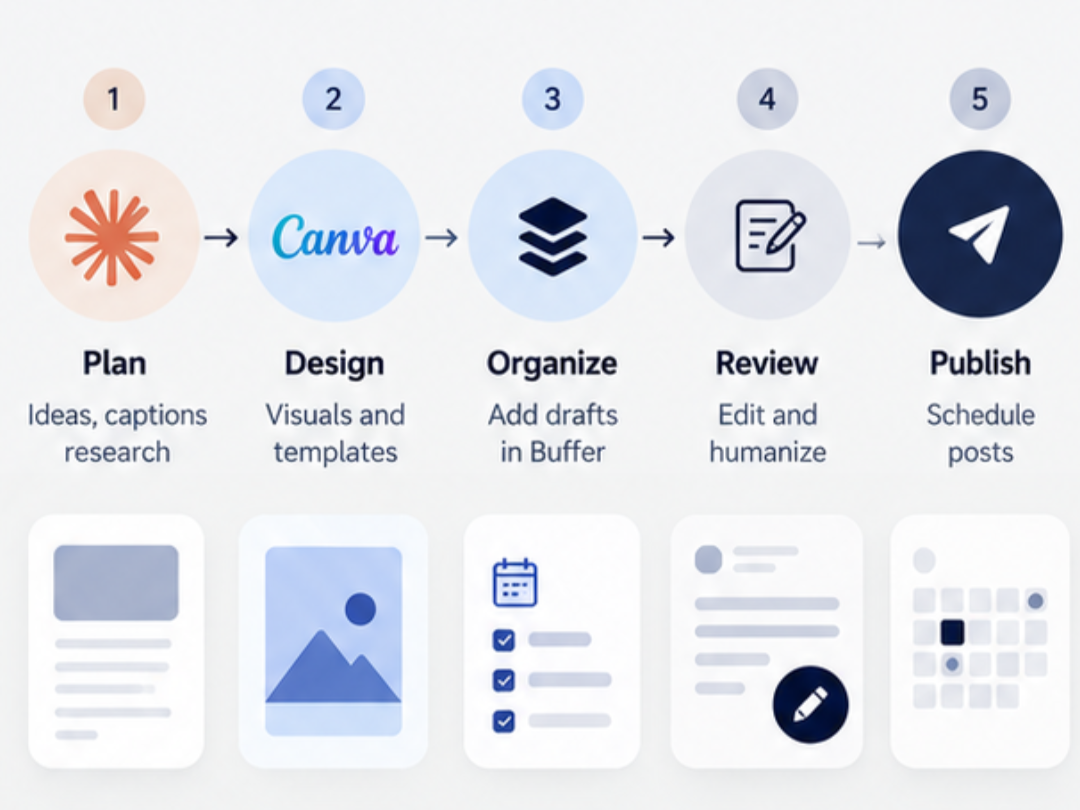
Phase 1: Build a 7-Day Content Plan
Start by giving Claude your brand guidelines, Instagram content pillars, and one campaign goal. Then ask it to build a seven-day plan with a format, topic, hook, caption direction, and CTA for each post.
A simple week might include two Reels, two carousels, two Stories, and one feed post. Ask Claude to organize the plan by day, format, topic, hook, and caption idea. You can also ask which post has the best chance of earning saves or shares and why.
The important part is review. Claude can suggest the direction, but you still decide what fits your audience and what does not.
Phase 2: Turn the Plan Into Visuals
Once the plan looks right, ask Claude to turn each idea into slide copy, a design brief, or a Reel cover headline. Transfer that material into your Canva templates, or use the Canva connector in Claude for the design actions it supports.
However, Canva works best when your templates are ready first. If you do not already have a carousel, quote post, Reel cover, or Story layout, build those once and save them for later.
That small setup step makes future weeks much faster. Reuse those templates each week so your posts follow a consistent visual style and take less time to prepare.
Phase 3: Move the Posts Into Buffer
With the visuals ready, the next job is getting everything organized for publishing. Add each caption and visual to a draft in Buffer. If you have connected Buffer to Claude, use the integration to create drafts, then check the selected Instagram account and post details before scheduling.

At this point, do not rush straight to scheduling. Open every post first and read the caption like a real person would.
Check for:
Words you would never use
Hooks that feel too general
CTAs that sound forced
Sentences that feel too polished
Then attach the Canva file and make your final edits. This is where the content starts to sound like you again.
Phase 4: Keep a Human Approval Step
Scheduling should never remove your final say. Before a post goes live, there should always be one clear approval point.
Ask yourself a few simple questions:
Would I actually say this?
Does this sound like my brand?
Is there a real opinion or useful idea here?
Would I stop scrolling for this?
If the answer is no, change it before you schedule it.
Claude can save time on the first draft, but your judgment is what keeps the post from feeling copied, flat, or forgettable.
Phase 5: Bring the Results Back Into Claude
The workflow does not end after the posts go live. In fact, this is where the next week starts.
Upload the Instagram performance data available to you as a spreadsheet or table. Include each post’s date, format, topic, reach, saves, shares, and relevant actions. Ask Claude to compare posts within similar formats and account for differences in reach.
For example, you can ask:
Which posts earned the most saves?
Which ones were shared the most?
Which topics brought profile visits?
Which formats should we repeat?
Which ideas should we drop?
That feedback gives the next content plan a stronger base. Instead of guessing every week, you begin building around what your audience already responded to.
Over time, that loop makes the system smarter because every new plan starts with real results from the week before.
Claude AI Instagram Prompts for Your Content Workflow
After going through the five phases, you can make prompting part of the system instead of another task on your list. Keep your strongest prompts saved, reuse them for similar jobs, and adjust the details when you need a different result.
Use these Claude AI Instagram prompts as starting points, then add your audience, source material, and campaign goal:
| Task | Prompt to Try |
|---|---|
| Plan a week of Claude for Instagram content | “Review my brand guidelines and content pillars, then create a 7-day Instagram plan around [theme]. Include the format, topic, hook, caption direction, CTA, and goal for each post.” |
| Write a caption | “Write an Instagram caption for this post idea: [idea]. Use my brand voice, keep the hook specific, avoid generic advice, and end with a CTA that fits the topic.” |
| Improve a weak caption | “Rewrite this caption so it sounds more natural and specific to my audience. Remove vague phrases, add a stronger point of view, and keep the language conversational.” |
| Find stronger hooks | “Give me 10 Instagram hooks for [topic]. Make them specific, clear, and useful. Avoid clickbait and generic motivational language.” |
| Create carousel copy | “Turn this topic into a 7-slide Instagram carousel. Keep one clear idea per slide and make the first slide strong enough to stop the scroll.” |
| Review brand voice | “Compare this caption with my brand guidelines and examples. Show me which lines sound off-brand and suggest cleaner alternatives.” |
| Analyze performance | “Review this Instagram performance data and identify which topics, formats, and posts earned the most saves, shares, and profile visits. Suggest what to repeat next week.” |
| Generate content experiments | “Create five Instagram content experiments around [goal]. Change one variable at a time, such as the hook, format, CTA, or topic angle, so I can compare the results.” |
| Create Instagram Stories | “Turn this topic into a 5-frame Instagram Story sequence for [audience]. Start with a strong opening frame, keep the copy short, build curiosity from one frame to the next, and end with a clear action such as replying, voting, clicking, or visiting the profile.” |
| Write a Reel concept and script | “Create an Instagram Reel around [topic] for [audience]. Give me a hook for the first 3 seconds, a simple shot-by-shot structure, short on-screen text, talking points, a caption idea, and a CTA. Keep it natural and avoid generic advice.” |
These prompts work best as starting points. Add real examples, customer language, current campaign details, or your own opinion before publishing so the finished content still feels tied to the person or brand behind the account.
The Line Between AI Assistance and AI Slop
Claude can take a lot of work off your plate, but the final content still needs your input. Keep the tasks that depend on personal experience, opinions, and creative judgment with you, and let AI handle the supporting work. You can split the process like this:
Claude can handle
Research
Claude for Instagram content planning
Caption drafts
Performance analysis
Topic ideas
Repetitive admin work
You should handle
Personal opinions
Stories from real experience
On-camera content
Comment replies
Final edits
Judgment about what should go live
The problem starts when every part of the post is handed over without review. That is when captions begin to sound generic, and the account loses its own voice. So before publishing, ask one last question: does this still sound like something only this brand or creator would say?
If the answer is yes, AI is helping in the right place.
More Ways to Use Claude for Instagram

Once the main weekly system is running, Claude can help with smaller jobs that are easy to overlook.
Start with your bio. Paste it into Claude alongside your audience and current offer. Ask for three versions that explain who you help, what you offer, and what visitors should do next. Check every detail before choosing one.
Claude can also help when a new Instagram feature feels confusing. Ask for a simple walkthrough of tools such as Meta Edits, Trial Reels, or topic preference settings.
If you plan to test those ideas in paid campaigns, our Instagram advertising services can help with audience targeting, ad creative, and campaign optimization.
Finally, if your strategy includes actions such as “comment a keyword” or “click the link,” Claude can help map the flow before you build it in a tool such as ManyChat.
How to Make Claude-Written Instagram Captions Feel Human
To make Claude for Instagram content sound like your brand, edit for specific details before polishing the wording.
Start by checking the hook. Replace broad lines with something more specific to the real problem, result, or moment behind the post.
Then look at the body. Add details that AI cannot invent well on its own, such as:
A real customer question
A mistake you made
A small opinion
A quick story
A number from your own results
A phrase you actually use
Next, check the rhythm. Shorten any sentence that feels too polished or formal.
Finally, read the caption out loud. If you would never say it that way in conversation, change it.
Quick Overview: How to Set Up Your Claude + Instagram System Today
By now, the full workflow should feel much clearer. The easiest way to start is to build the foundation first and add the rest in order.
Use this setup:
Create a Claude project for Instagram.
Upload your brand guidelines.
Add your Claude for Instagram content pillars.
Add two strong example posts for every pillar.
Connect Canva if you want to use its supported design actions through Claude.
Connect Buffer if you want Claude to help create and manage publishing drafts
Save reusable Canva templates.
Ask Claude for your first seven-day plan.
Review and edit every caption before scheduling.
Collect the available Instagram Insights after the week ends and record them in a spreadsheet.
Upload the spreadsheet to Claude and ask for comparisons within similar post formats.
Build the next week around what actually worked.
That first setup gives Claude enough context to stop guessing. After that, the planning, visuals, scheduling, and analysis all have a stronger base to work from.
Read more: How to Make AI Ads With Claude and Meta
Conclusion
Claude can make Instagram content much easier to manage, especially when you use it for the parts that take time: planning, research, drafts, scheduling support, and performance review.
The key is keeping the human part where it belongs. Your voice, opinions, stories, and final judgment should still shape every post before it goes live.
Used this way, Claude social media marketing gives you a repeatable process for planning, drafting, reviewing, and improving posts. Each stage has a clear purpose, and you keep control of the final result.
That is what keeps the workflow efficient without making the account feel automated.
Bring the Human Side Back Into Your Instagram Strategy
AI can speed up the work behind Instagram, but the strategy still needs a clear voice, strong creative direction, and content people actually want to stop for.
Gray Bay Marketing helps brands build social strategies that connect content, paid media, audience insights, and automation without making the account feel generic. If your Instagram workflow feels scattered, repetitive, or too dependent on AI drafts that still need heavy fixing, we can help turn it into a cleaner system.
Work with Gray Bay Marketing to build Instagram content that feels sharper, more consistent, and much closer to how your brand actually sounds.
FAQs
Can Claude write Instagram captions for me?
Yes. Claude can draft hooks, captions, CTAs, and post ideas based on your brand guidelines and content pillars. The strongest results usually come after you review the draft and add your own examples, opinions, and wording.
What should I upload to Claude before using it for Instagram?
Start with brand guidelines, content pillars, past campaigns, and a few strong posts that already sound like your brand. This gives Claude useful context before it starts writing.
How do I stop Claude from making Instagram captions sound generic?
Give it specific source material and edit the final draft. Add real stories, customer questions, results, opinions, and phrases you actually use. Generic input usually leads to generic output.
Can Claude create a full Instagram content calendar?
Yes. You can ask Claude to build a seven-day plan with Reels, carousels, Stories, feed posts, hooks, themes, and caption directions around one campaign goal.
Can Claude work with Canva for Instagram posts?
Claude can draft carousel copy, design briefs, and cover headlines for Canva. With the Canva connector enabled, it can also perform supported design actions. Review the finished design for layout, wording, and brand consistency.
Can Claude schedule Instagram posts?
Claude can help move planned content into a connected scheduling workflow such as Buffer. A final human review should still happen before anything is scheduled or published.
How can Claude help improve Instagram performance?
Give Claude a spreadsheet of post results and ask it to compare similar formats, account for reach, and identify repeated patterns. Use the findings to plan experiments rather than treating them as proof that one approach will always work.
What parts of Instagram content should I keep human?
Keep control of personal opinions, stories, on-camera content, comment replies, final edits, and judgment calls. These are the parts that give the account its voice.
Is Claude useful for Instagram marketing beyond caption writing?
Yes. Claude social media marketing can support planning, research, performance analysis, testing ideas, feature walkthroughs, content experiments, and workflow organization.