
Google Ads AI Max Campaign Tutorial 2026 (Step-by-Step Setup for Beginners)

Picture this: You just launched a new product, and your goal is to get the first wave of customers quickly. You set up a few ads in Google, but after a couple of days, the numbers don’t add up. Some ads get a few clicks, others get ignored, and your budget feels like it’s slipping through your fingers. You wonder if there’s a smarter way to handle all this without constantly watching the dashboard.
A Google Ads AI Max campaign acts like a co-pilot for your advertising. It studies patterns in real time, predicts what audiences are most likely to engage, and adjusts bids and placements automatically. For someone new to ads, it turns trial-and-error into guided action, helping you reach the right people at the right time while saving money and effort.
In this tutorial, you’ll learn exactly how to set up AI Max step by step, see why it’s different from regular campaigns, and discover tips to make your ads work harder and smarter. By the end, running data-driven campaigns will feel manageable, efficient, and surprisingly easy—even if it’s your first time.
What is an AI Max Campaign?
A Google Ads AI Max campaign is a type of Ads campaign that uses artificial intelligence to manage and optimize your ads automatically. Instead of manually choosing which keywords, audiences, or bids to use, the AI studies data from your ads and makes smart decisions to improve performance.
The AI can:
Figure out which audiences are more likely to click or buy
Adjust bids so you spend money more efficiently
Test different ad variations to see which works best
Reallocate budget toward high-performing ads automatically
For example, if you’re running an online store, an AI Max campaign can show your ads more often to people who are likely to buy your products, while pausing ads that aren’t working. This saves time, reduces wasted budget, and helps beginners get better results without spending hours managing every detail.
In short, an AI Max campaign is like having a smart assistant for your Google Ads—always learning, optimizing, and helping your campaigns perform better.
Read more: How AI Is Changing Google Ads Campaign Management for Service Businesses
AI Campaigns vs Performance Max: What’s the Difference?
When starting with Google Ads, it’s easy to get confused between AI campaigns vs Performance Max campaigns. Both use automation and machine learning, but they work a little differently and serve slightly different goals.
Google Ads AI Max campaign focuses on using artificial intelligence to optimize specific campaign types, like search, display, or shopping. They analyze which keywords, audiences, and ad variations perform best, then adjust bids, placements, and targeting automatically. This approach is perfect if you want smart optimization while still having some control over your campaign settings.
On the other hand, Performance Max campaigns are designed to maximize results across all Google channels—Search, YouTube, Display, Gmail, and Discover. Instead of managing separate campaigns, Performance Max uses AI to find opportunities across multiple networks at once. This means less manual setup, but also less control over where your ads appear.
Here’s a quick way to think about it:
AI campaigns give you automated optimization within a specific campaign type.
Performance Max automates across all Google platforms to capture the most conversions possible.
For beginners, the choice depends on your goals. If you want to test one type of campaign and keep track of details, an AI campaign is ideal. If you want a broader reach with minimal setup, Performance Max can be more efficient—but it may require more trust in the system’s decisions.
Both options save time, reduce wasted spend, and make running Google Ads campaigns much easier, especially if you’re new to advertising.
When AI Max Campaigns Work Best (Real-World Insight)
Here’s why AI Max can make a real difference for your campaigns, as it saves time, boosts performance, and reduces wasted budget:
Saves Time on Repetitive Tasks
Managing multiple campaigns can feel overwhelming. With AI Max, repetitive tasks like bid adjustments, audience testing, and performance tracking are handled automatically, freeing up your time to focus on strategy and creativity.
Improves Targeting Accuracy
AI Max studies user behavior and engagement patterns to find the audiences most likely to convert. This helps ensure your ads reach the right people at the right time, increasing efficiency and results.
Enhances Ad Performance
By analyzing which headlines, images, and formats perform best, AI Max refines your ads over time. Even if you’re new to Google Ads, your campaigns can continuously improve without constant manual adjustments.
Reduces Wasted Budget
One of the biggest advantages is smarter spending. Low-performing ads receive less budget while high-performing ones get more exposure, helping you get better results from every dollar spent.
Scales Campaigns Efficiently
Whether you’re running one campaign or dozens, AI Max allows growth without extra stress. Businesses can expand reach and engagement with ease, thanks to Google Ads automation with AI Max managing optimization behind the scenes.
Accessible for Beginners
Even if you’re just starting, AI Max makes campaigns approachable. It simplifies setup, provides clear insights, and helps you make data-driven decisions without needing advanced expertise.
Better Decision-Making with Data
With actionable reports and AI-driven recommendations, you can focus on improving strategy rather than guessing.
How to Set Up AI Max Campaign Google Ads (Step-by-Step Guide)
Getting started with your first AI Max campaign can feel overwhelming, but following clear steps ensures setup is smooth and effective.
Here is how to set up AI Max campaign Google Ads:
Step 1 – Create or Log in to Your Google Ads Account
Before diving into AI Max features, it’s important to have a Google Ads account ready. If you already have one, logging in is simple—just enter your email and password. For beginners, creating a new account only takes a few minutes, and Google guides you through the process step by step.
Once inside, you’ll see your dashboard with campaigns, ad groups, and performance metrics. This is where all your campaigns will live. Getting familiar with the dashboard early helps you understand how campaigns are organized and where to find important settings, making the AI Max setup smoother.
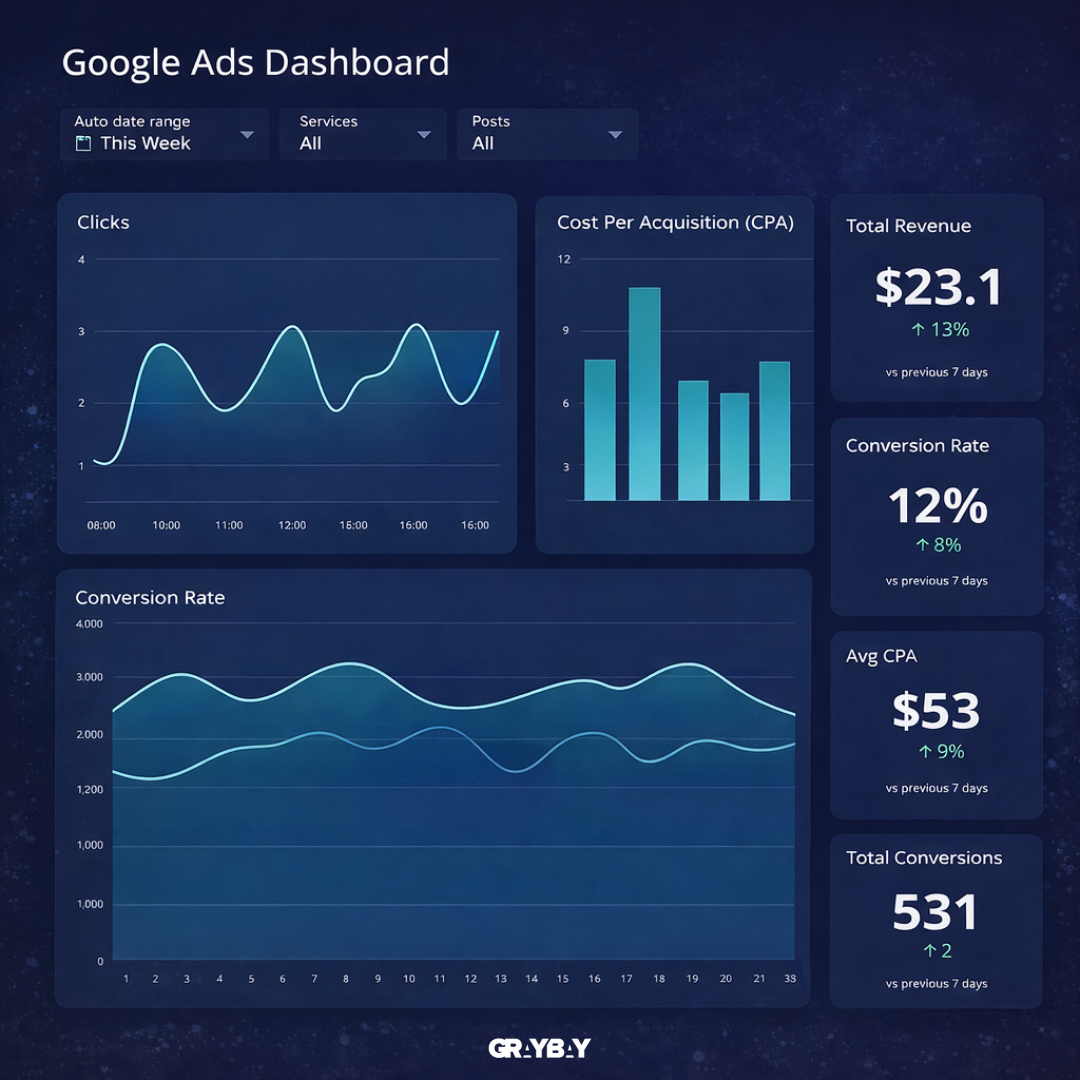
Key tips for beginners:
Use a clear account structure with separate campaigns for different goals.
Set up billing information early to avoid delays.
Explore the dashboard to understand reporting and insights before launching ads.
Step 2 – Choose Campaign Goal
After setting up your account, the next step is choosing a campaign goal. Google Ads lets you pick from several objectives, such as sales, leads, website traffic, or brand awareness. The goal you select determines how AI Max optimizes your ads, which audiences it targets, and which placements it prioritizes.
For beginners, selecting the right goal is crucial because it guides the AI in making smart decisions. For example, if your goal is to generate leads for a service, AI Max focuses on showing your ads to people more likely to fill out forms or contact you.
With an Automated AI Google Ads campaign, the system can automatically adjust bidding strategies, placements, and targeting to align with your chosen goal, making it easier to achieve results without manual guesswork.
Step 3 – Select Campaign Type
Once you’ve chosen your goal, it’s time to pick the campaign type. Google Ads offers several options, including Search, Display, Shopping, and Video campaigns. Each type serves a different purpose, so selecting the right one ensures your ads reach the most relevant audience.
For beginners, it’s usually best to start with a single campaign type that aligns with your business objectives. For example, e-commerce stores often benefit from Shopping campaigns, while service-based businesses may see better results with Search campaigns.
During the Google Ads AI Max setup, the system learns from your selected campaign type and uses AI to optimize targeting, placements, and bidding strategies. This makes it easier to achieve your goals efficiently without needing to monitor every detail manually.
Step 4 – Enable AI Max Features
After selecting your campaign type, the next step is to turn on AI Max features. These tools allow the system to optimize your campaigns automatically, from bidding and targeting to placements and budget allocation. Enabling these features ensures your ads are constantly improving based on real-time data.
For beginners, this might feel a little intimidating, but Google makes it straightforward. You can toggle automation settings for bidding strategies, audience targeting, and even ad rotation, letting the AI handle the heavy lifting while you focus on creative and strategy.
An AI-assisted Google Ads campaign uses these features to continuously test, adjust, and optimize your ads, so you don’t have to manually tweak everything. This approach helps campaigns become more efficient and cost-effective, especially when you’re just starting out.
Step 5 – Add Keywords and Audiences
Now that AI Max features are enabled, it’s time to add keywords and define your audiences. Keywords help Google understand what your ads are about, while audience settings determine who sees them. The AI will automatically analyze which keywords and audience segments are most likely to drive clicks and conversions.
By using a Google Ads AI Max, the system continuously refines which keywords perform best and identifies the audiences most likely to engage, reducing wasted spend and improving results over time.
Step 6 – Create Ad Copies and Assets
With keywords and audiences in place, the next step is creating your ad copies and assets. This includes writing engaging headlines, clear descriptions, and adding images, videos, or extensions that make your ads more appealing.
A Google Ads AI Max can analyze different combinations of headlines, images, and descriptions to determine which variations perform best. This allows your ads to automatically show the most effective versions to the right audiences, saving time while maximizing engagement.
Step 7 – Set Budget and Bidding Strategy
After creating your ads, it’s time to set your budget and choose a bidding strategy. Your budget determines how much you’re willing to spend daily or for the entire campaign, while the bidding strategy tells Google how to prioritize ad placements to reach your goals.
With a Google Ads AI Max, the system can automatically adjust bids in real time, allocating more budget to high-performing ads and reducing spend on underperforming ones. This helps maximize results without constant manual intervention.
Step 8 – Review and Launch
Before going live, take a moment to review your entire campaign. Check your keywords, audiences, ad copies, assets, budget, and automation settings. Make sure everything aligns with your campaign goals.
Launching a Google Ads AI Max campaign is straightforward once everything is reviewed. The AI starts optimizing immediately, learning which ads, audiences, and placements drive the best results, so you can focus on monitoring performance and planning future campaigns.
Monitoring and Optimizing Your AI Max Campaign
Once your campaign is live, monitoring performance is key to making sure everything runs smoothly. First, check your dashboards regularly to see which ads, audiences, and placements are performing best. Next, look at key metrics like clicks, conversions, and cost-per-action to understand where adjustments might be needed.
AI Max does a lot of the heavy lifting automatically, but linking insights with small manual tweaks often improves results even further. Then, adjust budgets, pause underperforming ads, and test new creative variations to see what resonates with your audience. Meanwhile, keep an eye on trends over time because performance can change as the AI learns more.
Reports also help identify patterns that might not be obvious at first glance. In addition, tracking metrics consistently helps prevent wasted spend and ensures campaigns are aligned with your goals. Furthermore, small changes based on data—like tweaking headlines or shifting budgets—can compound into noticeable improvements over weeks.
By combining AI automation with active monitoring, beginners can gradually refine their campaigns while learning what works. This ensures a more efficient, cost-effective approach and helps your Google Ads AI Max campaign reach its full potential.
Read more: Email Marketing vs Social Media for Local Service Businesses
Common Mistakes in Google Ads AI Campaigns (And How to Avoid Them)
Even with powerful AI tools, beginners often make mistakes that can limit results or waste budget. Being aware of these common mistakes in Google Ads AI campaigns to save time and improve campaign performance:
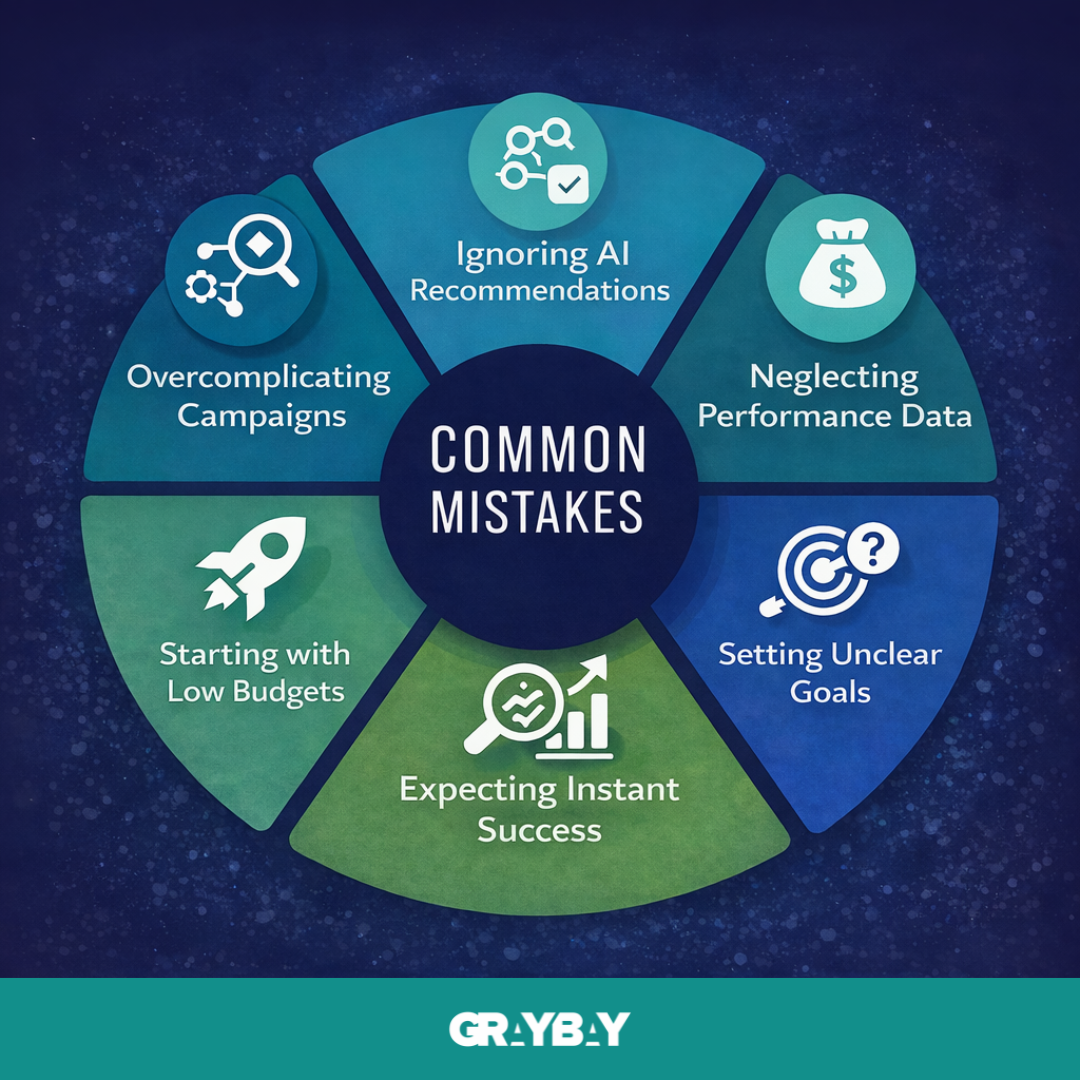
Overloading campaigns with too many keywords or audiences: Adding every possible keyword might feel thorough, but it can confuse the AI and dilute optimization. A more focused approach lets the system learn faster and make better decisions.
Ignoring AI recommendations: Google’s AI provides suggestions based on real-time data, and skipping them can slow down performance improvements. Trusting the system while keeping an eye on results usually works best.
Setting unrealistic budgets: Too low a budget prevents AI from collecting enough data to optimize effectively, while too high a budget can quickly drain resources without guaranteed returns.
Failing to monitor campaigns regularly: Even though AI handles optimization, checking reports and adjusting goals when needed ensures campaigns stay on track.
Expecting instant results: AI takes time to learn audience behavior and ad performance. Patience is key when running a Google Ads AI Max campaign, as consistent monitoring and small adjustments often lead to the best outcomes.
Final Words
A Google Ads campaign can feel overwhelming at first, but the right tools and a clear step-by-step approach make the process much easier. AI Max allows more focus on strategy while handling the heavy lifting of optimization, targeting, and bidding. Thoughtful planning and regular monitoring ensure that even the smartest tools deliver the best results. A Google Ads AI Max campaign can save time, reduce wasted spend, and help beginners achieve meaningful results faster.
Time to make your ads work for you!
Let Gray Bay Marketing manage your Google Ads AI Max campaign from setup to ongoing optimization. As a trusted Paid Media Agency, we provide digital marketing that includes Google Ads Management, Facebook advertising, AI-driven campaign optimization, and digital marketing strategies designed to maximize your return on investment.
FAQs
How much budget do I need to run a Google Ads AI Max campaign?
Beginners can start with a modest daily budget, but AI Max performs best when it has enough data to learn and optimize. Starting small and gradually increasing spend as the campaign learns usually works well.
Is AI Max better than manual Google Ads campaigns?
AI Max can outperform manual campaigns in many cases because it automates bidding, targeting, and optimization using real-time data. However, “better” depends on how it’s used. Manual campaigns offer more control, while AI Max focuses on efficiency and speed. The best results usually come from combining AI automation with human strategy and oversight.
Can beginners rely entirely on AI Max for their campaigns?
AI Max handles optimization, targeting, and bidding, but human oversight is still important. Monitoring performance and making strategic adjustments ensures better results.
How long does it take before AI Max starts showing results?
Results vary, but most campaigns need at least 1–2 weeks for the AI to collect data, test variations, and begin optimizing effectively.
What data does AI Max need to perform well?
AI Max relies on strong, consistent data to optimize effectively. Conversion data, audience behavior, keyword performance, and historical campaign results all help the system learn faster. The more accurate and complete the data, the better AI Max can identify patterns, refine targeting, and improve overall campaign performance.
What’s the difference between AI Max and regular Google Ads campaigns?
AI Max automates much of the manual work in traditional campaigns, using AI to optimize bidding, targeting, and ad placements in real time.
Which businesses benefit most from a Google Ads AI Max campaign?
E-commerce, service-based businesses, and beginners looking to save time and reduce wasted spend usually see the biggest advantages.