
10 Best AI Tools for Content Creators to Save Time in 2026
Creating content sounds simple until you look at everything that happens between an idea and a finished post.
You research the topic, organize your thoughts, write a draft, edit it, create visuals, record or edit video, write captions, schedule everything, and then try to keep up with comments and messages. None of those tasks feels huge on its own. Together, they can take up most of your day.
That is where AI can actually be useful.
The best AI tools for content creators are not designed to replace your ideas, experience, or voice. They are better used to handle repetitive work, give you a starting point, organize information, or speed up parts of the workflow that do not need to be done manually every time.
Adobe's 2026 Creators' Toolkit Report found that 75% of creators surveyed describe creative AI as integrated into or essential to their workflow, while 87% of creators who use creative AI say it has accelerated the growth of their business or audience. The same report found that 85% believe the final creative decision should remain theirs.
That last point matters. AI can make production faster, but the creator still needs to decide what is worth publishing.
In this guide, we look at ten AI tools that can help with different parts of the creator workflow, from brainstorming and research to video editing, scheduling, writing, and marketing. You will see what each tool does, who it is best for, what it can realistically help with, and where it fits into a practical content workflow.
What Makes Time-Saving AI Tools Worth Using in 2026?
Not every AI tool deserves a place in your workflow. A long feature list does not automatically make a product useful.
The tools worth keeping are the ones that solve a real problem without creating another layer of work.
Saves Time on a Specific Task
The easiest way to judge an AI tool is to look at one task you repeatedly spend too much time on.
Maybe you spend 30 minutes cleaning up captions for every video. Maybe research takes two hours before you can even start writing. Or perhaps you lose the first part of every morning deciding what belongs on your calendar.
A useful tool should make one of those bottlenecks easier.
Fits Into Your Existing Workflow
AI works best when it fits into the process you already understand.
If a tool requires you to constantly export files, copy information between platforms, or learn an entirely new system for a simple task, the time savings can disappear quickly.
Look for tools that work with the platforms, formats, and routines you already use.
Produces a Useful Starting Point
AI does not need to produce a finished piece of content to be valuable.
A first draft, rough outline, research summary, transcript, caption set, or list of ideas can save time if it gives you something useful to work from.
You still need to review the result. But editing a useful starting point is often easier than starting with a blank page.
Reduces Repetitive Work
This is where AI tends to provide the clearest benefit.
Transcription, basic video cuts, caption creation, idea expansion, research summaries, calendar scheduling, and content repurposing are all examples of work that can often be accelerated.
The goal is not to automate everything. It is to remove the repetitive parts so your attention can stay on the work that actually needs your judgment.
Protects Your Creative Voice
More output is not automatically better content.
Adobe's 2026 creator research highlights an important shift: as AI makes content production easier, creators' point of view, taste, and judgment become more valuable.
That means the best AI workflow still leaves room for your experience and personality.
Use AI to help you get somewhere faster. Do not let it decide what you should sound like.
Gives You a Clear Return on Time
A tool does not need to save ten hours a week to be useful.
If it saves 15 minutes every day on a task you dislike, that can still add up. If it eliminates an annoying process you have to repeat several times a week, it may be worth paying for even if the time savings are relatively small.
The important question is simple:
Does this tool make a meaningful part of my workflow easier?
How We Selected These AI Tools for Content Creators
This list is not based simply on which AI tools are popular.
We looked at tools that address different problems creators regularly face, including:
Content ideation and planning
Writing and voice-to-text
Short-form and long-form video editing
YouTube research
Scheduling and time management
Marketing and content production
General writing and research
Creator monetization
We also considered how easily each tool fits into a creator's workflow, whether it has a free option, and what type of creator is most likely to benefit from it.
That is why the list includes different types of products rather than ten tools that all do essentially the same thing.
10 Best AI Tools for Content Creators
1. Wispr Flow: Best for Voice-to-Text Content Creation
Wispr Flow is useful for creators who think faster than they type.
Instead of opening a document and slowly typing an idea, you can speak naturally and turn your thoughts into text. That makes it useful for rough drafts, captions, notes, emails, scripts, outlines, and other text-heavy tasks.
Wispr Flow can automatically add punctuation and formatting and remove filler words. It supports more than 100 languages and works across Mac, Windows, iPhone, and Android.
This is particularly helpful if your best ideas tend to arrive when you are away from your keyboard.
Key Features
Voice dictation across apps and text fields
Automatic punctuation and formatting
Filler-word removal
Support for 100+ languages
Custom dictionary and snippets
AI-powered text refinement
Cross-platform availability
How Much Time Can It Save?
Wispr Flow says its voice typing can be up to four times faster than typing. That is a product claim rather than a guarantee, so your actual results will depend on how quickly you speak and how much editing your drafts require.
The practical benefit is less about hitting a specific speed and more about reducing the friction between having an idea and getting it onto the page.
Best For
Bloggers and writers
Newsletter creators
Social media creators
Coaches and consultants
Content marketers
Creators who prefer speaking to typing
Pricing
Wispr Flow has a free Basic plan with usage limits. Flow Pro is currently listed at $15 per user per month, while Enterprise pricing is available through sales. New users also receive a 14-day Pro trial.
Best reason to try it: If typing is one of the slowest parts of your content process.
2. Ideamap AI: Best for Brainstorming and Organizing Content Ideas
Ideamap AI approaches brainstorming visually.
Instead of keeping dozens of disconnected ideas in notes, documents, and browser tabs, you can use an AI-powered visual workspace to expand and organize related thoughts.
That can be useful when you are planning a content series, mapping a campaign, developing a larger project, or trying to turn a vague idea into something you can actually publish.
The biggest advantage is not simply generating more ideas. It is being able to see how those ideas connect.
Key Features
AI-assisted brainstorming
Visual idea mapping
Idea expansion
Related-topic organization
Content planning
Collaboration features
How Much Time Can It Save?
Ideamap can reduce the time spent moving between scattered notes and trying to organize a large brainstorming session manually.
It is particularly useful at the beginning of a project when you know the general direction but have not yet worked out the structure.
Best For
Bloggers
YouTubers
Social media creators
Content strategists
Marketing teams
Creators planning content series
Best reason to try it: When you have plenty of ideas but struggle to turn them into an organized content plan.
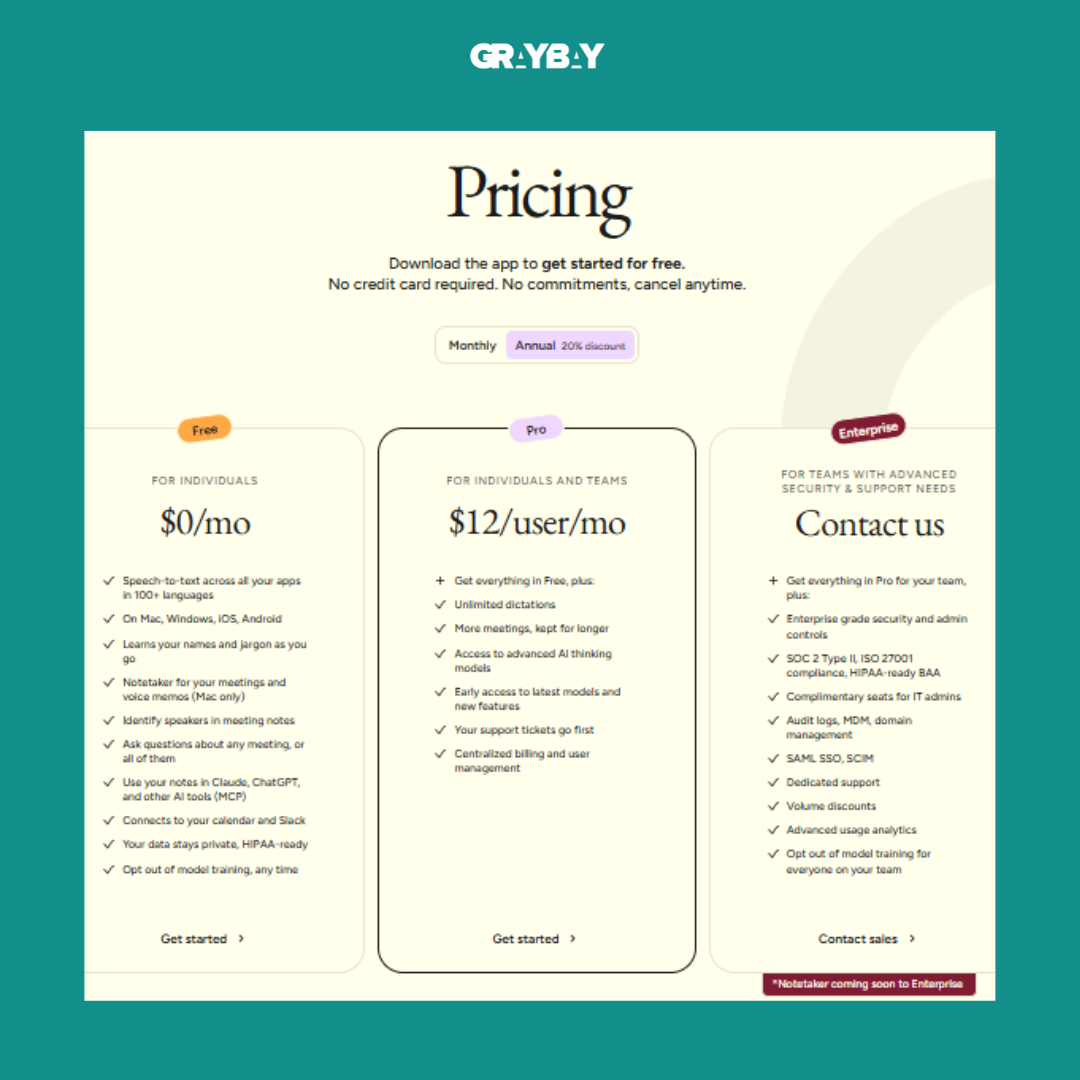
Pricing & Plans:
3. Submagic: Best AI Content Creation Tool for Short Videos
Submagic is built around short-form video production.
It can automatically create captions, help with text-based editing, clean up audio, remove bad takes and silences on supported plans, and add other enhancements designed for social video.
For creators publishing frequently on TikTok, Instagram, or YouTube Shorts, that can remove some of the repetitive editing work between filming and publishing.
Key Features
Automatic captions
Animated caption styles
Text-based trimming
AI video editing features
AI hook titles
Audio cleanup
Removal of bad takes and silences on eligible plans
Caption translation
Social publishing features
How Much Time Can It Save?
The biggest opportunity is reducing repetitive editing rather than eliminating the editing process completely.
Instead of manually captioning and cleaning every short video from scratch, you can start with an AI-generated version and spend your time reviewing it and making creative adjustments.
That distinction matters. AI can speed up production, but you still want a human reviewing captions, cuts, pacing, and context before publishing.
Best For
TikTok creators
Instagram creators
YouTubers
Coaches and educators
Personal brands
Short-form video creators
Pricing
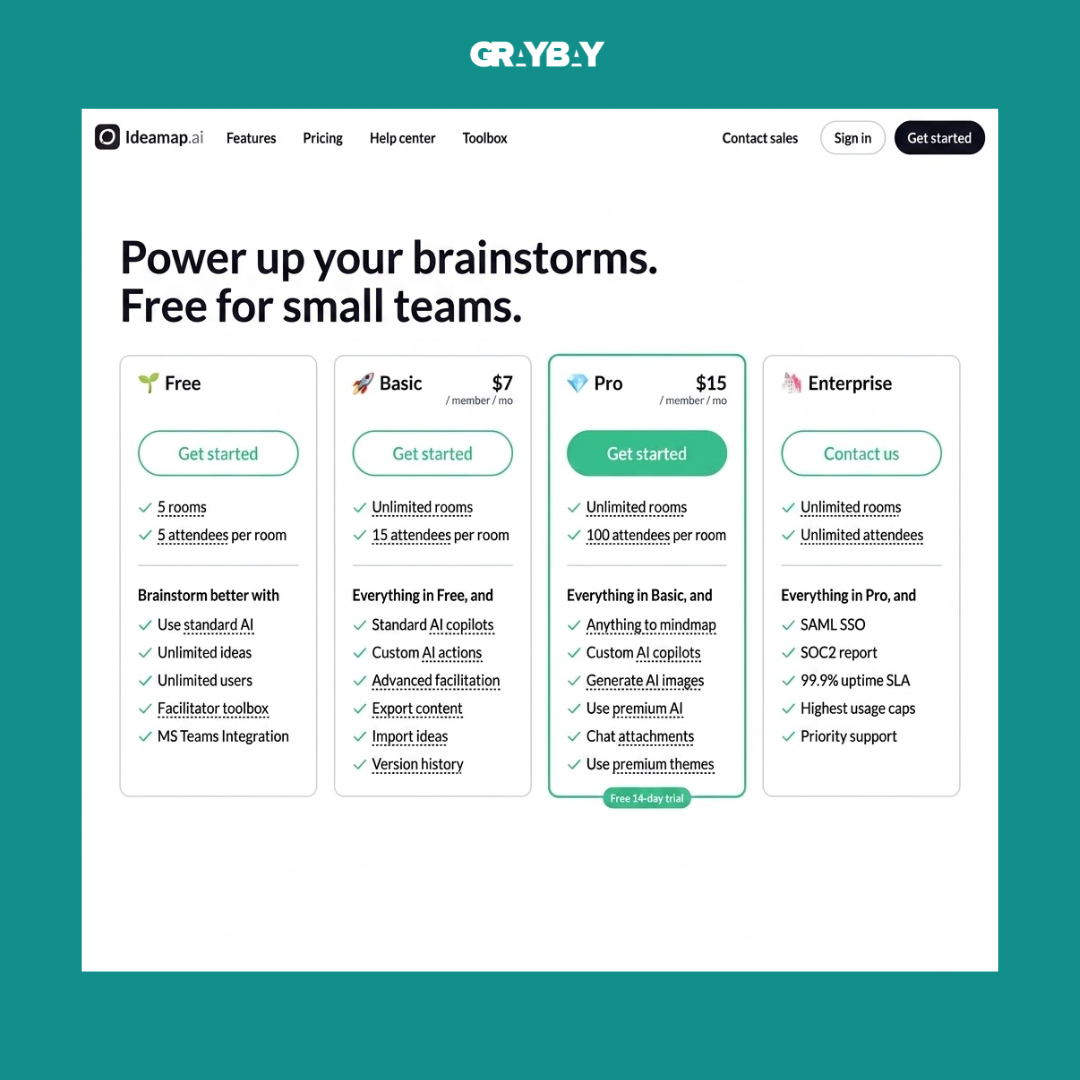
Submagic currently offers a free plan with limited usage. Paid plans include Starter, Pro, and Business/API options. The pricing page currently lists Starter at $19 per member/month when billed monthly and lower effective rates for annual billing.
Best reason to try it: When short-form video editing and captioning are taking too much of your publishing time.
4. Gling: Best for Editing Talking-Head Videos
Gling is aimed at creators who record talking-head videos and want to get through the first editing pass faster.
The tool can help remove silences, mistakes, and unwanted sections from raw recordings. Instead of watching an entire recording and manually making every basic cut, you can begin with an AI-assisted first edit and then refine it.
That makes it especially useful for YouTubers, coaches, educators, and podcasters who regularly work with long recordings.
Key Features
Silence removal
Mistake and bad-take removal
AI-assisted first cuts
Video and audio editing
Faster cleanup of talking-head recordings
Export workflows for supported editing platforms on paid plans
How Much Time Can It Save?
Gling is most useful when your editing process starts with a lot of dead space and obvious mistakes.
It does not mean you can skip the final edit. You still need to review the pacing, transitions, story, visuals, and overall flow.
But getting the rough cut done faster can remove one of the most tedious parts of video production.
Best For
YouTubers
Podcasters
Coaches
Educators
Talking-head creators
Long-form video creators
Pricing
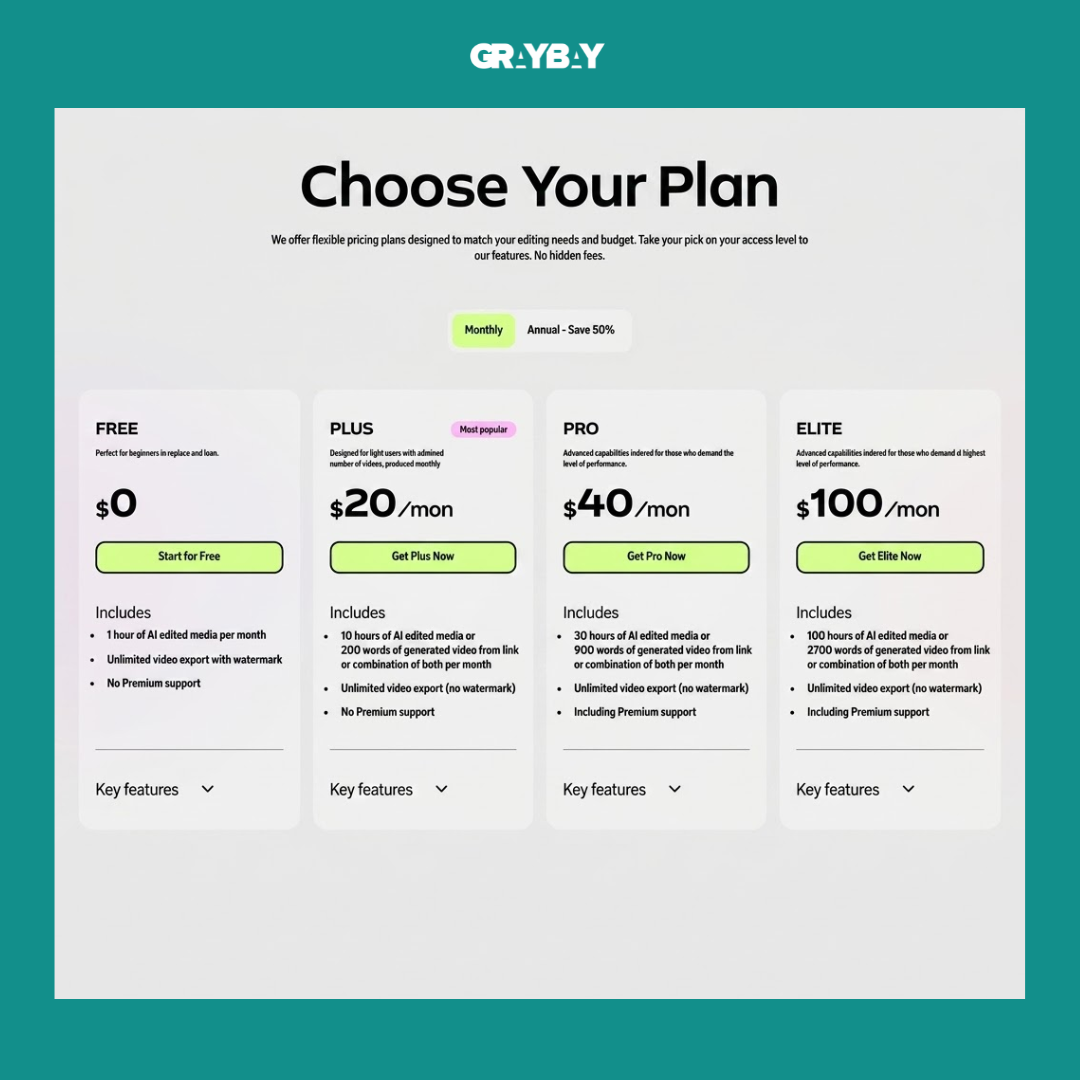
Gling offers a free version, although free exports include a watermark and have limitations. Paid plans increase the amount of footage you can process; the current help information lists 10 hours of footage per month for Plus and 30 hours for Pro.
Best reason to try it: When reviewing and cutting raw talking-head footage is one of your biggest editing bottlenecks.
5. VidIQ: Best AI Tool for YouTube Content Research
vidIQ is designed specifically around YouTube growth and research.
Instead of guessing what to make next, creators can use vidIQ to explore topics, trends, keywords, content ideas, and channel insights.
That makes it more useful for creators who treat YouTube as a serious publishing channel rather than simply uploading videos occasionally.
Key Features
YouTube keyword research
Content ideas
Trend discovery
Channel insights
Topic research
AI-generated recommendations
AI coaching
Optimization tools
How Much Time Can It Save?
The biggest benefit is research efficiency.
Rather than jumping between YouTube search, keyword tools, spreadsheets, and notes, you can use a creator-focused platform to bring several research activities together.
It can also help you move from:
"What should I make?"
to:
"Which of these ideas is worth testing?"
That is a much more useful question for a growing channel.
Best For
YouTubers
Video marketers
Educational creators
Gaming creators
Personal brands
YouTube-focused businesses
Pricing
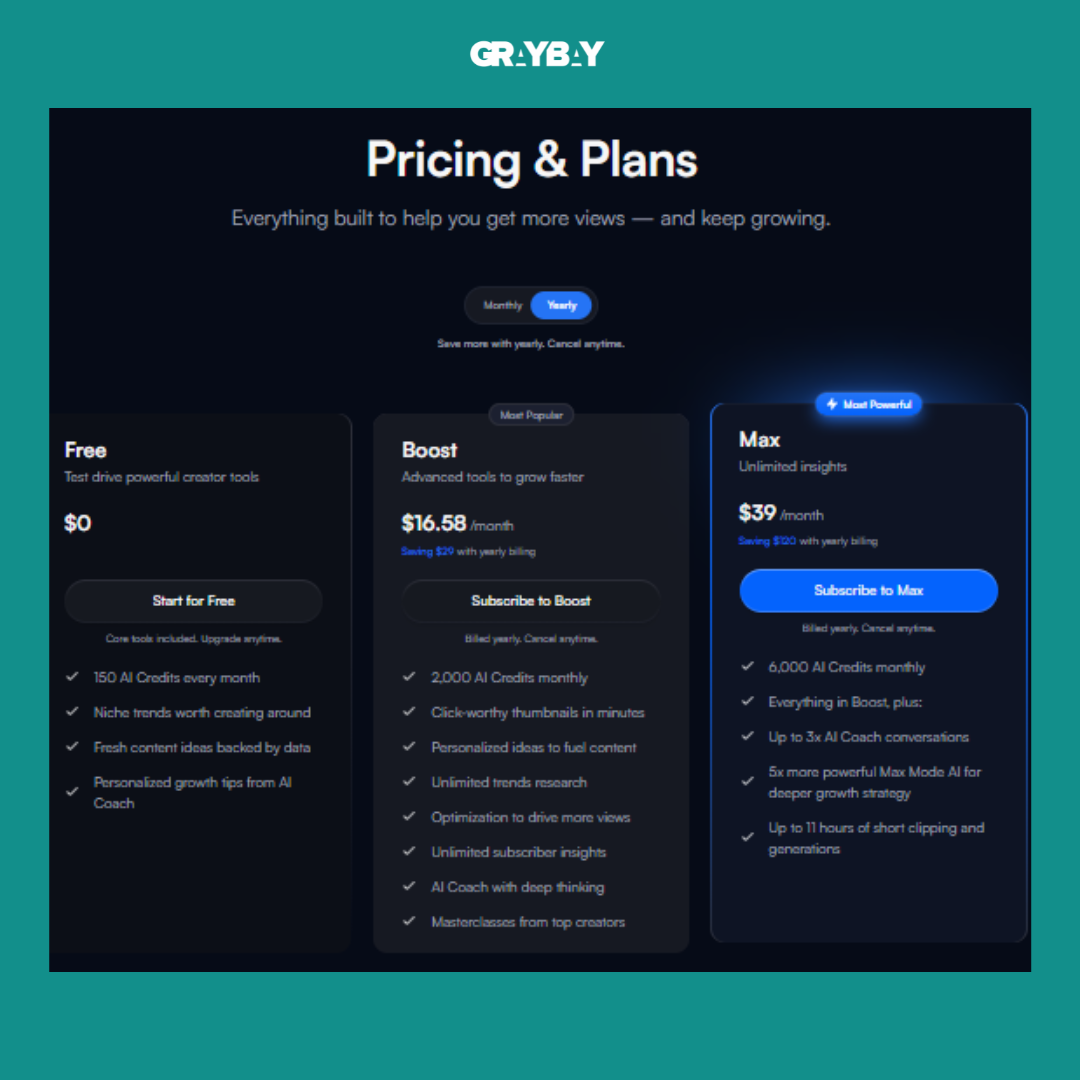
vidIQ currently has a Free plan. Its paid plans include Boost and Max, with the current pricing page listing Max at $39/month and the Boost plan with a free introductory price shown on the page. Pricing and promotions can change, so check the current plan page before purchasing.
Best reason to try it: When choosing video topics and researching YouTube opportunities takes longer than creating the actual videos.
6. Reclaim AI: Best for Managing Your Creator Schedule
Reclaim AI is less about creating content and more about making sure you actually have time to create it.
Creators often have calendars filled with meetings, client work, deadlines, admin tasks, filming, editing, and personal commitments. Without a system, content creation becomes the task that gets pushed to tomorrow.
Reclaim works around your calendar and priorities to schedule tasks and protect time for important work.
Key Features
AI-assisted task scheduling
Calendar management
Smart time blocking
Recurring habit scheduling
Flexible scheduling
Priority-based planning
Calendar and productivity integrations
How Much Time Can It Save?
The main benefit is reducing the mental effort of constantly deciding when to do something.
Instead of repeatedly moving tasks around your calendar, you can give the system your priorities and let it help find workable time blocks.
That can be particularly useful for creators managing several projects at once.
Best For
Full-time creators
Freelancers
Solopreneurs
Content managers
Coaches and consultants
Creators with overloaded calendars
Pricing
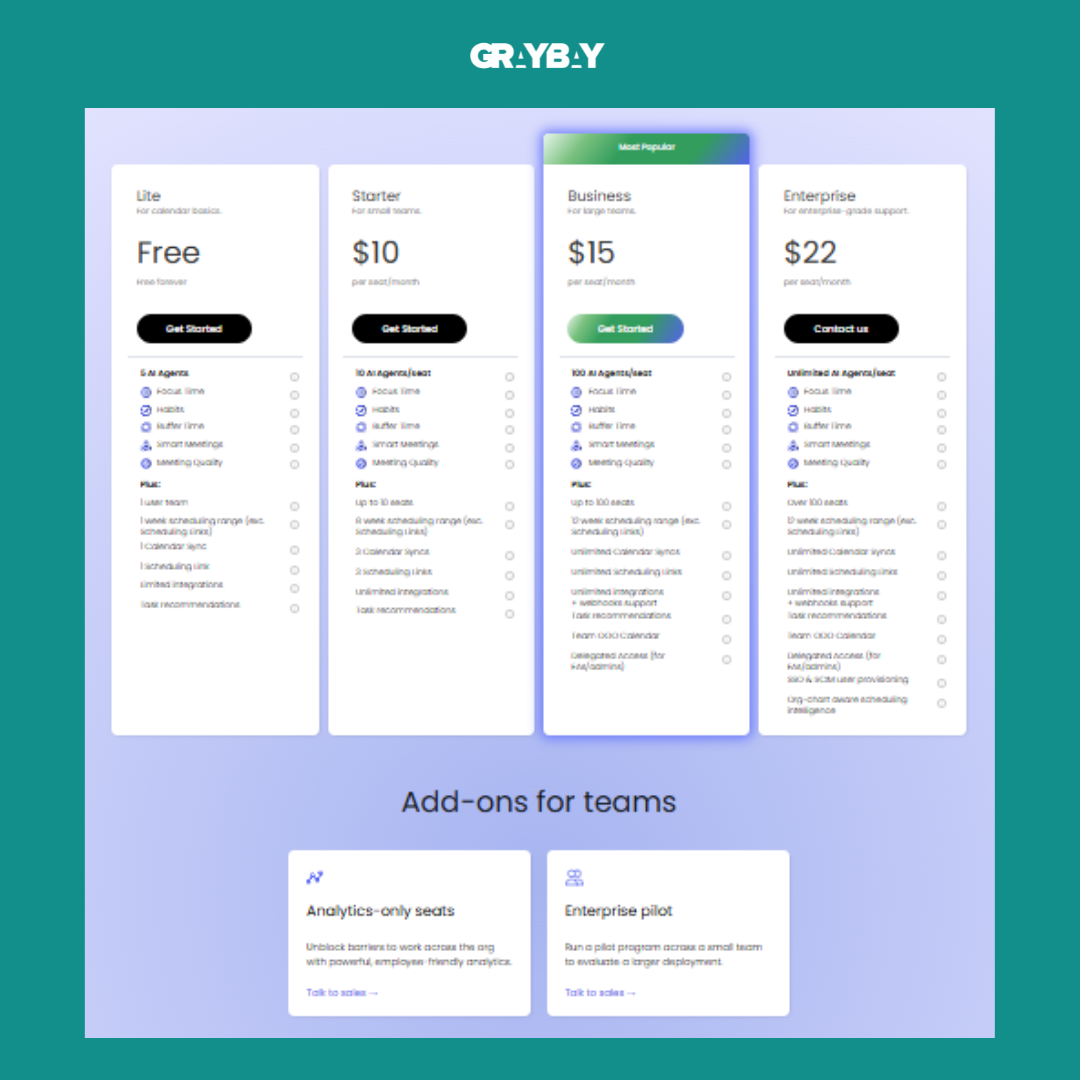
Reclaim currently offers a free Lite plan for individual users, with paid plans available for more advanced scheduling and team requirements.
Best reason to try it: When your biggest content problem is not ideas or tools, but finding uninterrupted time to actually create.
7. Stan: Best for Selling and Managing Creator Products
Stan is different from the other tools on this list because its main value is monetization rather than content production.
Creators can use a creator-focused storefront to organize and sell products, courses, coaching, and other offers.
That can help reduce the number of platforms involved in managing a creator business.
Key Features
Creator storefront
Digital product sales
Offer management
Course and coaching support
Audience monetization
Link-in-bio functionality
Creator-focused selling tools
How Much Time Can It Save?
The time benefit comes from consolidation.
Instead of maintaining separate systems for every offer, link, and sales process, a creator can manage important parts of the monetization workflow from one creator-focused platform.
The exact time saved depends heavily on how complex your business is.
Best For
Digital product creators
Coaches
Course creators
Consultants
Personal brands
Creators building online businesses
Best reason to try it: When managing your offers and creator business is becoming almost as complicated as producing the content itself.
8. Hire Mia: Best for Marketing Content Support
Hire Mia is designed more specifically around marketing work.
It can help with brainstorming, research, writing, editing, SEO, social media, and campaign development. The platform also provides web access for research and can create multiple related assets from a campaign.
For creators who are also responsible for their own marketing, this can make it easier to move from one content asset to a complete campaign.
Key Features
AI brainstorming
Research assistance
Writing support
Editing
SEO assistance
Social media support
Campaign creation
AI web access
Prompt libraries
Brand profiles
How Much Time Can It Save?
The value is less about one dramatic automation and more about reducing the number of small marketing tasks you have to start from scratch.
For example, one campaign might require a blog post, social posts, email copy, ad variations, and supporting assets.
A tool that helps you build those pieces from a common strategy can reduce repetitive setup work.
Best For
Content creators
Marketing creators
Freelancers
Small business owners
Coaches
Consultants
Creators managing their own promotion
Pricing
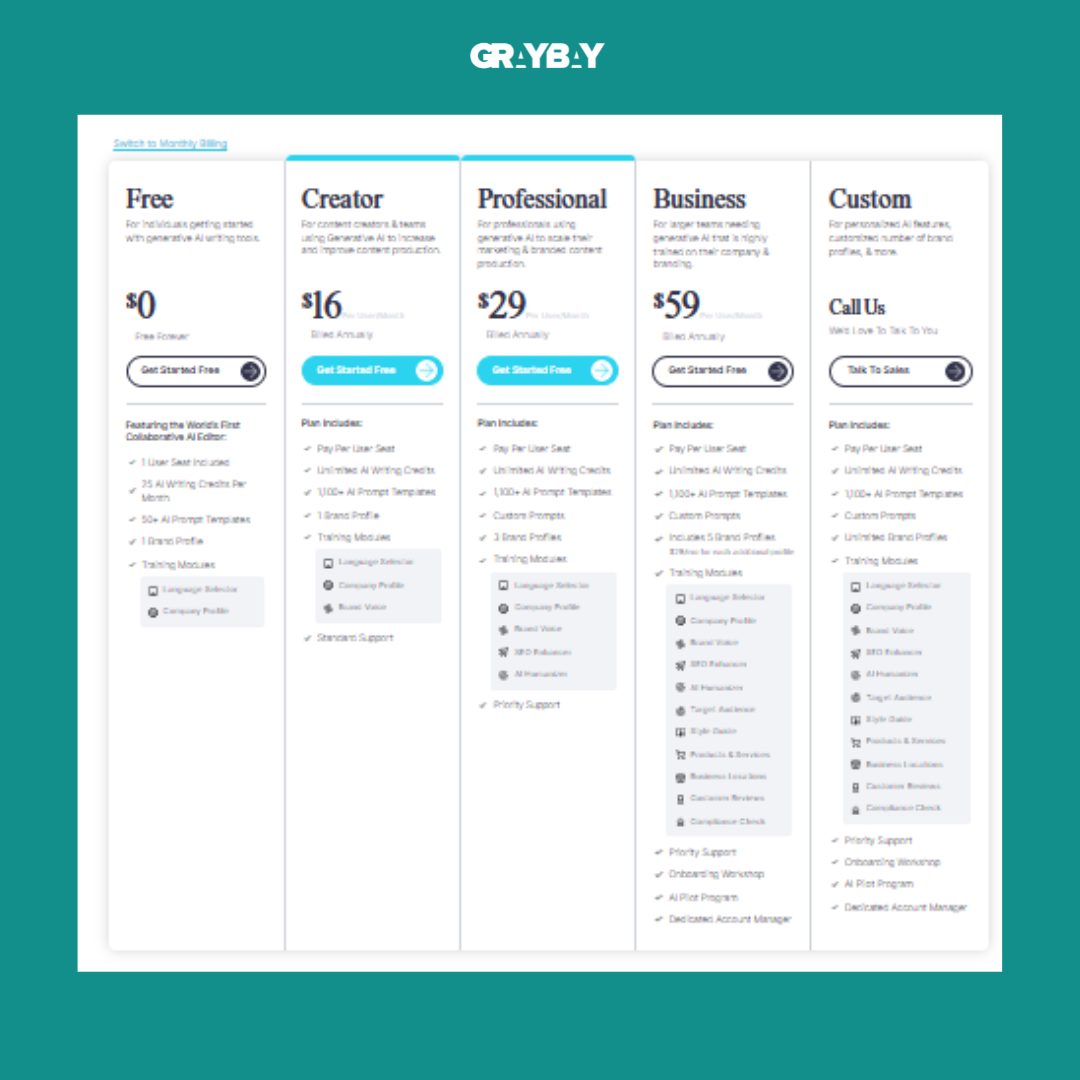
Hire Mia currently offers a Free plan. Paid plans listed by CoSchedule include Creator at $16/user/month, Professional at $29/user/month, and Business at $59/user/month when billed annually.
Best reason to try it: When content creation is only half your job and marketing the content takes almost as much time.
9. ChatGPT: Best for Everyday Content Creation
ChatGPT is the most flexible tool on this list because it can support so many different parts of the content process.
You can use it to brainstorm topics, build outlines, develop scripts, rewrite copy, repurpose an article into social posts, organize research, create interview questions, summarize information, and work through ideas.
The key is how you use it.
Instead of asking for an entire finished article and publishing whatever comes back, use ChatGPT as a working partner throughout the process.
For example:
Generate and group topic ideas.
Choose the strongest angle.
Build an outline.
Identify questions the article needs to answer.
Create a rough first draft.
Rewrite weak sections.
Repurpose the finished piece.
Review the final content yourself.
That workflow keeps the creator involved rather than treating AI as an automatic publishing machine.
Key Features
Brainstorming
Content outlines
Script development
Caption creation
Content repurposing
Editing and rewriting
Research assistance
File analysis
Image generation
Custom GPTs and workflows
Deep research capabilities on eligible plans
How Much Time Can It Save?
ChatGPT can reduce the amount of time you spend staring at a blank document or manually turning one piece of content into several formats.
But the time savings vary considerably.
If your workflow requires substantial research, fact-checking, brand review, and editing, AI will not eliminate those steps.
It simply gives you a faster starting point.
Best For
Bloggers
Writers
Social media creators
YouTubers
Newsletter creators
Content marketers
Freelancers
Solo creators
Pricing
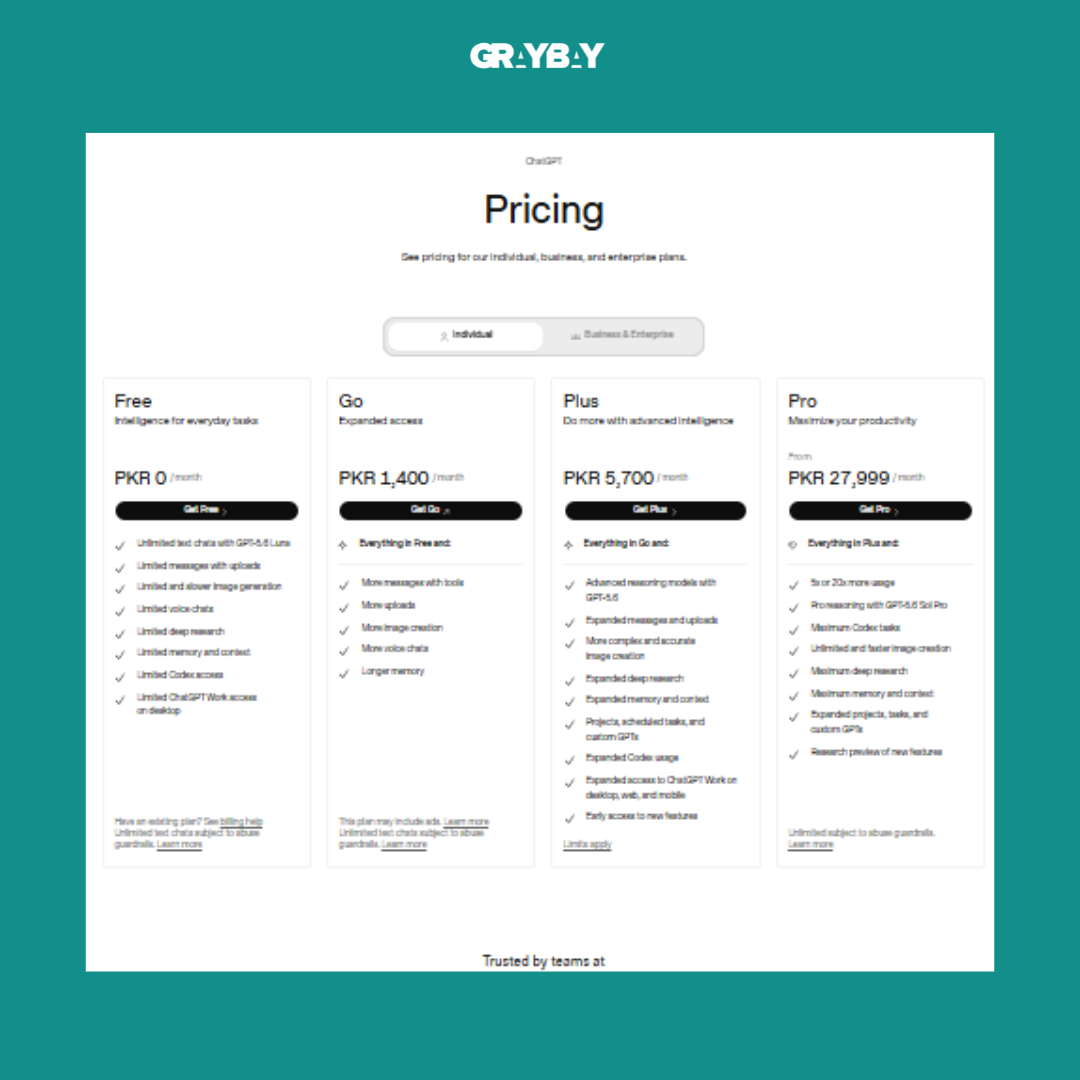
ChatGPT has a Free plan. ChatGPT Plus is currently $20/month, while higher-tier and business plans are available for users who need greater access or team features.
Best reason to try it: When you need one flexible tool that can support many different content tasks.
For a deeper look at how AI can fit into a broader marketing workflow, see Gray Bay Marketing's guide toAI skills for digital marketers.
10. Perplexity: Best for Fast Research
Perplexity is particularly useful when research is slowing down your content process.
Instead of opening a dozen tabs and manually piecing together basic information, you can ask a question and review an answer with linked sources.
That makes it useful for getting familiar with a topic before doing deeper research.
It can also help you find sources, compare information, identify questions worth exploring, and build an initial understanding of unfamiliar subjects.
Key Features
Web-based research
Source citations
Follow-up questions
Topic summaries
Current web information
Source discovery
Research assistance
Comparison of information from multiple sources
How Much Time Can It Save?
Perplexity can reduce the amount of time spent on the first stage of research.
However, it should not become your only source of truth.
For statistics, medical claims, financial information, legal information, product specifications, or anything else important, open the original source and verify the information yourself.
That extra step is worth the time.
Best For
Bloggers
Journalists
Researchers
Content marketers
YouTubers
Newsletter creators
Research-heavy creators
Pricing
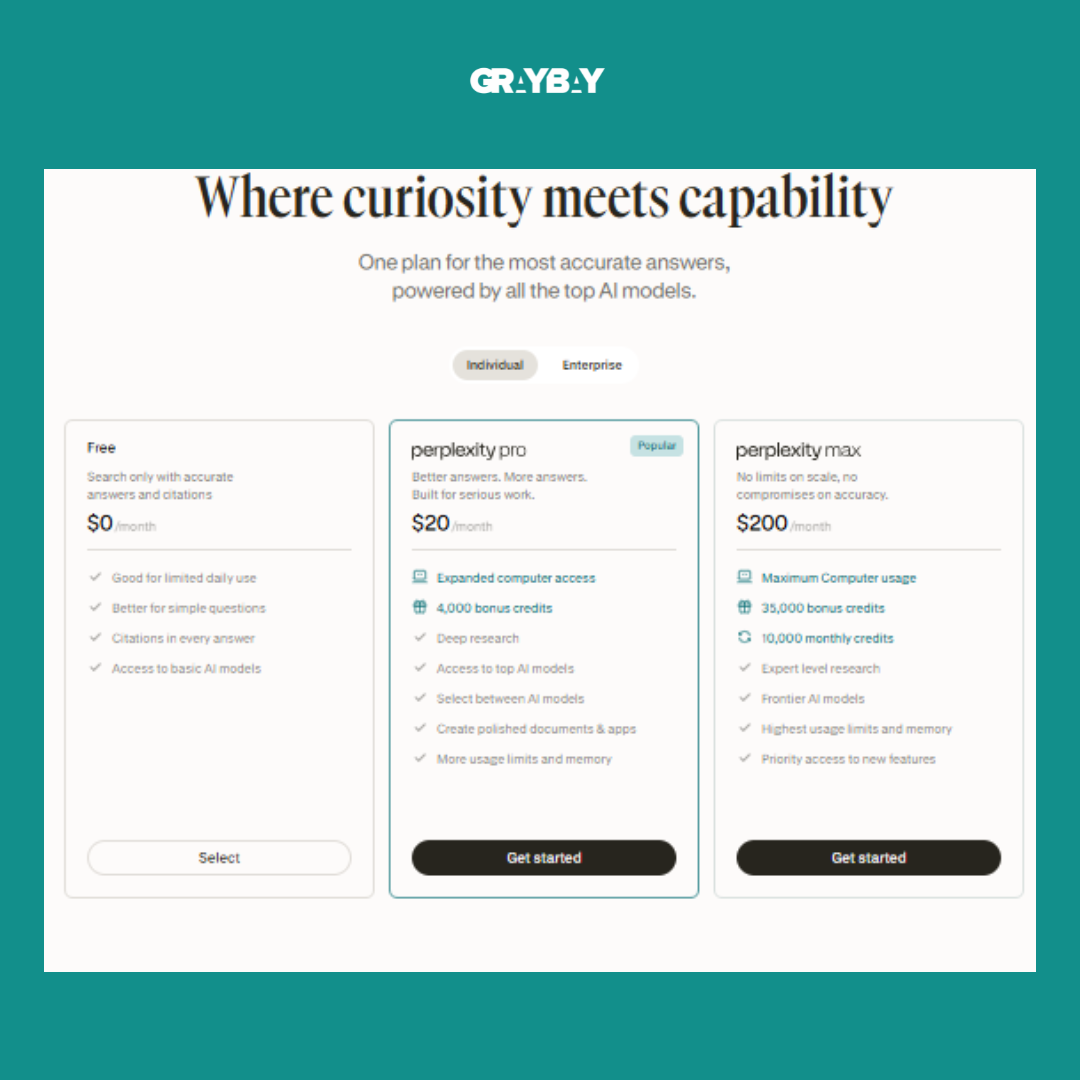
Perplexity has a Free plan. Its current individual paid options include Pro and Max, while enterprise plans are also available. Perplexity currently lists Pro at $17/month when billed annually.
Best reason to try it: When finding and organizing initial research is one of the slowest parts of your workflow.
Quick Comparison: 10 AI Tools for Content Creators
Pricing and plan availability can change, so check each product's current pricing page before purchasing.
Which AI Productivity Tools Should You Try First?
You do not need all ten tools.
In fact, adding ten new platforms to your workflow at the same time can create the exact problem you were trying to solve.
Start with the task that causes the most friction.
If Writing Takes Too Long
Try Wispr Flow if typing is slowing you down.
ChatGPT can also help with outlines, drafts, rewriting, and repurposing.
If You Never Know What to Post
Try Ideamap AI for visual brainstorming.
ChatGPT can also help turn a broad subject into content themes, angles, and individual post ideas.
If Video Editing Is Eating Your Week
Try Submagic for short-form content or Gling for talking-head videos.
The better choice depends on the type of footage you produce.
If YouTube Research Takes Forever
vidIQ is the more specialized choice because its workflow is built around YouTube.
Use it to research topics and opportunities before spending hours recording a video that may not have much audience demand.
If Your Calendar Is Always Full
Reclaim AI is worth considering.
Sometimes the problem is not that you need another content tool. You simply need protected time to use the tools you already have.
If Marketing Is the Bottleneck
Hire Mia can help with broader marketing tasks, while ChatGPT can handle many general-purpose writing and planning tasks.
If Research Is the Problem
Perplexity can help you get through the first stage of research faster.
Just remember that faster research is not the same thing as verified research.
How AI Tools for Social Media Creators Fit Into a Real Workflow
The most useful AI workflow is not:
Idea → AI → Publish
A better workflow looks more like this:
Research → Idea → Draft → Human Review → Edit → Repurpose → Publish → Analyze
For example, a social media creator might use Perplexity to understand a topic, ChatGPT to develop several angles, Wispr Flow to dictate the first draft, Submagic to edit the accompanying short video, and Reclaim to protect time for publishing and audience engagement.
The tools work together rather than replacing the creator.
If social media is a major part of your strategy, Gray Bay Marketing also has aTikTok marketing guide covering ways to grow and improve a TikTok account.
The same principle applies beyond TikTok. The goal should be to build a repeatable content system rather than constantly searching for the newest AI tool.
How to Use AI Without Making Your Content Feel AI-Generated
This is one of the most important parts of using AI well.
AI can make content faster, but it can also make everything sound the same.
You have probably seen the familiar pattern:
Generic introduction
Predictable headings
Overly polished sentences
Repeated phrases
Vague claims
No real examples
No strong opinion
No personal experience
That is not a tool problem. It is a workflow problem.
Start With Your Own Ideas
Give AI your actual opinions, experiences, examples, customer questions, or observations.
The more original information you provide, the less generic the final content is likely to feel.
Use AI for the First Pass, Not the Final Voice
Let AI help organize your thoughts.
Then rewrite the important parts yourself.
Your introduction, examples, recommendations, opinions, and conclusions should sound like the person or brand publishing them.
Add Specific Examples
Instead of saying:
AI can save creators time.
Explain exactly where.
For example:
If you publish three short videos a week and spend 20 minutes captioning each one, automating the first caption pass can remove a repetitive step from every publishing cycle.
Specific examples feel more useful because readers can compare them with their own workflow.
Fact-Check Important Claims
AI can produce confident-sounding information that is wrong or outdated.
Check statistics, product features, pricing, research findings, and claims against reliable sources before publishing.
Keep Your Judgment in the Process
The creator should decide:
What is worth saying
What should be removed
What examples matter
Which recommendations make sense
What the audience actually needs
What the final piece should sound like
That is where your value remains.
How to Build a Simple AI Content Workflow
You do not need a complicated stack.
A simple workflow might look like this:
Step 1: Research
Use Perplexity to understand the topic and find useful sources.
Step 2: Plan
Use Ideamap AI or ChatGPT to organize the topic into angles and content ideas.
Step 3: Create
Use ChatGPT for a starting outline or draft, or Wispr Flow if you prefer speaking through your ideas.
Step 4: Edit
Review the content manually and add your own examples, opinions, experience, and brand voice.
Step 5: Repurpose
Turn the finished piece into social posts, short-form video scripts, emails, or other formats.
Step 6: Schedule
Use Reclaim AI to protect time for recurring content tasks or manage your wider schedule.
Step 7: Measure
Look at what actually performs.
The goal is not to produce more content simply because AI makes it possible. The goal is to spend more of your time on content that deserves to exist.
For marketers looking at the broader SEO side of this workflow, Gray Bay Marketing'scontent gap analysis guide covers how to identify missing topics, improve content structure, and plan internal links.
Which Tool Should You Try First?
There is no single best AI tool for every creator.
Your best starting point depends on the part of your workflow that currently feels most painful.
Choose Wispr Flow if typing slows down your ideas.
Choose Ideamap AI if you struggle to organize brainstorming sessions.
Choose Submagic if short-form video editing is taking too long.
Choose Gling if you spend too much time cleaning up talking-head footage.
Choose vidIQ if YouTube research is your bottleneck.
Choose Reclaim AI if your calendar never leaves enough room for content.
Choose Stan if your creator business is growing and managing offers is becoming complicated.
Choose Hire Mia if marketing tasks are taking time away from content creation.
Choose ChatGPT if you want one flexible tool that can support many parts of your workflow.
Choose Perplexity if research and source discovery are slowing you down.
Start with one. Use it long enough to understand whether it genuinely improves your process. Then decide whether another tool solves another problem.
Final Thoughts
AI is most useful to creators when it removes friction rather than removing creativity.
You can use it to get a rough idea out of your head faster, turn a recording into a cleaner first cut, find sources without opening dozens of tabs, organize a crowded calendar, or turn one finished piece of content into several useful formats.
But none of that means you need to hand your entire creative process over to AI.
The strongest workflow is usually a combination of automation and judgment.
Let the tools handle repetitive work.
Keep the strategy, taste, experience, storytelling, and final decisions for yourself.
And do not feel like you need ten subscriptions to get started. One tool that solves a real problem is more valuable than a dozen platforms you barely use.
Turn Your Creator Workflow Into a Growth Engine
Saving time is only one part of the equation.
Once your workflow becomes more efficient, the next question is what you do with the time you get back.
That could mean creating better content, publishing more consistently, improving your website, building an audience, or putting more effort into the marketing activities that actually generate business.
AtGray Bay Marketing, we help businesses connect content, SEO, AI search visibility, and digital advertising into a more complete growth strategy. OurAI SEO services are designed around visibility across traditional search and AI-driven discovery, while our broader marketing services support SEO, content strategy, and digital advertising.
If you are trying to turn content into measurable business growth, your workflow should not stop at publishing.
You can also explore Gray Bay Marketing's guide onhow to turn blog traffic into paying clients, which covers internal linking, CTAs, conversion paths, and content journeys.
Ready to put the time you save toward growth? Contact Gray Bay Marketing and build a smarter digital marketing strategy for your business.
FAQs
What are AI tools for content creators?
AI tools for content creators are software platforms that use artificial intelligence to support different parts of the content workflow. Depending on the tool, they can help with brainstorming, writing, research, transcription, video editing, scheduling, repurposing, and marketing.
Which AI tools for content creators are best for beginners?
ChatGPT, Wispr Flow, and Ideamap AI can be approachable starting points because they address common problems such as writing, brainstorming, and organizing ideas. The best option depends on the task that currently takes the most time in your workflow.
What are the best AI productivity tools for creators?
Reclaim AI is particularly useful for scheduling and protecting time for important work, while Wispr Flow can make text-heavy tasks faster. ChatGPT can also support a wide range of planning and productivity tasks. The right choice depends on whether your main bottleneck is scheduling, writing, research, or organization.
What are the best AI tools for social media creators?
The best AI tools for social media creators depend on the type of content you produce. Submagic is useful for short-form video editing, ChatGPT can help with ideas and captions, Wispr Flow can speed up drafting, and Ideamap AI can help organize content ideas.
Can AI replace content creators?
AI can automate parts of content production, but it does not replace the need for human judgment. Creators still need to decide what is worth publishing, understand their audience, develop original perspectives, review factual accuracy, and make the final creative decisions. Adobe's 2026 creator research found that 85% of surveyed creators believe the final creative decision should remain theirs.
Are AI tools worth paying for?
They can be, but only when the time or capability they provide is valuable enough to justify the cost. Before subscribing, identify the specific task you want to improve. Then compare the time and effort required before and after using the tool.
What is the best free AI tool for content creators?
There is no single best free tool for everyone. ChatGPT has a free plan, while tools such as Gling, Submagic, vidIQ, Reclaim AI, and Hire Mia also offer free options or free tiers, although their limits vary.
How should I choose an AI tool for my workflow?
Start with one recurring task that takes too much time. Define what you want the tool to improve, test it for a few weeks, and compare your workflow before and after using it. If the improvement is meaningful, keep it. If it creates more work than it removes, move on.
How can I use AI without making my content sound generic?
Use AI for brainstorming, research, outlining, and repetitive tasks while keeping your own experience, opinions, examples, and final editing in the process. The more original information and perspective you bring to the content, the less likely it is to sound like generic AI copy.