
Conversion Rate Optimization for Online Stores: 7 Ways to Turn More Visitors Into Customers

An online store can attract steady traffic, showcase great products, and still struggle to turn that interest into sales. Visitors browse collections, compare prices, and explore product details, but many leave before completing a purchase. For business owners, the challenge is figuring out what holds customers back and how to make better use of the traffic they've worked hard to attract.
This is where ecommerce conversion rate optimization plays an important role. By looking closely at how people shop and where they run into difficulties, businesses can identify opportunities to improve the buying experience. This guide explores seven practical ways to remove purchasing obstacles, build customer confidence, and turn more website visits into completed orders.
What Is Ecommerce Conversion Rate Optimization?
Ecommerce conversion rate optimization is the process of finding and fixing problems that stop visitors from buying. For a store focused on sales, purchase conversion rate is the percentage of visits that result in an order. Calculate it by dividing purchases by visits and multiplying by 100. For example, 40 purchases from 2,000 visits equals a 2% purchase conversion rate. Use the same definition of a visit each time you compare results.
Purchases tell you the outcome; product views, cart additions, and checkout starts help you locate the problem. A low add-to-cart rate calls for a different investigation than a low checkout completion rate. Look at these steps together before deciding what to fix.
Before You Start: Find Out Where Your Online Store Is Losing Customers
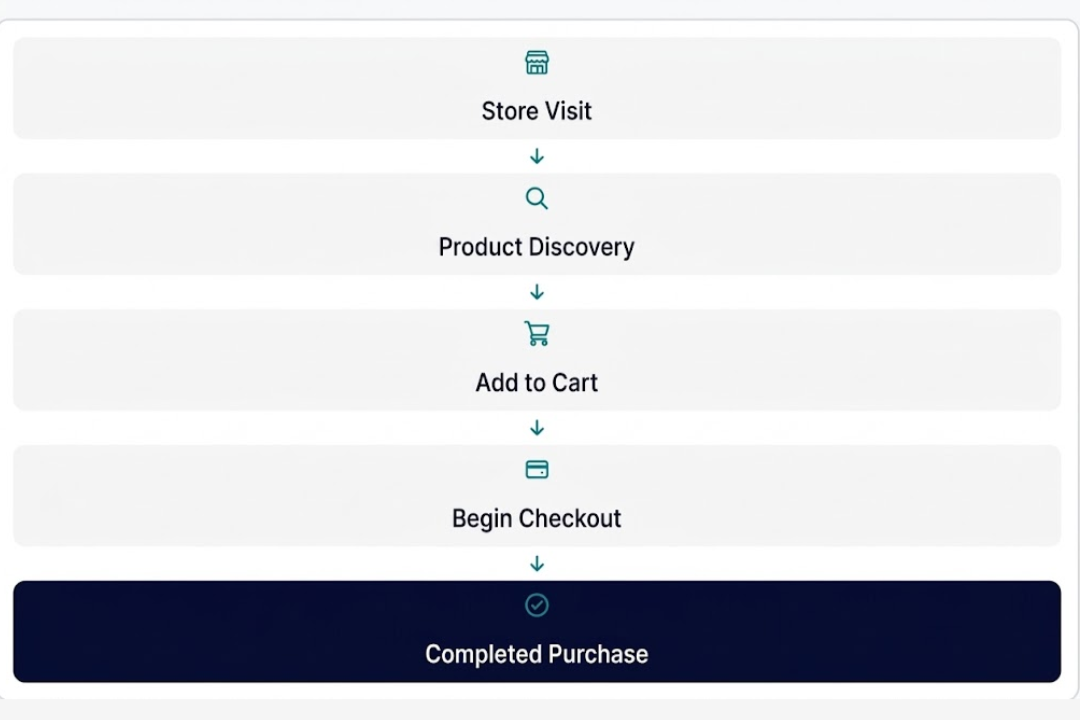
Before changing your website design or offering another discount, take a closer look at how customers move through the store. Are they finding the products they want? Do they add items to their carts and leave during checkout? These details can help you figure out where potential sales are slipping away.
The shopping journey generally follows five stages:
Tools like Google Analytics 4 and your ecommerce platform's reports can help track these steps. For example, frequent product views with few cart additions may point to missing product details or unclear pricing. If shoppers reach checkout but rarely complete their orders, payment options, shipping costs, or technical issues may be worth investigating.
Once you know where customers are dropping off, you can focus on the improvements that matter most.
7 CRO Strategies for Online Stores to Increase Sales

The following seven ecommerce conversion rate optimization strategies cover the key areas worth improving.
1. Ensure Your Website Is Faster and Easier to Use on Mobile
Picture someone browsing an online store during their lunch break. A product catches their eye, but the images take forever to load. They try to select a color, and the page jumps around. After a few frustrating taps, they close the tab and move on.
A slow or difficult shopping experience can cost you a sale before the customer even reaches the cart. Mobile shoppers need pages that load smoothly, product details that are easy to read, and buttons that work without a struggle.
Signs this may be the problem:
Mobile visitors browse your store but rarely complete purchases.
Product images and pages take too long to load.
Buttons, menus, or product options are difficult to use on smaller screens.
Pop-ups or overlapping elements interrupt the shopping experience.
How to improve it:
Test the full buying journey on an actual smartphone: open a collection, choose a product, select a variation, add it to the cart, and complete a test order. Note where you have to zoom, tap twice, wait for an image, or search for the next button. Repeat the test on a typical mobile connection, not just fast office Wi-Fi.
Compress large product images without sacrificing visual quality. Review third-party apps and scripts that may be slowing down your pages, and make sure important buttons remain easy to find.
Use PageSpeed Insights to identify performance problems, then check the affected pages yourself. Prioritize issues that interrupt product selection or checkout. After a change, compare mobile purchases and add-to-cart activity alongside speed measures; a better score alone does not establish a better buying experience.
2. Help Shoppers Find Exactly What They're Looking For
A customer looking for a brown leather watch shouldn't have to scroll through dozens of unrelated products to find one. If the menu is confusing or the search results don't match what they typed, there's a good chance they'll look elsewhere.
Product discovery plays an important role in how to improve ecommerce conversion rate. When shoppers can find what they need without extra effort, they have a clearer path toward making a purchase.
Signs this may be the problem:
Visitors browse several collection pages without adding anything to their carts.
Customers search for products that are already available but struggle to find them.
Product categories overlap or have unclear names.
Shoppers have difficulty locating specific sizes, colors, or materials.
How to improve it:
Organize your collections around the way customers actually shop. Use clear category names and filters that help narrow down the options.
For example, an online watch store could organize its collections by material, style, color, and recipient. Someone shopping for a gift could quickly find men's wooden watches, leather straps, or personalized designs without sorting through the entire catalog.
Search your own store using the words customers use, including common product names, materials, colors, and misspellings. Review searches that return no results even though you sell a matching item. Fix those results, then check whether shoppers who search find a product and add it to their carts.
Related product recommendations can also help shoppers discover similar designs, although they should support the browsing experience rather than distract from the product already being considered.
3. Turn Product Pages Into Confident Buying Decisions
A customer finds a necklace that looks beautiful in the first photo. They scroll down to check its size, but there's no picture showing how it sits around the neck. The description mentions the material without explaining the finish, and the shipping details are nowhere to be found. With too many questions left unanswered, the purchase gets pushed aside.
A product page should give shoppers enough information to feel comfortable placing an order. Clear details, useful visuals, and an easy purchasing process can make that decision much simpler.
Signs this may be the problem:
Product pages receive plenty of views but generate few cart additions.
Customers repeatedly ask questions about sizing, materials, or product compatibility.
Important information is buried beneath lengthy descriptions.
Shoppers struggle to locate product variations or the Add to Cart button.
How to improve it:
Start ecommerce product page optimization with your most-viewed products that have relatively few cart additions. Open each page as a first-time shopper and list the questions left unanswered: What exactly arrives? How large is it? What is it made from? When will it ship? What happens if it is not right?
For a jewelry store, include close-up photographs, images showing how the piece looks when worn, exact measurements, and clear material descriptions. A watch retailer could show the product on different wrist sizes and explain the movement, strap material, and clasp.
Keep essential information close to the product images and purchasing options. Make sure customers can easily select their preferred size, color, or variation.
Add genuine customer reviews and short product videos where they provide useful details.
The goal is to answer important questions before they become reasons to leave.
4. Remove the Doubts That Keep Shoppers From Buying
Buying from an unfamiliar online store involves a certain amount of trust. Customers want to know when their order will arrive, what happens if the product isn't right, and how to reach someone if something goes wrong.
When that information is hard to find, even a product that looks appealing can feel like a risky purchase. A customer may decide to keep searching instead of taking a chance.
Clear policies and accurate product information help make the shopping experience feel more dependable.
Signs this may be the problem:
Customers frequently contact support about shipping times, returns, or product warranties.
Shoppers leave after seeing delivery charges.
Product pages have little customer feedback or information about the business.
Return and refund policies are difficult to locate.
How to improve it:
Start by making the information customers care about easy to find. Display shipping estimates, return policies, and warranty details near the purchasing area or through clearly labeled links.
If a necklace takes additional time to personalize, explain the production timeline before checkout. For a watch that includes a warranty, provide the coverage period and a link to the full terms.
Show genuine reviews where they help answer buying questions. Make contact details easy to find, and link to the full shipping, return, and warranty terms near the purchase area. Check that the short policy summaries match the full policies.
Be transparent about shipping fees and any additional charges. Unexpected costs at the final stage can leave customers feeling misled.
Avoid exaggerated testimonials, artificial countdown timers, or discount claims that don't reflect a genuine offer.
Customer confidence grows when the product, pricing, and store policies are presented clearly throughout the buying process.
5. Make Checkout So Simple That Nothing Gets in the Way
By the time someone reaches checkout, they've already spent time choosing a product and deciding to buy it. Asking them to create an account, fill out unnecessary fields, or navigate several confusing steps can make finishing the purchase feel like a chore.
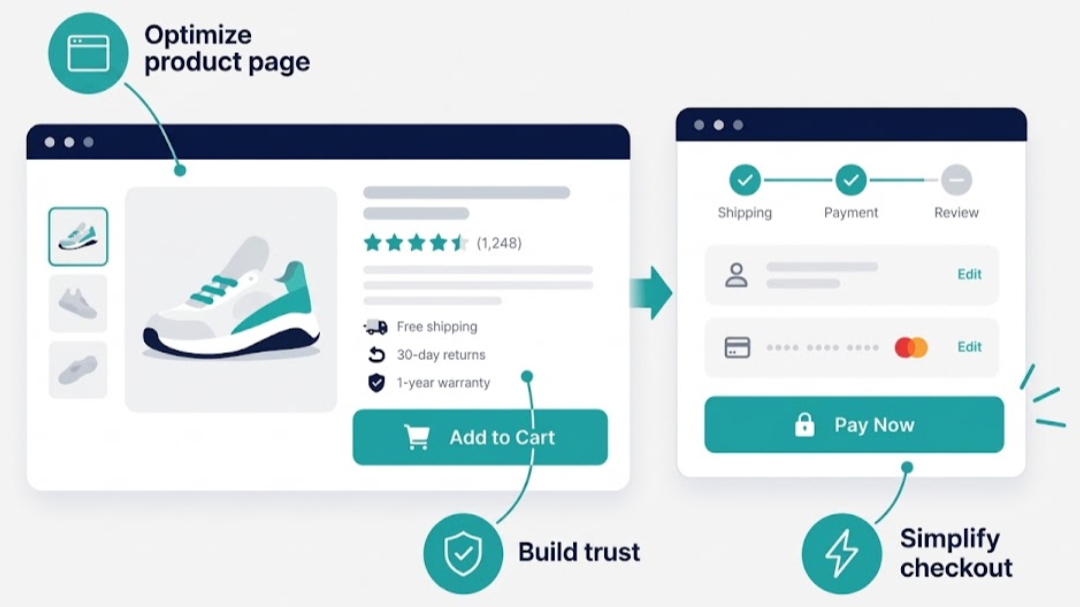
Unexpected delivery charges or a missing payment option can create another reason to abandon the order.
A smooth checkout should help customers finish what they came to do without making them work through avoidable complications.
Signs this may be the problem:
Many shoppers begin checkout but never complete their purchases.
Customers abandon their orders after shipping costs appear.
The checkout requires unnecessary account creation or lengthy forms.
Payment errors and address validation problems interrupt purchases.
How to improve it:
Begin by completing a test purchase on your own website. Use both a desktop computer and a smartphone to find any steps that feel confusing or take longer than necessary.
Offer guest checkout where your platform supports it. Remove fields that are not required to process the order, use address autocomplete where available, and test each payment method you display. When a field fails validation or a payment is declined, make sure the shopper can see what happened and what to do next.
Show the order summary, shipping charges, and expected delivery information before customers reach the final payment step.
Offer relevant payment options that suit your audience, and make sure errors are explained clearly when something goes wrong.
Once the changes are in place, compare checkout completion rates with previous performance. A simpler process should help interested shoppers finish their orders without unnecessary interruptions.
6. Bring Back Interested Shoppers With Timely Cart Reminders
A shopper adds a pair of earrings to the cart during a coffee break but gets distracted before completing the order. Later that evening, the product is still on their mind, but the store's name has already slipped away. A timely reminder could make it easier to pick up where they left off.
Cart recovery gives interested customers another opportunity to complete their purchases. The key is to make the reminder helpful and relevant without turning every unfinished order into a reason to offer a discount.
Signs this may be the problem:
Many customers add products to their carts but never complete checkout.
Shoppers rarely return after leaving items behind.
Abandoned checkout emails are missing or contain generic messages.
Recovery campaigns generate clicks but very few completed orders.
How to improve it:
Start by setting up abandoned checkout reminders through your ecommerce platform. Include the product image, name, and a direct link that helps customers return to their order.
To reduce online shopping cart abandonment, think about what might have interrupted the purchase. A reminder about delivery estimates, product availability, or return policies could answer a question that was holding the customer back.
Keep messages short and give shoppers enough time to make a decision. Discounts can be tested when appropriate, but offering one after every abandoned cart may eat into profit margins.
Make sure email and SMS reminders follow applicable consent requirements. Track recovered orders and revenue to see which messages bring customers back.
7. Let Real Customer Data Guide Your Next Website Improvements
A new product page layout looks cleaner, so you replace the old design. A week later, sales appear to have improved. Was it the new layout, a promotional campaign, or simply more customers shopping that week?

Without a clear way to measure the results, it's difficult to know which changes are actually helping.
CRO strategies for online stores work best when they're based on customer behavior and supported by meaningful performance data. Instead of redesigning everything at once, focus on one problem and test a specific solution.
Signs this may be the problem:
Website changes are made based on personal preferences rather than customer behavior.
Several elements are updated at once, making results difficult to interpret.
Decisions rely heavily on page views and clicks without considering completed purchases.
Previous website improvements haven't been measured or documented.
How to improve it:
Start by reviewing your website analytics to identify a specific area where shoppers are struggling.
For example, if product pages receive plenty of traffic but few cart additions, test a different product image arrangement or make important sizing information easier to find.
If your store has enough traffic for a reliable A/B test, show different visitor groups the original and revised version. Write down the hypothesis before starting—for example, “Showing dimensions beside Add to Cart will increase cart additions.” Choose a primary measure such as purchases or revenue per visit, and watch for unwanted effects such as lower order value or more returns.
Give the test enough time to collect meaningful data. Smaller stores may need longer testing periods before drawing reliable conclusions.
Document what changed, what happened, and what you learned. Those findings can guide future improvements and help you invest your time in changes that support actual sales.
Which Ecommerce Conversion Rate Optimization Strategies Should You Try First?
Every online store has different reasons for losing sales, so start with the part of the shopping journey where customers seem to struggle most. Your website analytics can help narrow down the problem before you spend time making changes that may not improve results.
The table below connects common shopping frustrations with the areas worth looking into first.
| Store Performance Issue | What to Inspect First | Measure After a Change |
|---|---|---|
| High Mobile Traffic but Few Purchases | Product selection and checkout on a phone; slow or unstable pages | Mobile purchases and add-to-cart rate |
| Shoppers Search but Fail to Find Products | Search terms with no results; unclear categories and filters | Search-to-product-view rate and purchases from search |
| Product Views Rarely Become Cart Additions | Images, dimensions, price, options, delivery information | Add-to-cart rate and purchases |
| Shoppers Ask the Same Questions Before Buying | Missing product details, reviews, shipping or return terms | Relevant support questions and purchases |
| Checkout Starts Rarely Become Orders | Shipping charges, required fields, payment and address errors | Checkout completion rate |
| Many Shoppers Leave Items in Carts | Checkout obstacles first; reminder content and links second | Completed orders and recovered revenue |
| Results Change After a Redesign | Traffic mix, promotions, seasonality, and test setup | Purchases and revenue per visit |
Use these patterns as starting points. Focus on the issues affecting the most shoppers and measure the results before moving on to the next improvement.
Final Thoughts
Getting more sales from an online store starts with making the shopping experience easier. A faster website, helpful product information, transparent pricing, and a smooth checkout can remove the small frustrations that cause customers to leave.
The key to successful ecommerce conversion rate optimization is finding out where shoppers get stuck and addressing those issues one at a time. Start with what your store's data reveals, test practical improvements, and keep track of the results. The goal is to help more visitors complete their purchases and make every marketing dollar work harder.
Unlock More Sales With Gray Bay Marketing's Ecommerce Expertise
Getting traffic is only half the job. Gray Bay Marketing helps online stores identify what's holding shoppers back, improve product pages, simplify the buying experience, and turn existing visitors into paying customers.
As an experienced paid media agency, we connect website improvements with targeted advertising and smarter customer acquisition. Our Google Ads Management, Facebook Ads management, and LLM SEO services also help businesses reach potential customers across paid advertising and AI-powered search.
Ready to turn more clicks into sales? Contact Gray Bay Marketing and find out where your online store has room to grow.
FAQs
Why do customers add products to their carts but leave without buying?
Unexpected shipping costs, limited payment options, or a complicated checkout can interrupt a purchase. Compare cart additions with checkout starts and completed orders to identify where shoppers leave. Test the checkout process on mobile to uncover issues that may be easy to miss on desktop.
Can an online store have a high conversion rate and still lose money?
Yes. Heavy discounts, expensive advertising, shipping subsidies, and high return rates can reduce profits even when more visitors complete purchases. Track contribution margin, customer acquisition cost, and revenue alongside conversion rate.
Why does my store convert well on desktop but poorly on mobile?
Mobile shoppers may struggle with small buttons, slow product images, difficult navigation, or lengthy checkout forms. Compare conversion performance by device and complete a test purchase on a smartphone to identify problems.
Should I offer free shipping or a discount to increase sales?
Review your product margins and customer behavior before introducing either offer. Free shipping may address delivery cost concerns, and a discount may encourage price-sensitive shoppers. Test the offers and compare their impact on completed orders, average order value, and profit.
Why do my best-selling products receive fewer orders despite high traffic?
Check whether the traffic source, product price, availability, or customer demand has changed. Also review recent customer feedback, product page updates, and competitor offers. A rise in visitors doesn't necessarily mean more people are ready to buy.
How can I tell if my product page is preventing customers from buying?
Compare product views with add-to-cart activity. Review customer questions, product reviews, and on-site search behavior for missing information. Test improvements to product images, sizing details, descriptions, and purchasing options.
How many visitors do I need before running an A/B test?
There's no fixed number that works for every store. The required sample size depends on your current conversion rate, the size of the improvement you want to detect, and the statistical confidence required. Smaller stores may need longer testing periods or should prioritize fixing obvious usability problems first.
Will increasing my advertising budget improve my store's conversion rate?
Additional spending can bring more visitors, but it won't automatically improve the percentage who purchase. If customers are struggling with product information, pricing, or checkout, attracting more traffic may increase spending without resolving the underlying problem.